Need help?
Do you have a question about the SAFE HOME DB-35HD and is the answer not in the manual?
Explains ring notification, automatic picture taking upon doorbell press, and previewing photos.
Details how to use the monitoring button and take snapshots.
Explains video recording and zoom functionality using buttons.
Describes the motion detection feature and automatic picture snapping.
How to select and confirm the display language for the viewer.
Steps to adjust and confirm the date and time settings.
How to select the screen standby duration (10s/20s/30s).
How to switch between picture snapping and video recording modes.
How to view photos and videos stored on the TF card.
How to enable/disable the function to prevent the doorbell from ringing.
Adjusting doorbell volume and ringtone type.
Enabling or disabling the motion detection feature.
How to exit the menu system.
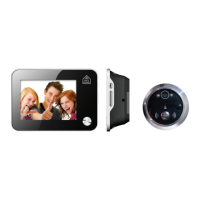
Inserting the viewer lens through the door with a specified drill size.
Step to pull off the 3M adhesive sticker.
Assembling the viewer barrel, base flange, and lens.
Note on camera lens position (top) and doorbell button (bottom).
Installing batteries and connecting the FPC cable to the base flange.
Tightening the screw to prevent accidental dropping of the unit.
States company is not liable for manual errors or product faults.
Notes right to revise products and that it's not a toy.
Advises consulting local rules for surveillance and property use.
States user must be competent adult and provides support contact.
 General
| Night Vision | Yes |
|---|---|
| Two-Way Audio | Yes |
| Motion Detection | Yes |
| Storage | MicroSD card (up to 128GB) |
| Audio | Built-in microphone and speaker |
| Video Resolution | 1080p Full HD |
| Operating Temperature | -10°C to 50°C |

 To Next Page