5 – Update Firmware
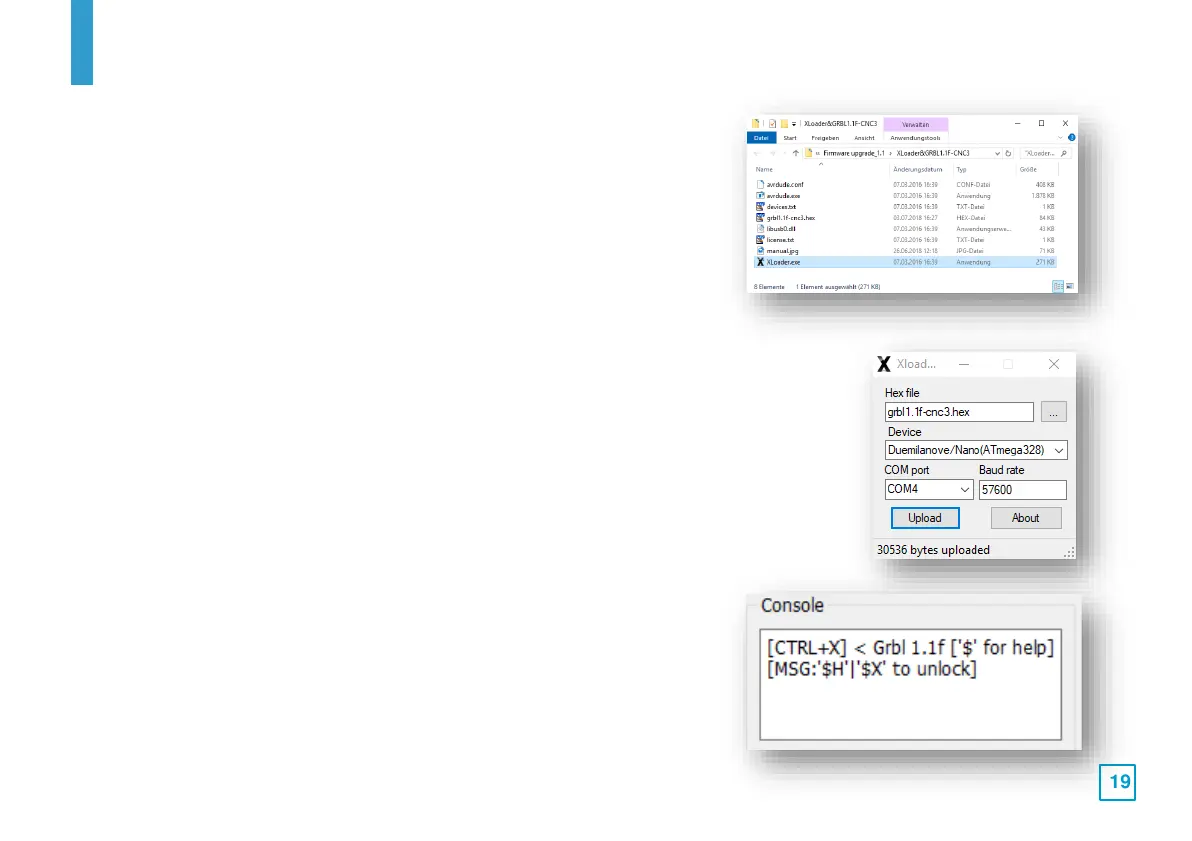
5. Use the file manager to navigate to the directory where you saved
the update file and unpack it. In the created file there is usually
also an executable program called "XLoader". Double-click on this
program to start it and ignore any error messages that may
appear.
If the program is not included in your update archive, you can also
find it on the Internet by searching for "xloader arduino".
6. In the Hex file window, click the name of the hex file required to update the
GRBL version of your control board. In the "Device" window, select
"Duemilanove/Nano(ATmega328)" as the device type. In the "COM Port"
window, enter the same COM port number that you noted down in step 3. Set
the baud rate to "115200". Only then click on the "Upload" button. As soon as
the specified hex file has been completely uploaded to the control module, a
message is displayed which also shows the number of bytes uploaded. The
value depends on the size of the hex file.
7. Start Grbl (Candle) on your PC and in the status window check
whether a version number is displayed. This final check completes
the upgrade process of the control module.



 To Next Page