EasyManua.ls Logo

Salt. TV Box - Page 3

Default Icon
27 pages
Print Icon
To Next Page IconTo Next Page
To Previous Page IconTo Previous Page
Loading...
2
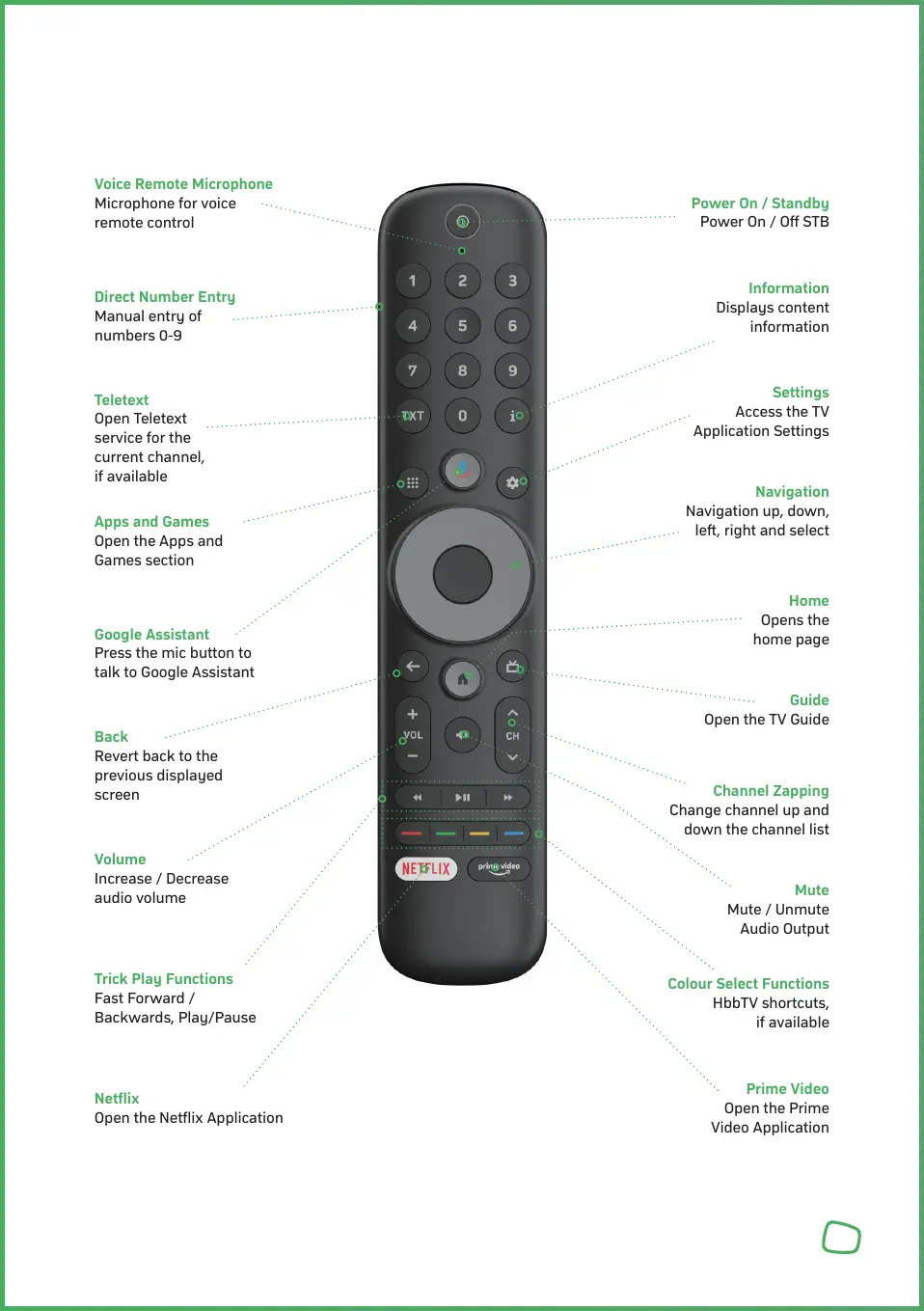
2 Remote Control Unit
Voice Remote Microphone
Microphone for voice
remote control
Power On / Standby
Power On / Off STB
Navigation
Navigation up, down,
left, right and select
Volume
Increase / Decrease
audio volume
Channel Zapping
Change channel up and
down the channel list
Direct Number Entry
Manual entry of
numbers 0-9
Information
Displays content
information
Google Assistant
Press the mic button to
talk to Google Assistant
Home
Opens the
home page
Trick Play Functions
Fast Forward /
Backwards, Play/Pause
Mute
Mute / Unmute
Audio Output
Teletext
Open Teletext
service for the
current channel,
if available
Settings
Access the TV
Application Settings
Back
Revert back to the
previous displayed
screen
Guide
Open the TV Guide
Netflix
Open the Netflix Application
Colour Select Functions
HbbTV shortcuts,
if available
Prime Video
Open the Prime
Video Application