Apps and features
50
Slow motion mode
Record a video for viewing it in slow motion. You can specify sections of your videos to be
played in slow motion.
1 On the shooting modes list, tap
MORE
→
SLOW MOTION
and tap to record a video.
2 When you are finished recording, tap to stop.
3 On the preview screen, tap the preview thumbnail.
The fast section of the video will be set as a slow motion section and the video will
start playing. Up to two slow motion sections will be created based on the video.
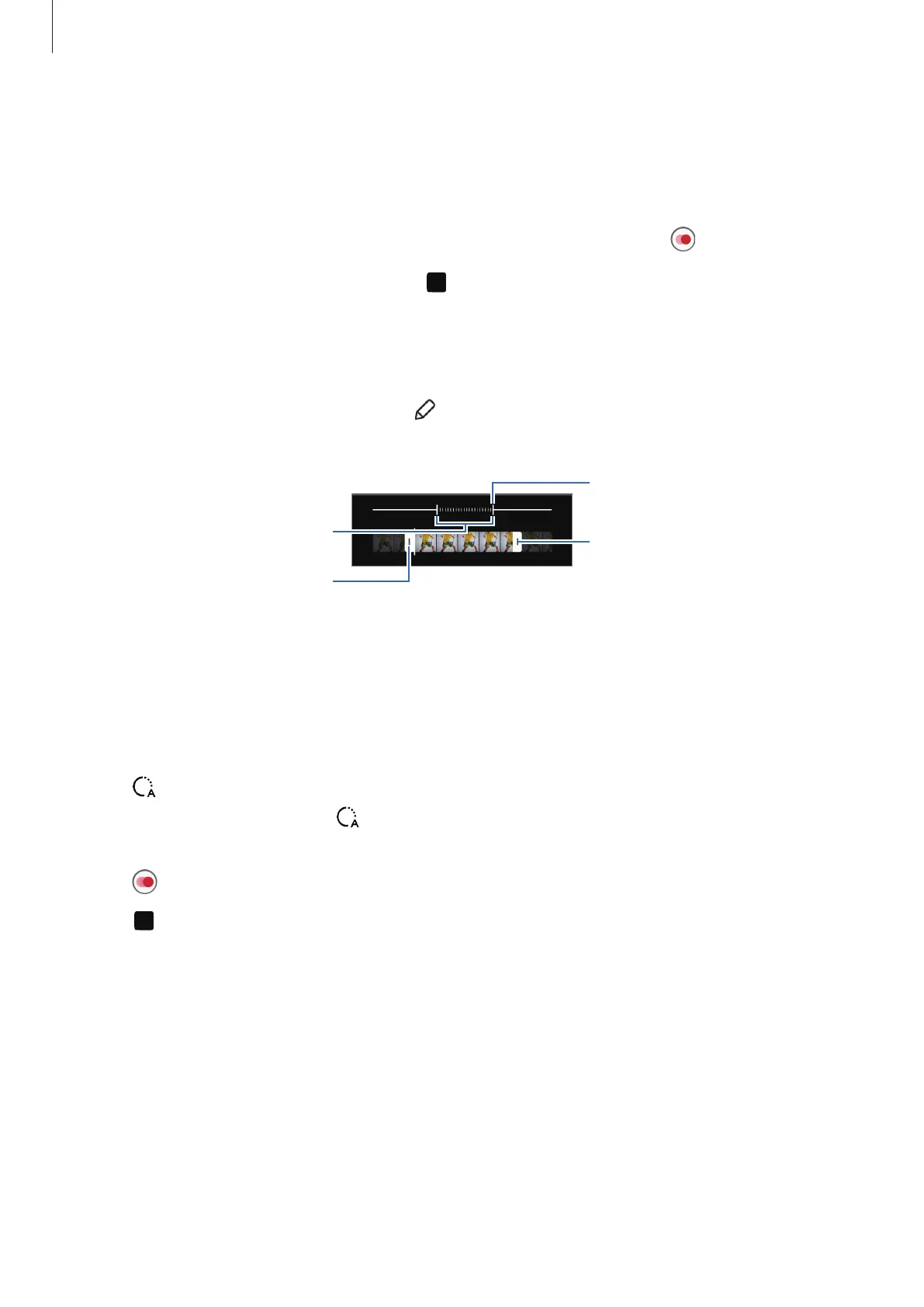
To edit the slow motion section, tap
and drag the section editing bar to the left or
right.
Start bracket
Slow motion section
End bracket
Hyperlapse mode
Record scenes, such as passing people or cars, and view them as fast-motion videos.
1 On the shooting modes list, tap
MORE
→
HYPERLAPSE
.
2 Tap and select a frame rate option.
If you set the frame rate to
, the device will automatically adjust the frame rate
according to the changing rate of the scene.
3 Tap to start recording.
4 Tap to finish recording.



 To Next Page