Apps and features
86
221110_wonseop.lee 221110_wo
221110_wonseop.lee 221110_wonseop.lee 221110
221110_wonseop.lee 221110_wo
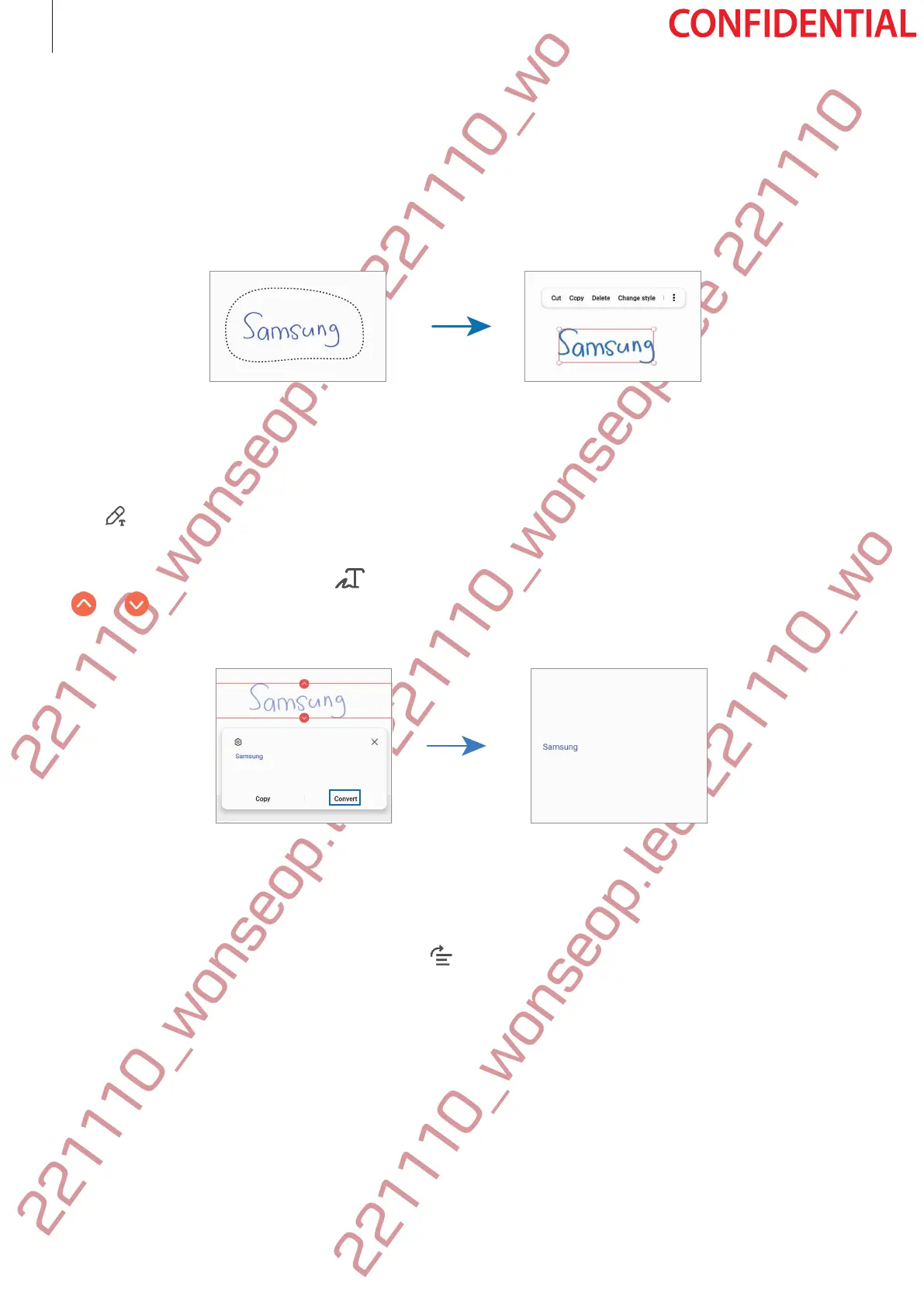
2 Tap or draw a line around the input to select.
•
To move the input to another location, select the input, and then drag it to a new
location.
•
To change the size of the selection, tap the input and drag a corner of the frame that
appears.
3 Edit the input using the available options.
Converting handwriting to text
Tap
and write on the screen with the S Pen. The handwriting will be replaced with text
right away.
After writing on the screen, tap
. Options will appear in the preview window. If you drag
or , you can select the handwriting you want. To replace the handwriting with the text,
tap
Convert
.
Straightening content horizontally
You can horizontally straighten your handwriting and drawings.
After writing or drawing on the screen, tap
.



 To Next Page