Installation
Installation
English10
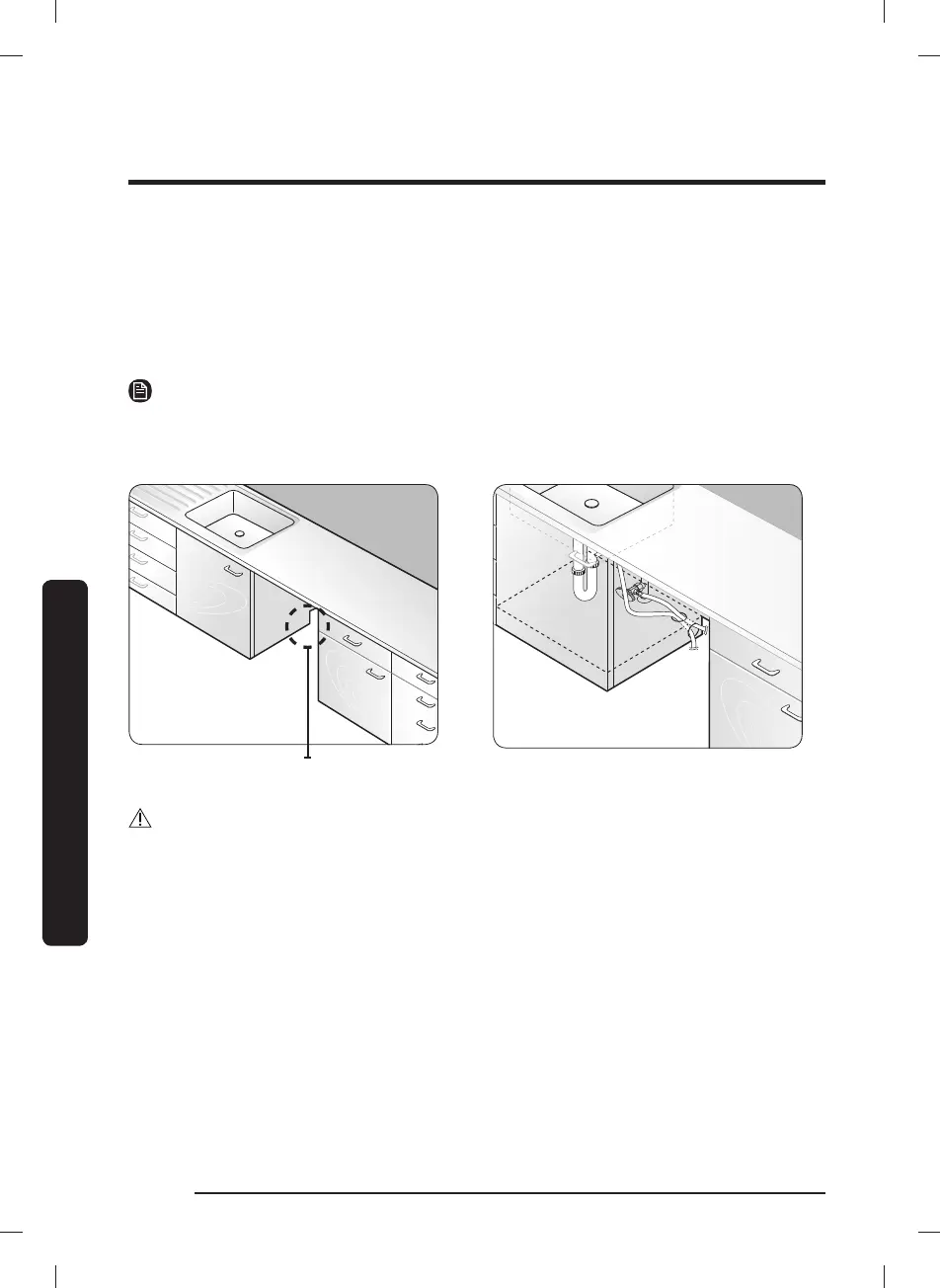
If this is a new installation, follow these steps:
1. Using a 2
1
/
2
inch hole saw, cut a hole into the side of the cabinet that holds the sink as
shown in Figure 1-1 below.
2. If the base inside the sink cabinet is raised above the kitchen oor and is higher than the
connections on the dishwasher, make a hole in the base inside the cabinet and in the cabinet
side as shown in Figure 1-2.
NOTE
Depending on where your electrical outlet is, you may need to cut a hole in the opposite
cabinet side.
Figure 1-1
The hole for the water supply line, drain
The hole for the water supply line, drain
hose and power cables.
Figure 1-2
CAUTION
Make sure the edges of the cabinet hole are smooth before you insert the drain hose
through the hole. Sharp edges from the cabinet hole may cause damage to the drain hose,
resulting in a leak from the hose.
DW5000C_DW80CB507012AA_DD68-00260A-00_EN.indd 10DW5000C_DW80CB507012AA_DD68-00260A-00_EN.indd 10 2023-05-03 11:50:022023-05-03 11:50:02



 To Next Page