English 37
Installation
10. If the “LC” information code continues to appear on the window panel, contact a local
service center.
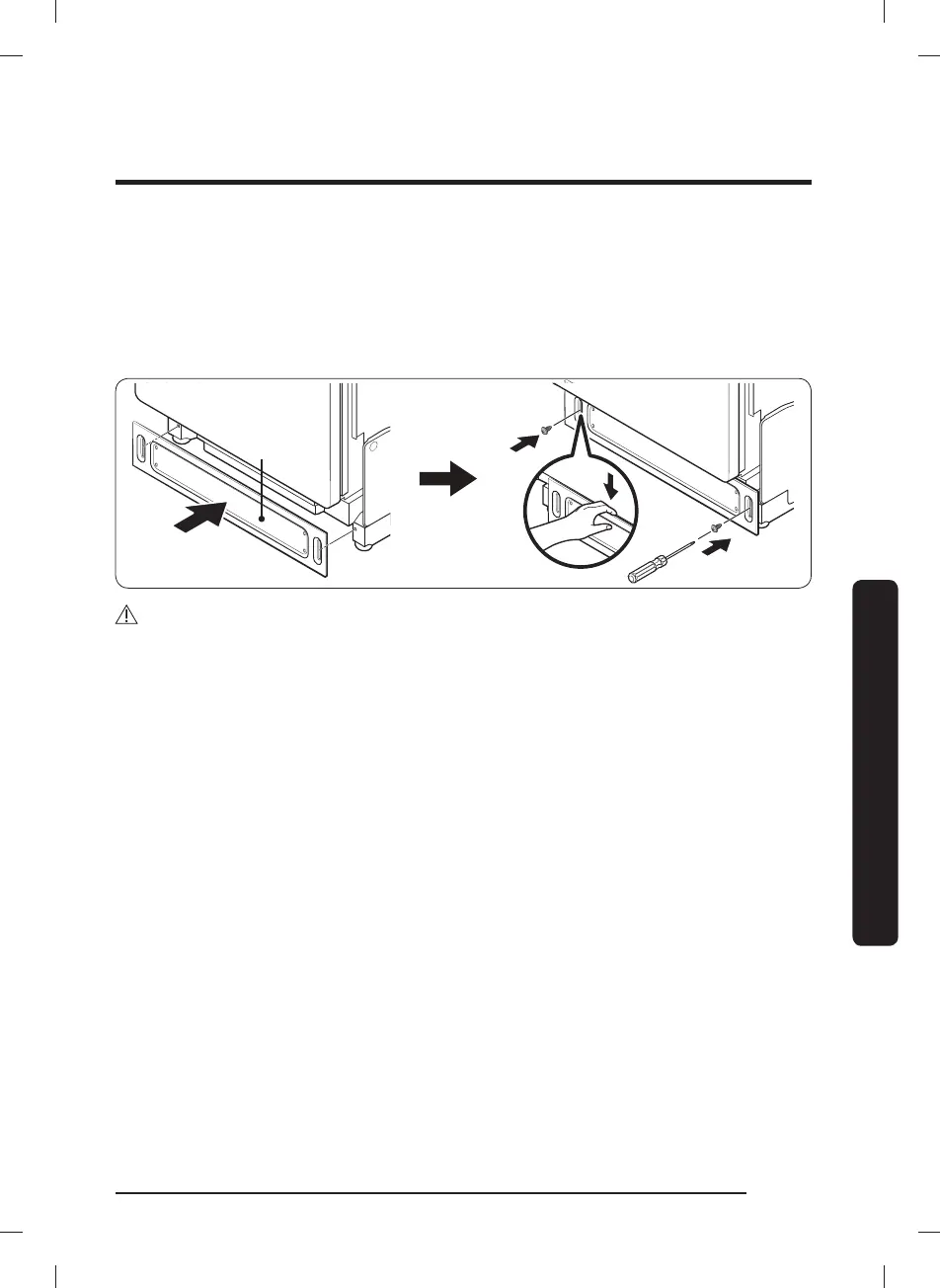
11. Finally, attach the kick plate to the bottom of the dishwasher. While keeping the rubber
skirt of the door taut, push the kick plate from the front of the rubber skirt inward
underneath the door of the dishwasher. Make sure the gaskets of the kick plate are
ush with the oor and side walls. Then, tighten the screws to x the plate.
Kick plate
CAUTION
Make sure the kick plate does not interfere with the dishwasher's door opening and
closing. Try to open the door 90 degrees, and make sure the door fully opens without any
noise.
DW5000C_DW80CB507012AA_DD68-00260A-00_EN.indd 37DW5000C_DW80CB507012AA_DD68-00260A-00_EN.indd 37 2023-05-03 11:50:082023-05-03 11:50:08



 To Next Page