Settings
229
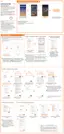
Using the mobile hotspot
Use your device as a mobile hotspot to share your device’s mobile data connection with other
devices.
1
On the Settings screen, tap
Connections
→
Mobile Hotspot and Tethering
→
MobileHotspot
.
2
Tap the switch to activate it.
The icon appears on the status bar. Other devices can find your device in the Wi-Fi
networks list.
To set a password for the mobile hotspot, tap
→
Configure Mobile Hotspot
and select
the level of security. Then, enter a password and tap
SAVE
.
3
On the other device’s screen, search for and select your device from the Wi-Fi networks
list.
•
If the mobile hotspot is not found, on your device, tap
→
ConfigureMobileHotspot
, tick
Show advanced options
, and then deselect
Hidemy device
and
Use 5 GHz band when available
.
•
If the other device cannot connect to the mobile hotspot, on your device, tap
→
Allowed devices
and tap the
Allowed devices only
switch to deactivate it.
4
On the connected device, use the device’s mobile data connection to access the Internet.






 To Next Page