EasyManua.ls Logo

Samsung HW-J8510 - User Manual

Samsung HW-J8510
165 pages
Print Icon
To Next Page IconTo Next Page
Loading...
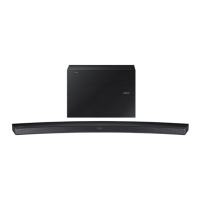
Curved Soundbar
Imagine the possibilities
Thank you for purchasing this Samsung product.
To receive more complete service, please register your product at
www.samsung.com/register
User manual
HW-J8510
HW-J8511
HW-J8510_J8511_XE_ENG_0417.indd 1HW-J8510_J8511_XE_ENG_0417.indd 1 2015-08-11 11:20:452015-08-11  11:20:45

Questions and Answers

  • G
    Gary KimAug 8, 2025
    Why is my Samsung HW-J8510 remote control not working?
    • R
      Robert SanchezAug 9, 2025
      Your Samsung Soundbar remote may not be working because the batteries are drained or the distance between the remote and the main unit is too far. Try replacing the batteries with new ones or moving closer to the unit.
  • D
    davistaraAug 14, 2025
    How to fix no sound on Samsung HW-J8510 Soundbar?
    • L
      Lisa OdonnellAug 14, 2025
      If your Samsung Soundbar is not producing sound, check if the Mute function is on or if the volume is set to the minimum. Press the (Mute) button to cancel the mute function and adjust the volume.
  • K
    khornAug 18, 2025
    What to do if TV SoundConnect (TV pairing) failed on Samsung HW-J8510?
    • G
      goodwindavidAug 18, 2025
      TV SoundConnect is supported by some Samsung TVs released from 2012. Check if your TV supports TV SoundConnect and update your TV with the latest firmware. Press and hold the & button for 5 seconds to reset the TV SoundConnect connection.
  • R
    Richard WilsonAug 25, 2025
    How to adjust subwoofer vibration on Samsung HW-J8510?
    • T
      Teresa PalmerAug 25, 2025
      To adjust the vibration of your Samsung Soundbar's subwoofer, press the WOOFER button on your remote control to adjust its value (between -12, -6 to +6).
  • E
    Edward OconnellAug 29, 2025
    What to do if a function does not work when the button is pressed on Samsung HW-J8510?
    • M
      Michelle WilliamsAug 29, 2025
      If a function on your Samsung Soundbar does not work when the button is pressed, it could be due to static electricity in the air. Try disconnecting the power plug and connecting it again.
  • C
    charles30Sep 2, 2025
    Why is the red LED blinking on my Samsung Soundbar subwoofer?
    • J
      James WallaceSep 2, 2025
      Your subwoofer may not be connected to the main body of the product. Try to connect your subwoofer again.

Samsung HW-J8510 Specifications

General IconGeneral
BrandSamsung
ModelHW-J8510
CategorySoundbar
LanguageEnglish

Related product manuals