31
Flash mode indicator
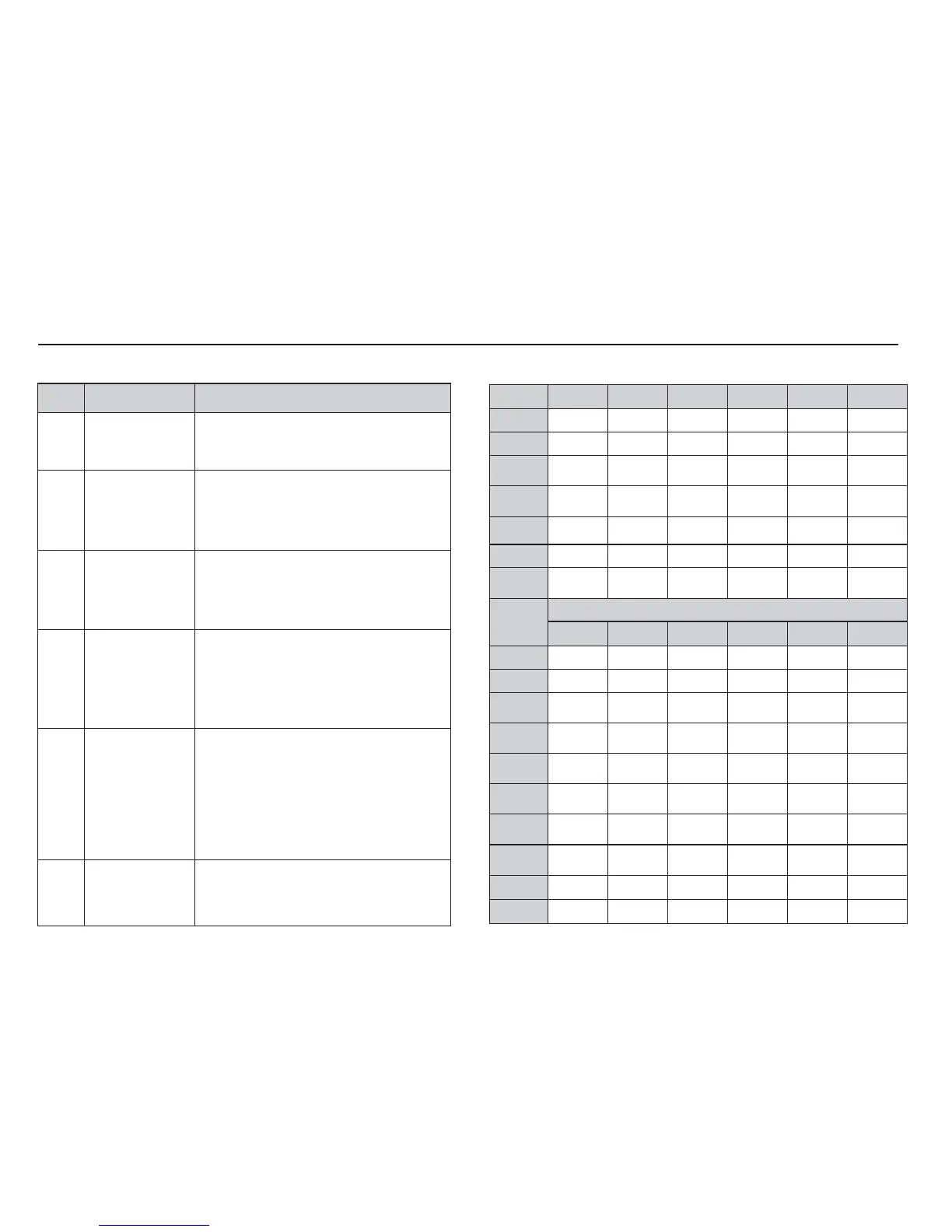
Available fl ash mode, by recording mode
Mode
^] ª Œ
Š
oo oo
‰
oooooo
oo
‚
o
_
oooooo
ooo
†
o
Mode
SCENE
^] ª Œ
ooo
ooo
o
o
o
o
o
o
o
o
Flash
(
)
/ Left button
( o : Selectable)
Icon Flash mode Description
^
Auto fl ash
If the subject or background is dark, the
camera fl ash will operate automatically.
]
Auto & Red eye
reduction
If a subject or background is dark, the
camera fl ash will work automatically and
will reduce the red-eye effect by using the
red-eye reduction function.
Fill in fl ash
The fl ash fi res regardless of the avail-
able light. The intensity of the fl ash will be
automatically controlled to suit the prevailing
conditions.
ª
Slow synchro
The fl ash operates with a slow shutter speed
to obtain a balanced correct exposure. In
poor lighting conditions the camera shake
warning indicator (
Ã
) will display on the
LCD monitor.
Œ
Flash off
The fl ash does not fi re.
Select this mode when capturing images in
a place or situation where fl ash photography
is prohibited. When you capture an image
in poorly lit conditions, the camera shake
warning indicator (
Ã
) will appear on the
LCD monitor.
Red-eye reduction
When a shot with "red eye" is detected,
this mode will reduce the red-eye effect
automatically.



 To Next Page