043
E (Effect) button: Image editing
Press the E button in the [Auto], [Program], [Manual], [Movie] and
some scene modes ([Portrait], [Children], [Landscope], [Close up]).
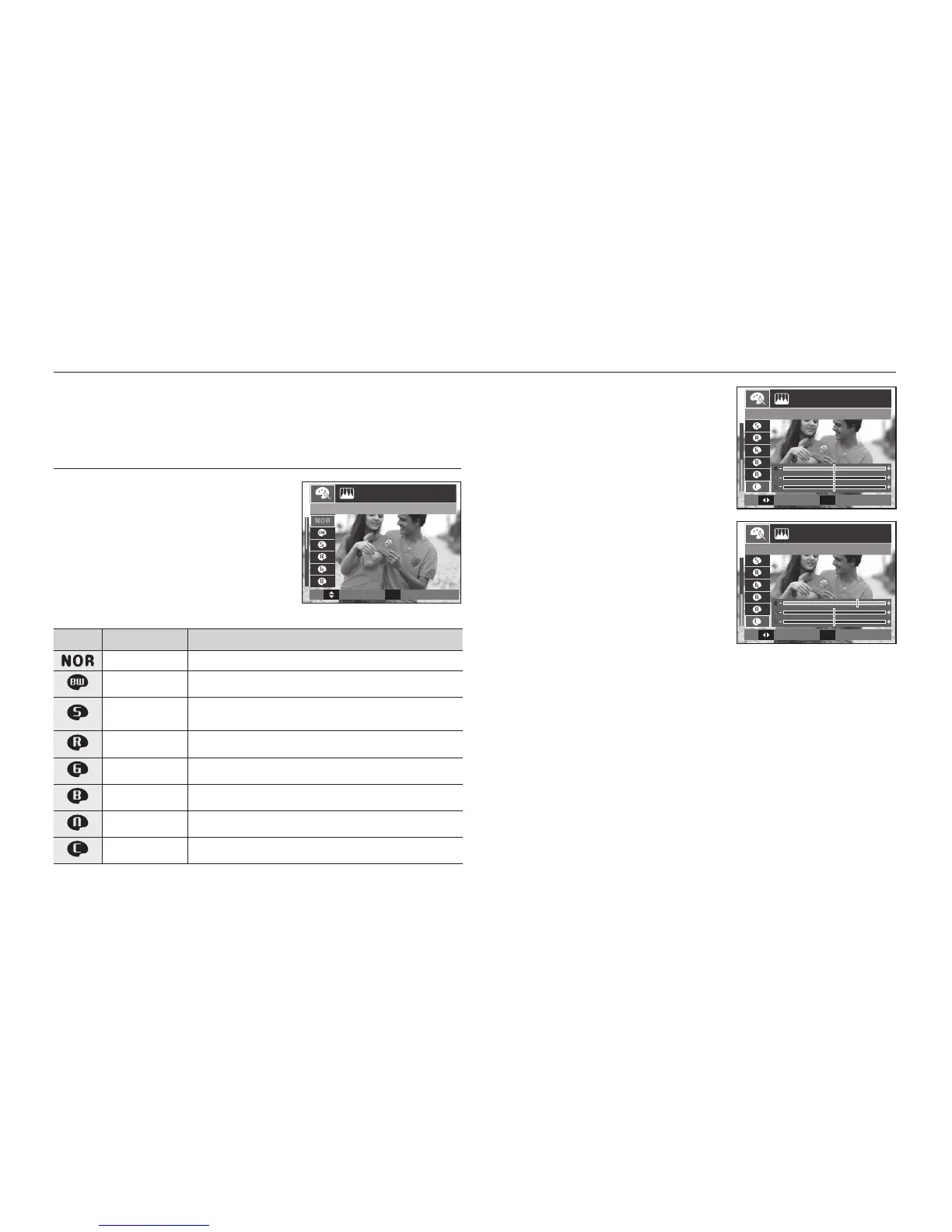
Colour
1. Select the desired sub menu by
pressing the Left/Right button and
press the OK button.
2. Press the Shutter button to take an
image.
Icon Color Description
Normal No colour effect is added to the image.
B/W Captured images will be stored in black and white.
Sepia
Captured images will be stored in a sepia tone
(a gradient of yellowish brown colours).
Red Captured images will be stored in a red tone.
Green Captured images will be stored in a green tone.
Blue Captured images will be stored in a blue tone.
Negative Saves the image in negative mode.
Custom Color Captured image will be saved in set RGB tone.
Custom colour: You can change the R
(Red), G (Green) and B (Blue) values of
the image.
– OK button: Selects / sets up the
Custom Colour
– Up/Down button: Selects R, G, B
– Left/Right button: Changes the values
Move
Set
OK


 To Next Page