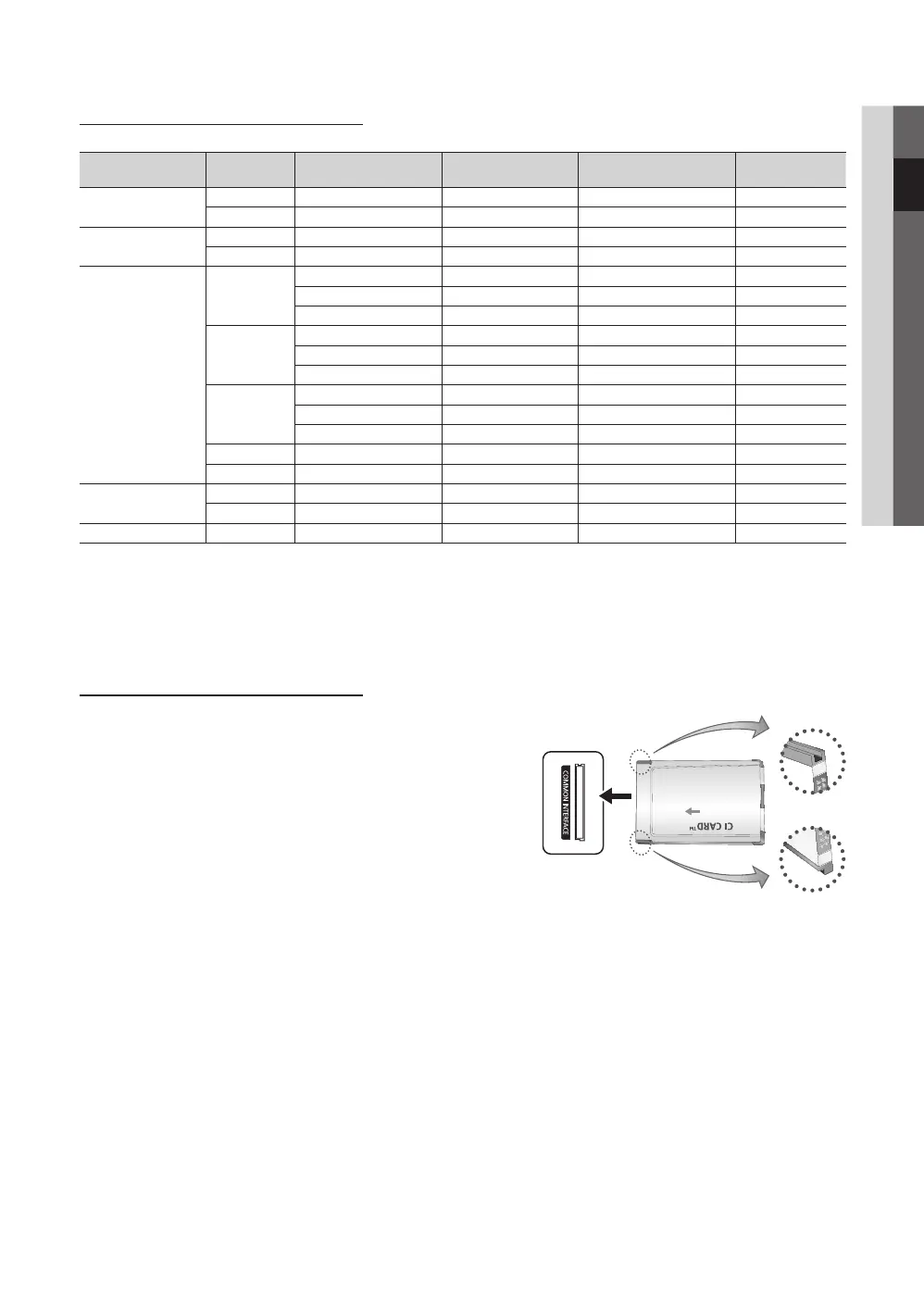
Display Modes (D-Sub and HDMI/DVI Input)
Optimal resolution is 1360 X 768 @ 60 Hz.1920X1080@60Hz.
Mode Resolution
Horizontal Frequency
(KHz)
Vertical Frequency (Hz)
Pixel Clock Frequency
(MHz)
Sync Polarity
(H / V)
IBM
640 x 350 31.469 70.086 25.175 +/-
720 x 400 31.469 70.087 28.322 -/+
MAC
640 x 480 35.000 66.667 30.240 -/-
832 x 624 49.726 74.551 57.284 -/-
VESA DMT
640 x 480
31.469 59.940 25.175 -/-
37.861 72.809 31.500 -/-
37.500 75.000 31.500 -/-
800 x 600
37.879 60.317 40.000 +/+
48.077 72.188 50.000 +/+
46.875 75.000 49.500 +/+
1024 x 768
48.363 60.004 65.000 -/-
56.476 70.069 75.000 -/-
60.023 75.029 78.750 +/+
1280 x 720 45.000 60.000 74.250 +/+
1360 x 768 47.712 60.015 85.500 +/+
VESA GTF
720 x 576 35.910 59.950 32.750 -/+
1280 x 720 56.456 74.777 97.750 -/-
VESA GTF 1280 x 720 52.500 70.000 89.040 +/+
NOTE
✎
For HDMI/DVI cable connection, you must use the
x
HDMI (DVI) IN jack.
The interlace mode is not supported.
x
The set might operate abnormally if a non-standard video format is selected.
x
Separate and Composite modes are supported. SOG(Sync On Green) is not supported.
x
CONNECTIONS COMMON INTERFACE Slot
To watch paid channels, the “CI or CI+ CARD” must be inserted.
If you don’t insert the “CI or CI+ CARD,” some channels will y
display the message “Scrambled Signal”.
The pairing information containing a telephone number, the “CI or y
CI+ CARD” ID the Host ID and other information will be displayed
in about 2~3 minutes. If an error message is displayed, please
contact your service provider.
When the configuration of channel information has finished, the y
message “Updating Completed” is displayed, indicating the
channel list is updated.
NOTE
✎
You must obtain a “CI or CI+ CARD” from a local cable service provider.
x
When removing the “CI or CI+ CARD”, carefully pull it out with your hands since dropping the “CI or CI+ CARD” may
x
cause damage to it.
Insert the “CI or CI+ CARD” in the direction marked on the card.
x
The location of the
x
COMMON INTERFACE slot may be different depending on the model.
“CI or CI+ CARD” is not supported in some countries and regions; check with your authorized dealer.
x
If you have any problems, please contact a service provider.
x
BN68-02589H_Eng.indb 9 2010-3-18 18:58:24





 To Next Page