4-20 Samsung Electronics
4-2-1-2 The procedure of setting option
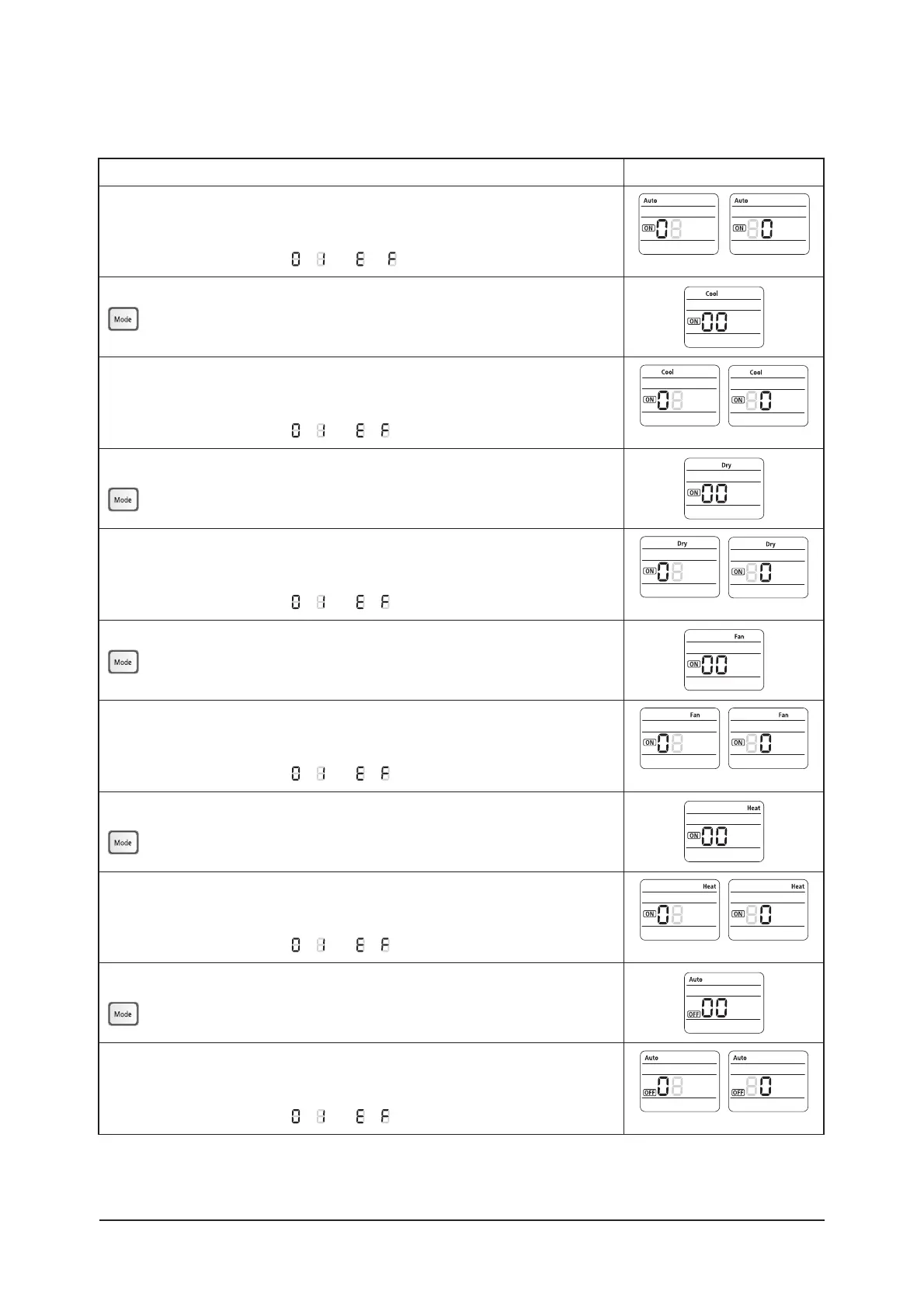
Option setting Status
4FUUJOH4&(4&(PQUJPO
Press Low Fan button(
∨
UPFOUFS4&(WBMVF
Press High Fan button(
∧
UPFOUFS4&(WBMVF
Each time you press the button,
⋯
will be selected in rotation.
2. Setting Cool mode
Press Mode button to be changed to Cool mode in the ON status.
4FUUJOH4&(4&(PQUJPO
Press Low Fan button(
∨
UPFOUFS4&(WBMVF
Press High Fan button(
∧
UPFOUFS4&(WBMVF
Each time you press the button,
⋯
will be selected in rotation.
4. Setting Dry mode
Press Mode button to be changed to DRY mode in the ON status.
4FUUJOH4&(4&(PQUJPO
Press Low Fan button(
∨
UPFOUFS4&(WBMVF
Press High Fan button(
∧
UPFOUFS4&(WBMVF
Each time you press the button,
⋯
will be selected in rotation.
6. Setting Fan mode
Press Mode button to be changed to FAN mode in the ON status.
4FUUJOH4&(4&(PQUJPO
Press Low Fan button(
∨
UPFOUFS4&(WBMVF
Press High Fan button(
∧
UPFOUFS4&(WBMVF
Each time you press the button,
⋯
will be selected in rotation.
8. Setting Heat mode
Press Mode button to be changed to HEAT mode in the ON status.
4FUUJOH4&(4&(PQUJPO
Press Low Fan button(
∨
UPFOUFS4&(WBMVF
Press High Fan button(
∧
UPFOUFS4&(WBMVF
Each time you press the button,
⋯
will be selected in rotation.
10. Setting Auto mode
Press Mode button to be changed to AUTO mode in the OFF status.
4FUUJOH4&(4&(PQUJPO
Press Low Fan button(
∨
UPFOUFS4&(WBMVF
Press High Fan button(
∧
UPFOUFS4&(WBMVF
Each time you press the button,
⋯
will be selected in rotation.
4&( 4&(
4&(
4&(
4&(
4&(
4&(
4&(
4&(
4&(
4&(
4&(



 To Next Page