4-24 Samsung Electronics
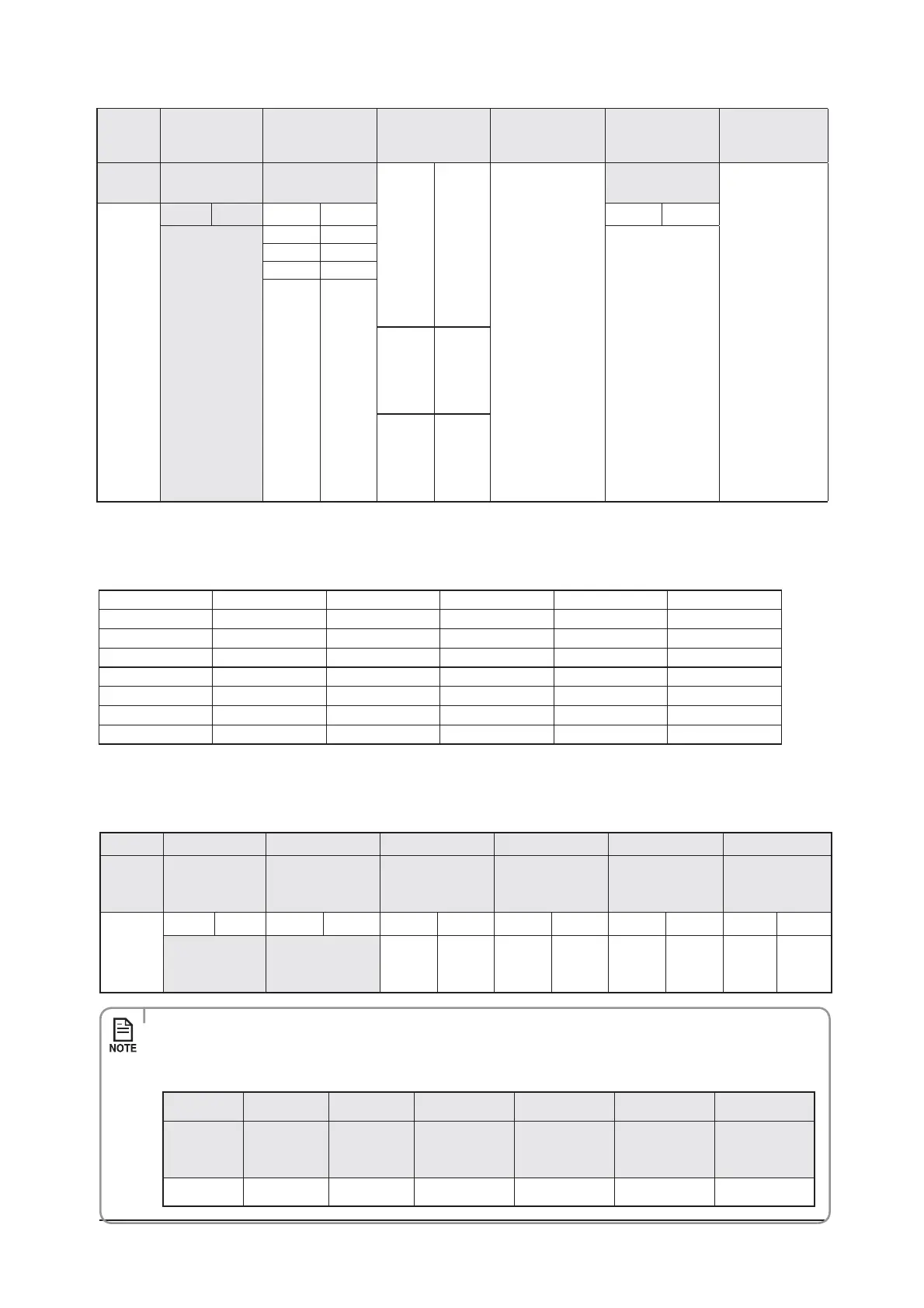
Option
4&( 4&( 4&( 4&(
4&(
(Mini 4 Way only)
4&(
Explanation
1"(&
Individual control of
a remote controller
0 Disuse
3&4&37&%
Motion detect
sensor
3&4&37&%
Indication
and
Details
Indication
Details
Indication
Details
Indication
Details
3
0 or 1 Indoor 1 0.No Use (Factory Setting)
1.Standard Mode/Auto
Set OFF30 Min.
2.Standard Mode/Auto
Set OFF60 Min.
3.Standard Mode/Auto
Set OFF 120 Min.
4.Standard Mode/Auto
Set OFF 180 Min.
5.Premium Mode/
Auto Set OFF30
Min.6.Premium Mode/
Auto Set OFF60 Min.
7.Premium Mode/Auto
Set OFF 120 Min.
8.Premium Mode/Auto
Set OFF 180 Min.
2 Indoor 2
3 Indoor 3
4 Indoor 4
12
˚C
25˚C
X If you input a number other than 0~4 on the individual control of the indoor unit(SEG 20), the indoor is
set as "Indoor 1".
Example) If you want to set as "Exterior temperature sensor : USE, External control : USE, Number of hours
using ler : 2000hr",
4&( 4&( 4&( 4&( 4&( 4&(
02-10-
4&( 4&( 4&( 4&( 4&( 4&(
10- - - 0
4&( 4&( 4&( 4&( 4&( 4&(
210- 06
4&( 4&( 4&( 4&( 4&( 4&(
30----
assign option codes except SEG 1, 7, 13, 19 which are page options.
You can change each digit of set option.
Option
4&( 4&( 4&( 4&( 4&( 4&(
Explanation
1"(& MODE
The option mode
you want to
change
The tens’ digit of an
PQUJPO4&(ZPVXJMM
change
The unit digit of
BOPQUJPO4&(ZPV
will change
The changed value
Indication
and
Details
Indication
Details
Indication
Details
Indication
Details
Indication
Details
Indication
Details
Indication
Details
0D
Option
mode
_'
Tens’ digit
PG4&(
_
Unit digit
PG4&(
_
The
changed
value
_'
t 8IFODIBOHJOHBEJHJUPGBOJOEPPSVOJUBEESFTTTFUUJOHPQUJPOTFUUIF4&(BTA"
t 8IFODIBOHJOHBEJHJUPGJOEPPSVOJUJOTUBMMBUJPOPQUJPOTFUUIF4&(BTA
Ex) When setting the 'buzzer control' into disuse status.
Option
4&( 4&( 4&( 4&( 4&( 4&(
Explanation 1"(& MODE
The option
mode you want
to change
The tens’ digit of
BOPQUJPO4&(
you will change
The unit digit of
BOPQUJPO4&(
you will change
The changed
value
Indication 0 D 2 1 7 1
4-2-1-5 Changing a particular option



 To Next Page