Operations
English66
Operations
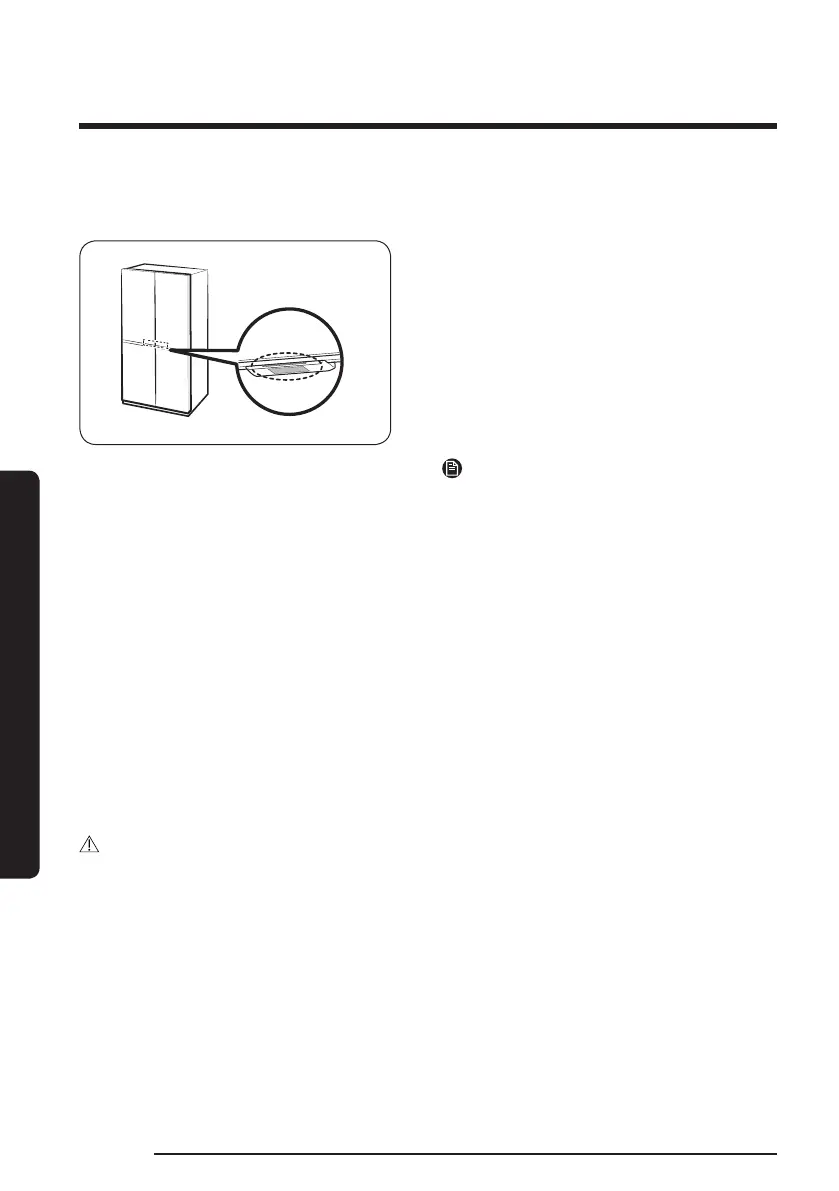
Auto Open Door function (applicable models only)
The Auto Open Door function does not apply to the freezer doors.
Touch the sensor near the door handle of
the fridge. The door will open.
• The default setting is Off.
• To turn on the function, refer to the
followings.
- General type: On the main panel,
select Settings > Auto Open Door and
select On.
- Family Hub type: On the Fridge
Manager app, tap Settings, and then
turn on the Auto Open Door.
NOTE
• If both sensors are touched
simultaneously, the door on the rst
touched sensor opens and then so does
the other door within about 2 seconds.
• The door does not close automatically.
Close the door manually after use.
• The angle (degree) at which the fridge
doors open may vary depending on the
installation environment, such as the
oor where the refrigerator is installed,
the level of the refrigerator, and the load
of the food stored in the door bin.
- If the doors open too wide or not
wide enough, check and make sure
the refrigerator is level. (For more
information, see the “STEP 4 Leveling
the refrigerator” section on page 44.)
CAUTION
• The Auto Open Door function may malfunction if you open and close the door
repeatedly.
• Do not push or force stop the door while it is opening automatically. It may cause the
product to malfunction.
- Be cautious not to get hit by the doors when they open automatically.
• If the door resists opening after repeated door opening, wait for about a minute and
then try again. (It may be hard to open the door immediately after closing it due to
air pressure change inside the refrigerator which occurs when you open and close the
door.)
• Accidental touches to the sensor can cause the door to open, verify that it is closed.



 To Next Page