Call Functions and Contacts List 60
2.
From the Home screen, tap (
Applications
) ➔
(
Wi-Fi Calling
).
3. If prompted to register onto the T-Mobile network prior to
use, tap
Register
to complete the process.
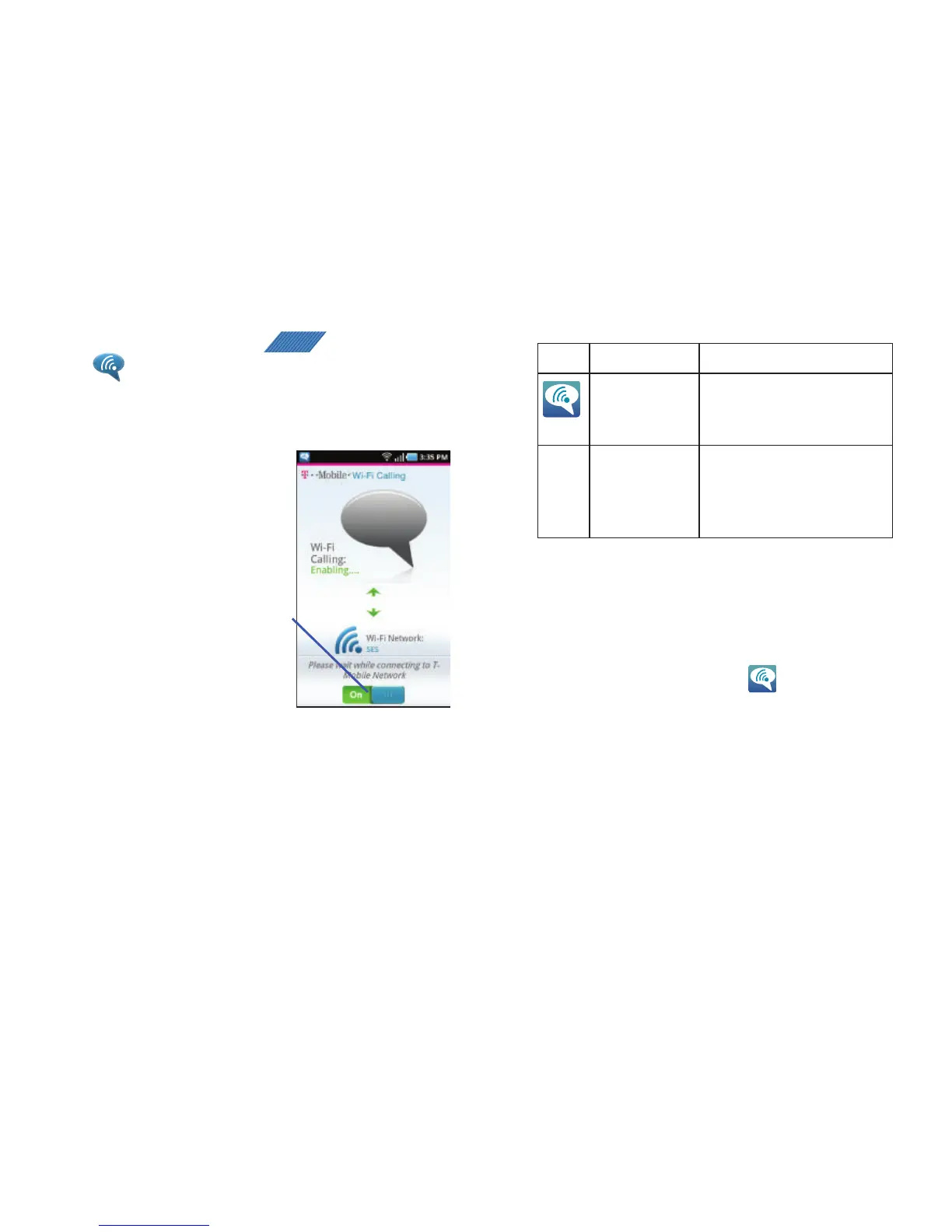
4. Tap the slider to
activate Wi-Fi
Calling. The
slider shows
On
.
Your device
connects to the
T-Mobile
Network.
5. Use the phone Dialer, call log, or contacts list to make a
call. For more information, refer to “Making a Call” on
page 53.
6. Confirm you established a Wi-Fi calling connection to the
T-Mobile network by making sure appears at the top
of the screen.
When Action Then
Displays on the
screen status
bar.
You are connected to the
T-Mobile network and can
make Wi-Fi calls.
Does not display
on the screen
status bar.
You are charged normal calling
rate minutes. For more
information, refer to “Activating
Wi-Fi” on page 181.



 To Next Page