4.Troubleshooting
4.Troubleshooting
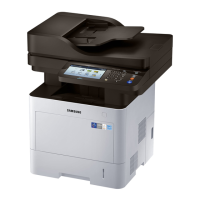
4.1.Controlpanel
1DisplayscreenShowsthecurrentmachinestatusandpromptsduringanoperation.Youcan
setmenuseasilyusingthedisplayscreen.
2JobStatusShowsthejobscurrentlyrunning,queuedjobs,completedjobs,currenterror
codeorsecuredjobs.
3CounterShowstheamountofpaperused.
4NumerickeypadDialsnumbersandentersalphanumericcharacters.Youcanalsoenterthe
numbervaluefordocumentcopiesorotheroptions.
5EcoTurnonEcomode.TurnontheEcomodetoreducetonerconsumptionand
paperusagewhenpc-printingandcopyingonly.
6Power/WakeUpTurnsthepoweronoroff.WhentheblueLEDison,themachineispowered
onandyoucanuseit.Toturnthemachineoff,pressandholethisbuttonfor
atleast3seconds.PressY eswhentheconrmationwindowappears.
7ClearDeletescharactersintheeditarea.
8InterruptStopsajobinoperationforurgentcopying.
9StopStopsanoperationatanytime.Thepop-upwindowappearsonthescreen
showingthecurrentjobthattheusercanstoporresume.
10StartStartsajob.
11Redial/PauseRedialstherecentlysentfaxnumberorreceivedcallerIDinreadymode,or
insertsapause(-)intoafaxnumberineditmode.
12LogoutAllowsusertologout.
13OnHookDialWhenyoupressthisbutton,youcanhearadialtone.Thenenterafaxnumber.
Itissimilartomakingacallusingaspeakerphone.
14ResetResetsthecurrentmachinesetup.
15StatusLEDShowsthestatusofyourmachine
4-1Copyright©1995-2013SAMSUNG.Allrightsreserved.


 To Next Page
 Loading...