RS-232C Connection
Terminal
Connect a RS-232C cable to this terminal.
VGA OUT port Connect a monitor to another monitor through a D-Sub cable.
Kensington Lock The Kensington lock is a device used to physically fix the system when
using it in a public place.
The locking device has to be purchased
separately.
For using a locking device, contact where
you purchase it.
Cable Fix Ring When connecting the cable is finished, fix the cables to the Cable Fix
Ring.
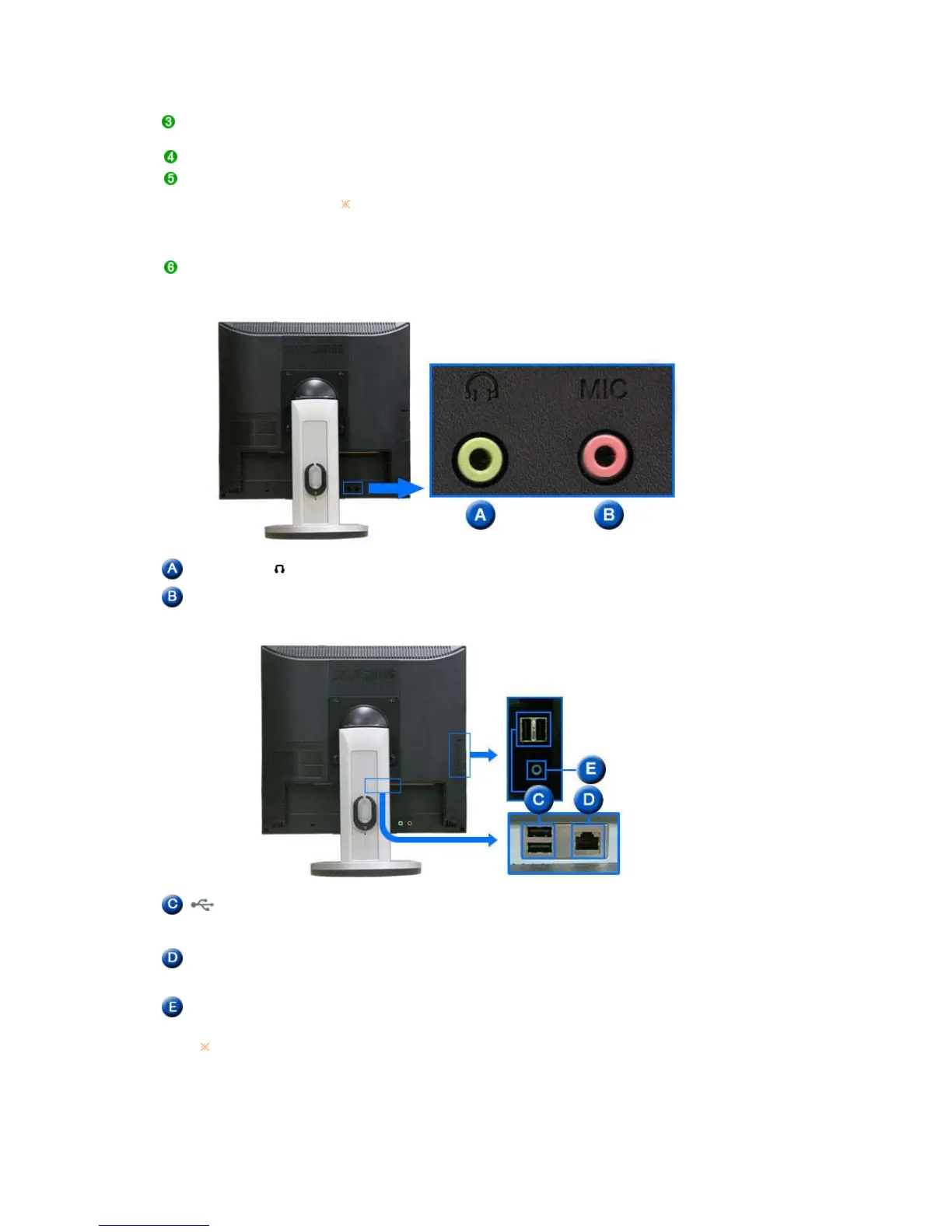
Earphone jack [ ]
Headphone connection terminal.
The Microphone
connection terminal (MIC)
Connect a microphone to the MIC terminal.
USB
(USB Connection
Terminal)
Connect USB devices such as a mouse, keyboard and external storage
devices (DSC, MP3, external storage, etc.).
LAN
(LAN Connection
Terminal)
Connect when using it as a monitor.
AUDIO IN Connect the audio cable for your monitor to the audio port on the back of
your computer.
See Connecting Cables for further information regarding cable connections.









 To Next Page