EasyManua.ls Logo

Samsung SyncMaster 797MB - Page 12

Samsung SyncMaster 797MB
80 pages
Print Icon
To Next Page IconTo Next Page
To Previous Page IconTo Previous Page
Loading...
Unpacking
Front
Rea
Bottom
Ge nera l
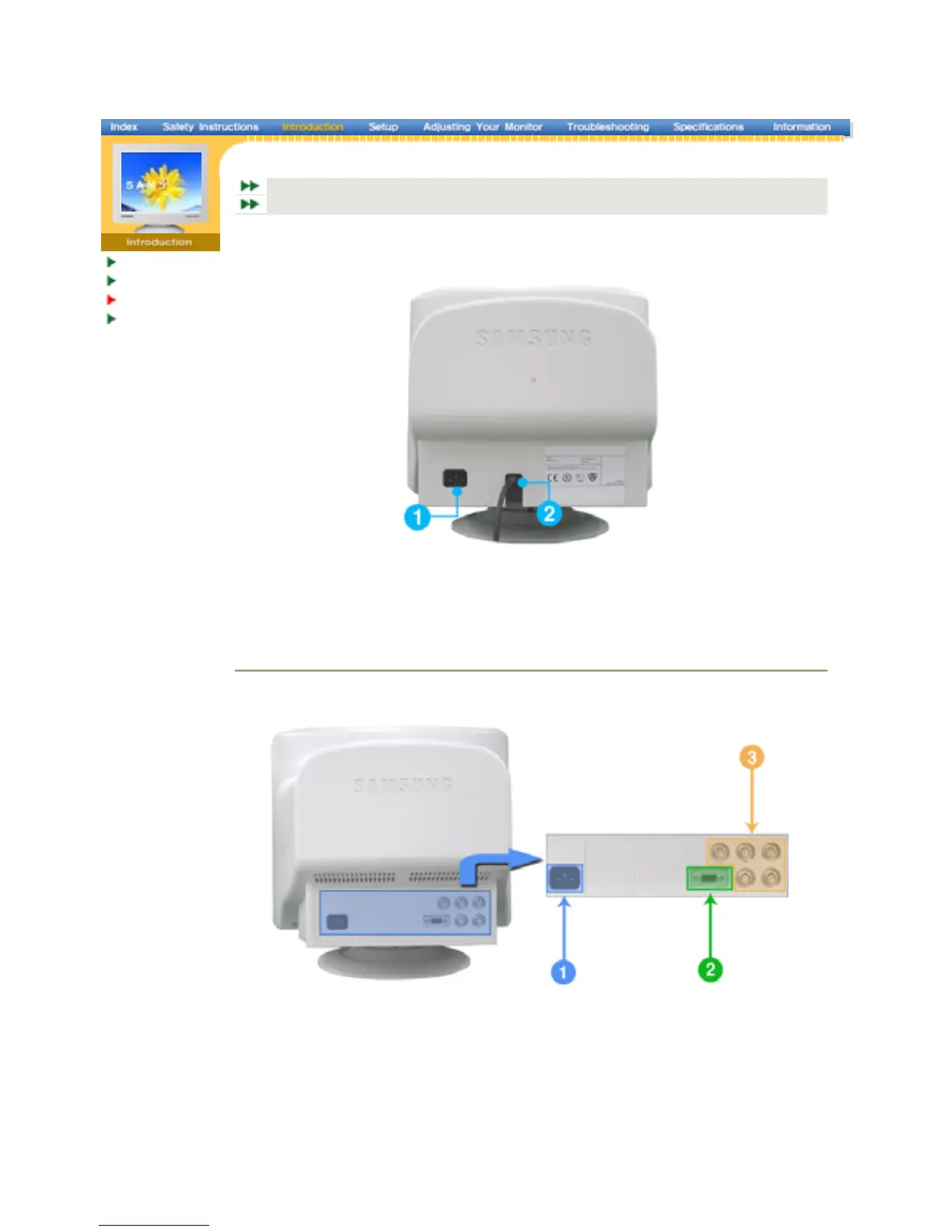
BNC Conne cto rs (Option)
General
(
The confi
g
uration at the back of the monitor ma
y
var
y
from
p
roduct to
p
roduct.
)
1. Power port Connect the power cord for your monitor to the power port on the back of
the monitor.
2. Signal Cable Connect the signal cable to the video port on your computer, video board,
video card
,
or
g
ra
p
hics card.
BNC Connectors (Option)
(
The confi
g
uration at the back of the monitor ma
y
var
y
from
p
roduct to
p
roduct.
)
1. Power port Connect the power cord for your monitor to the power port on the back of
the monitor.
2. Signal port Connect the signal cable to the 15-pin D-sub connector on the back of
your monitor.
3. BNC Connectors
(
O
p
tion
)
Connect the signal cable to the BNC signal port on the back of your
monitor.
Note: See Connectin
g
the Monito
r
for further information re
g
ardin
g
cable connections.
SyncMaster 797MB/997MB
SyncMaster 997MB

Related product manuals