Installing the
Monitor Driver
Base Installat ion
Ge nera l
BNC Conne cto rs (Option)
General
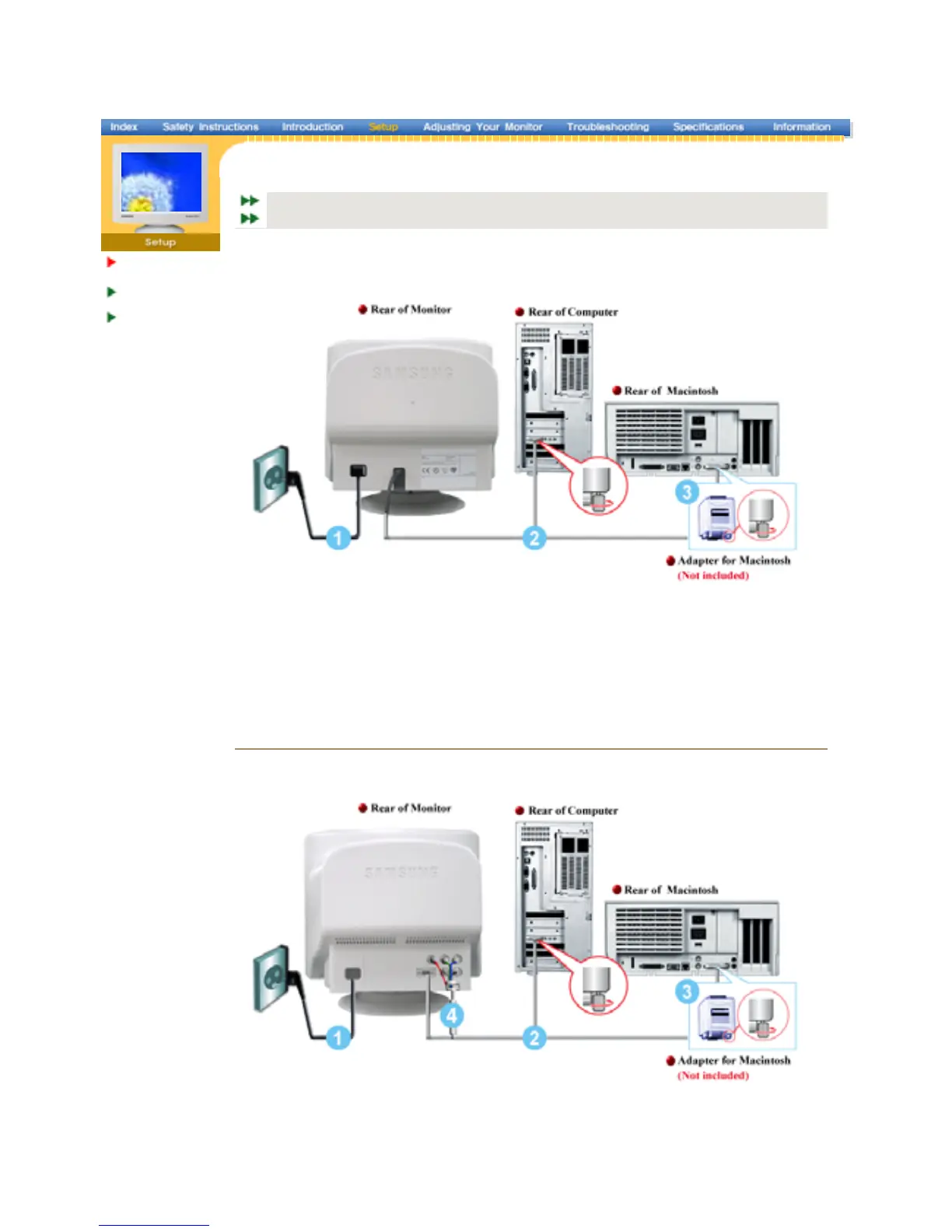
1. Connect the power cord for your monitor to the power port on the back of the monitor.
Plu
ower cord for the monitor into a nearb
outlet.
2. Connect the signal cable to the video port on your computer, video board, video card, or
hics card.
3. If you are using a Macintosh computer, connect the cable to a Macintosh adapter, and set the
pins on your adapter(Adapter not included). A PC-compatible computer does not need an
ada
1. Connect the power cord for your monitor to the power port on the back of the monitor.
Plu
ower cord for the monitor into a nearb
outlet.
2. Connect the end of the signal cable to your computer's video port(video board, video card or
connect the cable to a Macintosh ada
and set the
SyncMaster 797MB/997MB
SyncMaster 997MB














 To Next Page