3-5 Using the Product
Selecting the Sound Mode
When you set to <Dual I-II> the current sound mode is displayed on the screen.
• If the stereo signal is weak and an automatic switching occurs, then switch to the mono.
• This function is only activated in stereo sound signal. It is deactivated in mono sound signal.
• This function is only available in <TV> mode.
Channel
Audio Type Dual I / II DEFAULT
A2 Stereo Mono MONO Automatic change
Stereo
STEREO MONO
Automatic change
Dual
DUAL I DUAL II
DUAL I
NICAM Stereo Mono MONO Automatic change
Stereo
MONO STEREO
Automatic change
Dual
MONO DUAL I
DUAL II
DUAL I
MENU DESCRIPTION
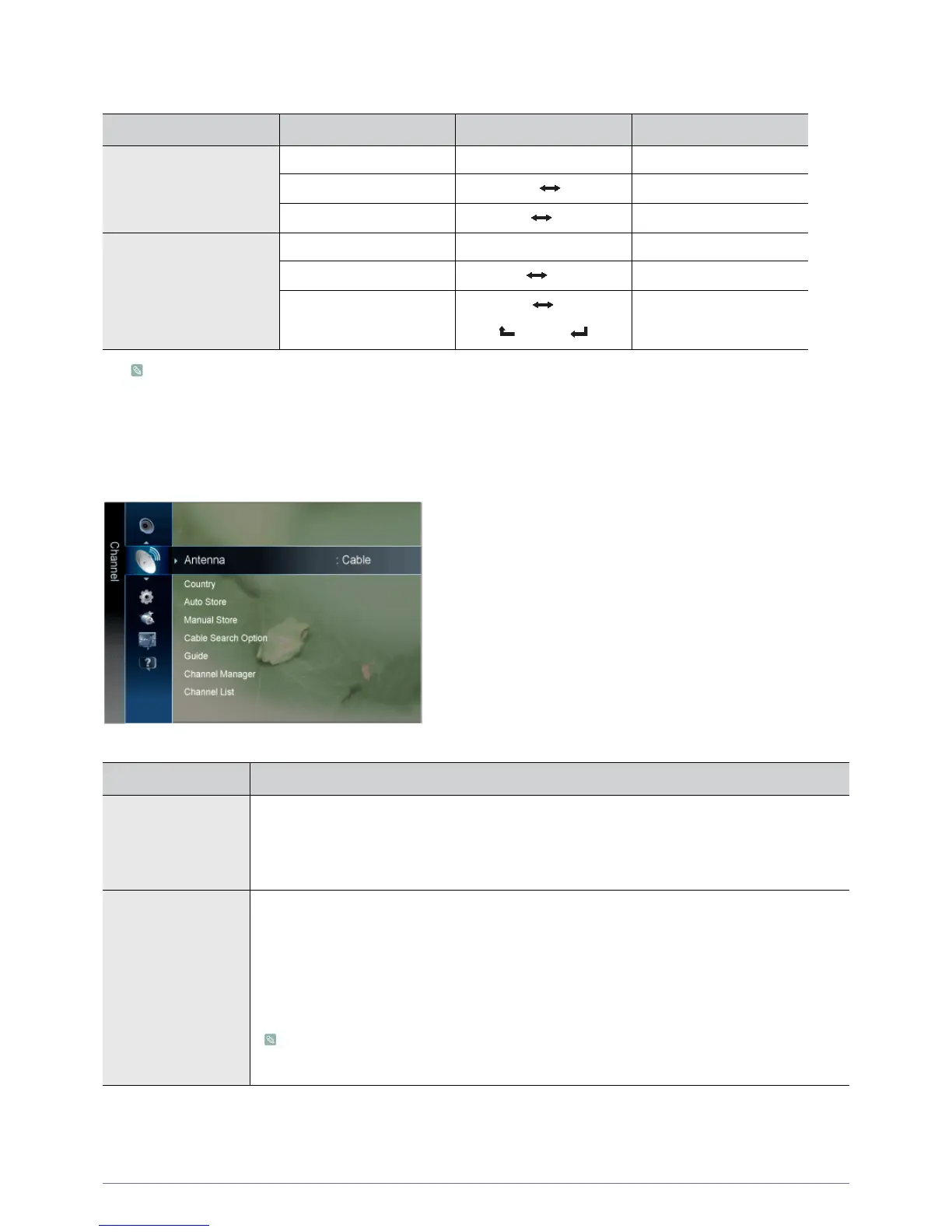
Antenna You can select antenna or cable TV.
If [ANT IN] connected, select the antenna input you want. If the antenna input is not selected prop-
erly, noise may appear on the screen.
• <Air> - <Cable>
Country Select the country in which the product is being used before you use the Auto Store feature. If you do
not see your country in the list, select others.
• <Digital Channel>
You can change the country for digital channels.
• <Analogue Channel>
You can change the country for analogue channels.
• The PIN number input screen appears. Enter your 4 digit PIN number.
• The default PIN number of a new TV set is 0-0-0-0.





 To Next Page