9
YOUR NEW TV
Remote Control
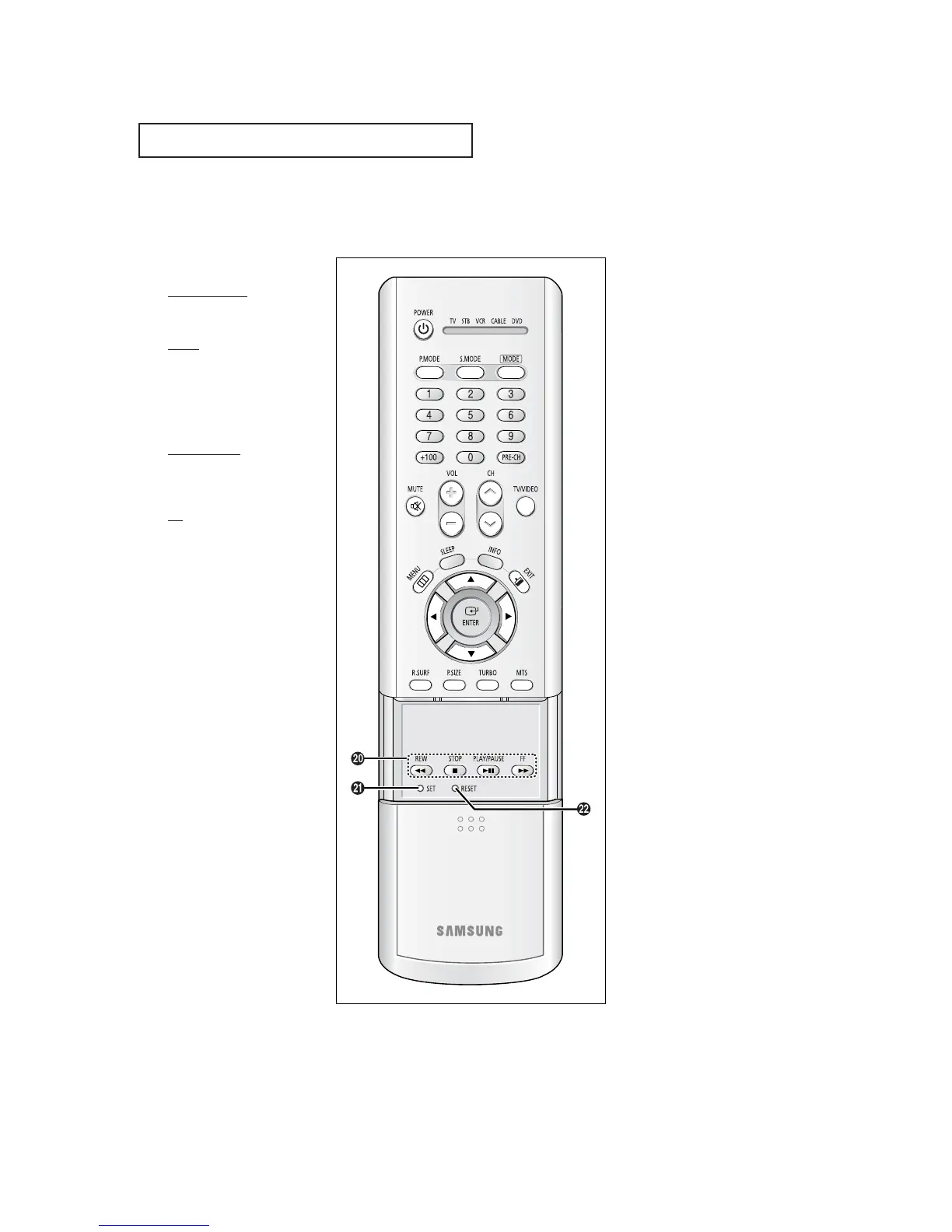
VCR Controls
REW (Rewind)
Press to rewind a tape in your
VCR.
STOP
Press this button to stop a tape
during play, record, rewind or
fast forward. If the button is
pressed during Full-Automatic
play, the function will be can-
celled.
PLAY/PAUSE
Press the PLAY/PAUSE button to
play back prerecorded tapes or
pause the tape.
FF
Press to fast forward the tape in
your VCR.
SET
Use this button when you are set-
ting up your remote control to
operate your Set Top Box, VCR,
Cable box, or DVD.
RESET
If your remote control is not func-
tioning properly, take out the bat-
teries and press the reset button
for about 2~3 seconds. Re-insert
the batteries and try using the
remote control again.
TX-P2036



 To Next Page