This document describes the Samsung Mini Wall Mount, model WMN550M/ZA, designed for mounting LED, LCD, and PDP TVs ranging from 32" to 65" in size.
Function Description
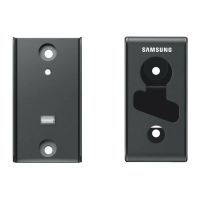
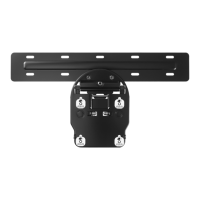
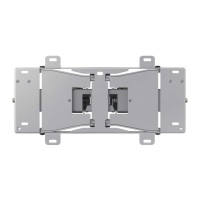
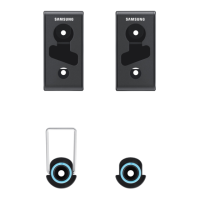
The Samsung Mini Wall Mount provides a secure and space-saving solution for mounting compatible televisions to a wall. It is designed to hold the TV close to the wall, offering a sleek and integrated look. The mounting system consists of wall-mounted brackets and TV-mounted components that interlock to hold the television in place. The design allows for easy installation and removal of the TV from the wall, facilitating access to ports or for maintenance.
Important Technical Specifications
- Model: WMN550M/ZA
- VESA Compatibility: 200x200, 400x400, 600x400
- Compatible TV Types: LED, LCD, PDP TV
- Compatible TV Sizes: 32" ~ 65"
- Safe Working Load: 50 kg (110 lb)
- Minimum Breaking Load: 200 kg (440 lb)
- Wall Mount Dimensions: The wall-mounted brackets have a depth of 40mm (1.57"). The TV-mounted components have a depth of 17mm (0.67").
- Wall Mount Spacing (W):
- 200 mm (7.88")
- 400 mm (15.75")
- 600 mm (23.62")
- Screw Specifications (Assembly to TV):
- S-1: M8x28 (x4)
- S-2: M8x35 (x4)
- S-3: M6x28 (x4)
- S-5: M8x40 (x4)
- S-6: M8x30 (x4)
- S-7: M8x42 (x4)
- S-8: M8x64 (x4)
- Screw Specifications (Assembly to Wall):
- A: M5x65mm-Wood (x4)
- B: M5x65mm-Wood (x4)
- C: M5x65mm-Wood (x2)
- D: M5x65mm-Wood (x2)
- S-4: M5x15 (x2)
- F: Mini wall mount (x8) - These are the wall anchors/screws for the wall mount itself.
- Drill Bit Diameter for Concrete/Wood Wall: 9mm (0.3")
- Drill Depth for Concrete/Wood Wall: 65mm (2.5")
- Minimum Wall Plug Insertion Depth: 5mm (0.2")
- Minimum Wall Plug Protrusion: 2mm (0.08")
Usage Features
Assembly to TV:
The manual provides detailed instructions for attaching the mounting components to the back of the television, with specific screw types (S-1 to S-8) and quantities depending on the TV model and year.
- For JS9000~JS9500 48"~65" and KS9800~KS9900 65" TVs: Use S-2 (M8x35) screws with components G and I.
- For JS8000 48"~65" and JS850D 48"~65" TVs: Use S-5 (M8x40) screws with components G, I, and L.
- For 2016 Premium TV (S9500) 49"~65" and S9000 49"~65" TVs: Use S-6 (M8x30) screws with components G and I. Holder rings (supplied with the TV) are also used.
- For 2016 TV KU7000~7500 and K6200~6500 TVs: Use S-8 (M8x64) screws with components G and I. Holder rings (supplied with the TV) are also used.
- For 2013 UHD F9000 55"~65" TVs: Use S-5 (M8x40) screws with components G, I, and J.
- For 2014 UHD TV HU9000 55" TVs: Use S-5 (M8x40) screws with components G, I, and S-5. Cover Wall top and Holder rings (supplied with the TV) are also used.
- For 2014 LED TV H8000, 2014 UHD TV HU8700, and 2014 UHD TV HU9000 65" TVs: Use S-2 (M8x35) screws with components G, I, and L.
- For 2014 LED TV (H4500) 32", 2014 LED TV (H5000~6300, 6410~7150) 46"~60", 2014 LED TV (H6400 series) 48"~50" TVs: Use S-2 (M8x35) screws with components G, H, I, and L.
- For 2014 LED TV H6800~6870, 2014 UHD TV (HU5900~8550) 40"~65" TVs: Use S-7 (M8x42) screws with components G, H, I, and L.
- For various other models (LED TV Slim, PDP TV, LCD TV, 2014 LED TV FH series, 2015 J5200/J520D/J6200/J620D, 2014 UHD TV HU7100~7800, 2014 LED TV H4000~7150, 2015 LED TV J4000~J5003, J5205~J5500, J525D~J550D, J6200/J620D 48", 2016 LED TV KU6300~KU6500, 2014 LED TV H6300/H6400 series, 2015 LED TV JU6700, 2014 LED TV H5201~3/6201~3, 2015 LED TV J5200/J520D/J620D, 2015 LED TV JS9000~JS9500, 2015 J5200/J520D/J6200/J620D, 2015 LED TV J6300, 2015 LED TV JU6400~JU640D, JU6500/JU650D, JU6700, JU7100~JU7500, JU710D~JU750D, 2014 LED TV H7000~7150, 2015 LED TV J6300/J630D): The manual lists specific screw types (S-1, S-2, S-3, S-5, S-6, S-7) for these models, indicating the appropriate components (G, H, I).
Assembly to Wall:
The wall mount is designed for concrete or wood walls.
- Marking and Drilling: Use the wall mount bracket (component E) as a template to mark the drilling points on the wall. Ensure the bracket is level using a spirit level. Drill holes with a 9mm (0.3") drill bit to a depth of 65mm (2.5").
- Inserting Wall Plugs: Insert the wall plugs (component F, Mini wall mount) into the drilled holes. Ensure they are fully inserted, with at least 5mm (0.2") of the plug inside the wall and no more than 2mm (0.08") protruding.
- Attaching Wall Brackets: Secure the wall mount brackets (component A and B) to the wall using the M5x65mm wood screws (component A and B) and the M5x15 screws (component S-4). The brackets are designed to be installed with a specific orientation (indicated by arrows).
- Mounting the TV: Once the wall brackets are securely installed, the TV, with its attached mounting components, can be carefully lifted and hooked onto the wall brackets. The design allows for easy engagement and disengagement of the TV.
- Leveling and Securing: After mounting, ensure the TV is level. The system allows for slight adjustments to achieve perfect horizontal alignment. The TV is then secured to the wall brackets.
Mounting and Dismounting the TV:
- Mounting: Carefully lift the TV and align the TV-mounted components with the wall-mounted brackets. Gently lower the TV until it clicks into place. The manual illustrates this process with a person lifting the TV and hooking it onto the wall brackets.
- Dismounting: To remove the TV, push up on the bottom edge of the TV to disengage the locking mechanism, then lift the TV upwards and away from the wall brackets. This feature is useful for accessing cables or for maintenance.
Maintenance Features
- Easy Access: The design allows for relatively easy removal of the TV from the wall, which simplifies access to the TV's ports and for cleaning or maintenance.
- Robust Construction: The high minimum breaking load of 200 kg (440 lb) indicates a robust design, suggesting minimal maintenance requirements for the mount itself under normal usage conditions.
- Component Replacement: The manual lists individual components and screw types, implying that specific parts could potentially be replaced if damaged, though this is not explicitly stated as a user-serviceable feature.
- Regular Checks: While not explicitly mentioned, it is good practice to periodically check the tightness of all screws and the security of the wall mounting to ensure continued safe operation.

 Need help?
 General




 To Next Page