EasyManua.ls Logo

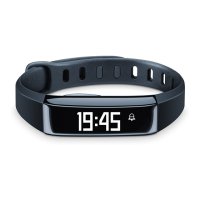
Sanitas SAS 75 - User Manual

Sanitas SAS 75
16 pages
Print Icon
To Next Page IconTo Next Page
Loading...
quick start guide
SAS 75
Hans Dinslage GmbH • Riedlinger Str. 28 • 88524 Uttenweiler, GERMANY
Tel.-Nr.: +49 (0) 73 74 - 91 57 66 • E-Mail: service@sanitas-online.de
D GB F I RUS
Question and Answer IconNeed help?

Do you have a question about the Sanitas SAS 75 and is the answer not in the manual?

Summary

Included in Delivery

Before First Use

Activate the Activity Sensor

Activate the activity sensor by holding down the button.

Fully Charge Your Activity Sensor

Fully charge your activity sensor; charging time is approx. 3 hours.

Activate Bluetooth on Smartphone

Activate Bluetooth in your smartphone's settings.

Download the HealthCoach App

Download the free HealthCoach app from the App Store or Google Play Store.

Start and Use the HealthCoach App

Start the app and follow instructions, then register or continue without registering.

Configure the Activity Sensor in the App

Select SAS75, set activity/sleep targets, stride length, weight, and optional alarm.

Synchronise Data with Your Smartphone

Sleep Mode

Activate;Deactivate Sleep Mode

Press button until SLEEP appears; hold button for 3s to toggle mode.

Important Notes

Device Care and Warnings

Protect from moisture, suncream; avoid submersion. Improper handling voids warranty.

Disposal and Compliance Information

Dispose according to WEEE directive. Product complies with R&TTE Directive 1999/5/EC.

Questions and Further Information

Find Answers and More Information

Visit the Sanitas website for FAQs and technical information updates.

Summary

Included in Delivery

Before First Use

Activate the Activity Sensor

Activate the activity sensor by holding down the button.

Fully Charge Your Activity Sensor

Fully charge your activity sensor; charging time is approx. 3 hours.

Activate Bluetooth on Smartphone

Activate Bluetooth in your smartphone's settings.

Download the HealthCoach App

Download the free HealthCoach app from the App Store or Google Play Store.

Start and Use the HealthCoach App

Start the app and follow instructions, then register or continue without registering.

Configure the Activity Sensor in the App

Select SAS75, set activity/sleep targets, stride length, weight, and optional alarm.

Synchronise Data with Your Smartphone

Sleep Mode

Activate;Deactivate Sleep Mode

Press button until SLEEP appears; hold button for 3s to toggle mode.

Important Notes

Device Care and Warnings

Protect from moisture, suncream; avoid submersion. Improper handling voids warranty.

Disposal and Compliance Information

Dispose according to WEEE directive. Product complies with R&TTE Directive 1999/5/EC.

Questions and Further Information

Find Answers and More Information

Visit the Sanitas website for FAQs and technical information updates.

Sanitas SAS 75 Specifications

General IconGeneral
BrandSanitas
ModelSAS 75
ConnectivityBluetooth
DisplayOLED
TypeActivity Tracker
FeaturesActivity tracking, heart rate monitoring, notifications
CompatibilityiOS, Android
Activity TrackingSteps, distance, calories
Heart Rate MonitorYes
NotificationsSMS