EasyManua.ls Logo

Sansui CD-V1000 - 6. Adjustments

Sansui CD-V1000
18 pages
Print Icon
To Next Page IconTo Next Page
To Previous Page IconTo Previous Page
Loading...
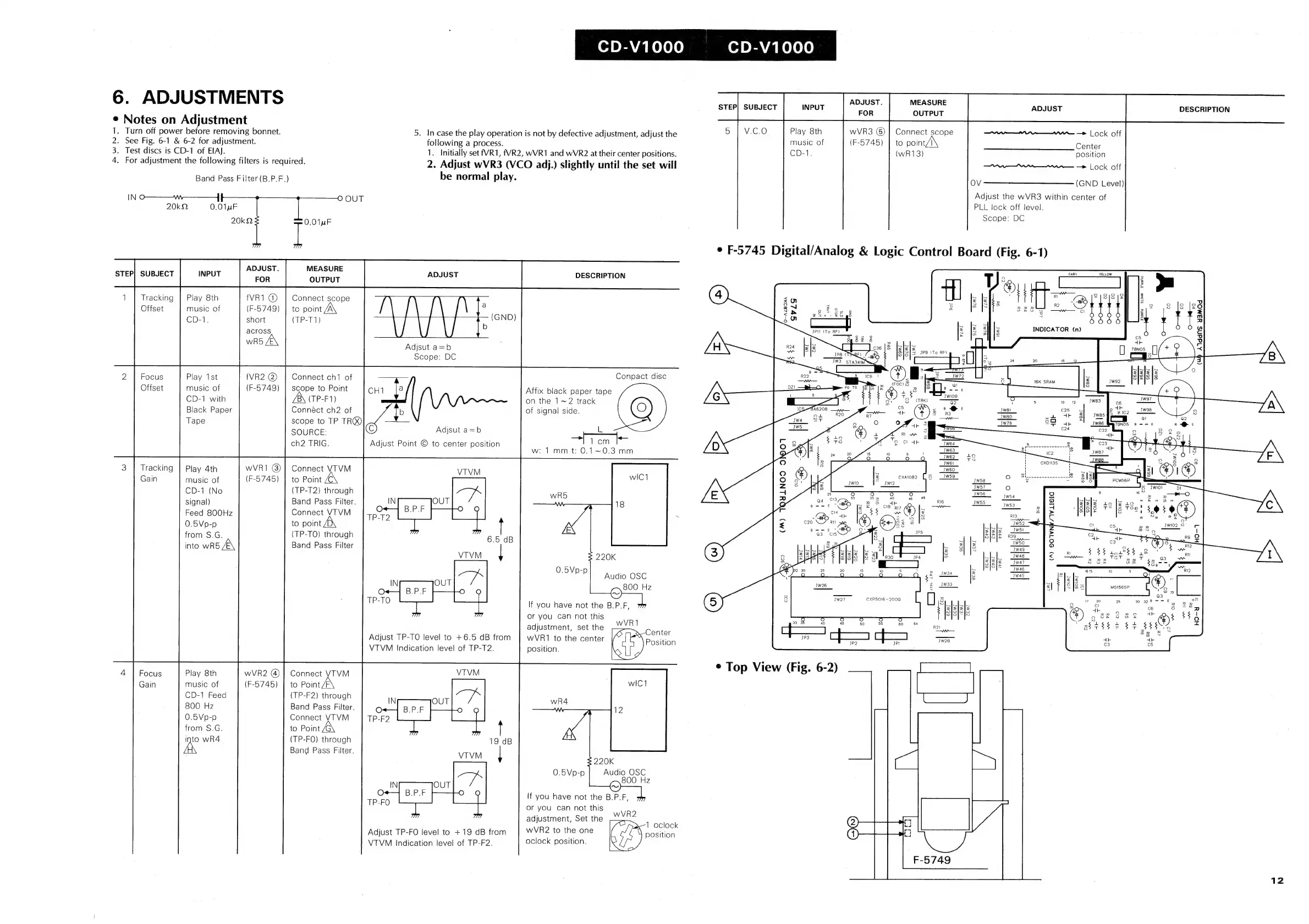
6.
ADJUSTMENTS
¢
Notes
on
Adjustment
1.
Turn
off
power
before
removing
bonnet.
5.
Incase
the
play
operation
is
not
by
defective
adjustment,
adjust
the
Play
8th
wVR3
©)
|
Connect
scope
=
she
w~—
—>
Lock
off
2.
See
Fig.
6-1
&
6-2
for
adjustment.
following
a
process.
music
of
(F-5745)
|
to
point,
Center
3.
Test
discs
is
CD-1
of
EIA).
1.
Initially
set
f(VR1,
fVR2,
WVR1
and
WVR2
at
their
center
positions.
CD-1.
(wR13)
position
4.
For
adjustment
the
following
filters
is
required.
Band
Pass
Filter
(B.P.F.)
be
normal
play.
IN
o—
\W————]
20k2
0.01
uF
20kQ
_
ADJUST.
MEASURE
T
STEP|
SUBJECT
INPUT
OUTPUT
ADJUS
O
OUT
1
Tracking
|
Play
8th
fVR1
@)
|
Connect
scope
Offset
music
of
(F-5749)
|
to
point
CD-1.
short
(TP-T1)
across
nn
Adjsut
a=b
Scope:
DC
2
|
Focus
Play
1st
Connect
ch1
of
Offset
music
of
scope
to
Point
CH1
{4
CD-1
with
A\
(TP-F1)
Black
Paper
Connéct
ch2
of
b
Tape
scope
to
TP
TR®
SOURCE:
Adjsut
a=b
ch2
TRIG.
Adjust
Point
©
to
center
position
3
|
Tracking
|
Play
4th
wVR1
@)]
Connect
VTVM
Gain
music
of
(F-5745)
to
Point
CD-1
(No
(TP-T2)
through
signal)
Band
Pass
Filter.
Feed
800Hz
Connect
VTVM
0.5Vp-p
to
point
from
S.G.
(TP-TO)
through
into
wR5
Band
Pass
Filter
Adjust
TP-TO
level
to
+6.5
dB
from
VTVM
Indication
level
of
TP-T2.
4
|
Focus
Play
8th
wVR2
@)
|}
Connect
YTVM
Gain
music
of
(F-65745)
|
to
Point
CD-1
Feed
(TP-F2)
through
800
Hz
Band
Pass
Filter.
0.5Vp-p
Connect
VTVM
from
S.G.
to
Point
(TP-FO)
through
Band
Pass
Filter.
UN
wR4
Adjust
TP-FO
level
to
+19
dB
from
VTVM
Indication
level
of
TP-F2.
2.
Adjust
wVR3
(VCO
adj.)
slightly
until
the
set
will
07
PEAY
Keleye)
0]
DEA
el
ele)
ADJUST.
MEASURE
SUBJE
INPUT
V.C.0
STEP)
ADJUST
———
Oe
>
Lock
off
OV
(GND
Level)
Adjust
the
wVR3
within
center
of
PLL
lock
off
level.
Scope:
DC
¢
F-5745
Digital/Analog
&
Logic
Control
Board
(Fig.
6-1)
DESCRIPTION
my
3
x
IPI
(To
RF)
|
O—ALBOMA
Svls
40
OLS
as
‘No
d
2
ey
fs
ogsz
6
5
]
R24
fz
lz
Lf
dics
J&
Jelels
mw
IS
SIS]S
3e9
(To
RF)
oe
JP8
TORRE)
(bP
BIS]
=
g
[1
5
Re
JW3
STA34IM
a
ke
Q
7
2
;
32
R22
.
Ss
icé
Conpact
disc
Affix
black
paper
tape
on
the
1~2
track
OZ1
_—ay
FO
TO
md
:
®
¢
u
[ee
3
~
of
signal
side.
oe
a
WK
OL
=
i
©
Tom
w:
1mm
t:
0.1~0.3
mm
(M)
TQYLNOD
9N01
220K
SQ
ke
el
eS
0.5Vp-
iy
.
PP]
Audio
OSC
[
co
i
;
Z
800
Hz
al
TS
CXP5016
-
2000
3B:
a
7
20
28
If
you
have
not
the
B.P.F,
(®)
Biche
or
you
can
not
this
vei
ae
=
adjustment,
set
the
—~
abr
dh
r
Center
wVR1
to
the
center
Position
a
position.
¢
Top
View
(Fig.
6-2)
220K
Audio
OSC
800
Hz
If
you
have
not
the
B.P.F,
or
you
can
not
this
adjustment,
Set
the
wVR2
to
the
one
oclock
position.
wVR2
1
oclock
position
DESCRIPTION
10
Oo—-++—
za
:
tS
:
Ca
(Wb
AlddNS
Y3MOd
oe
2
AF
ig
$3)
i
"2
“ar
>
[>
>
bB
&
12