EasyManua.ls Logo

Sansui CD-V1000 - 8. How to Replace Main Parts

Sansui CD-V1000
18 pages
Print Icon
To Next Page IconTo Next Page
To Previous Page IconTo Previous Page
Loading...
A.Bonnet
a)
1.
Remove
the
two
screws
on
either
side
and
the
two
screws
on
the
rear
panel.
B.
Front
Panel
Assembly
(9)
1.
Remove
the
two
screws
securing
the
front
panel,
the
three
screws
on
the
bottom,
and
the
two
screws
on
the
inside.
2.
Detach
F-5746
and
F-5748
from
the
front
panel.
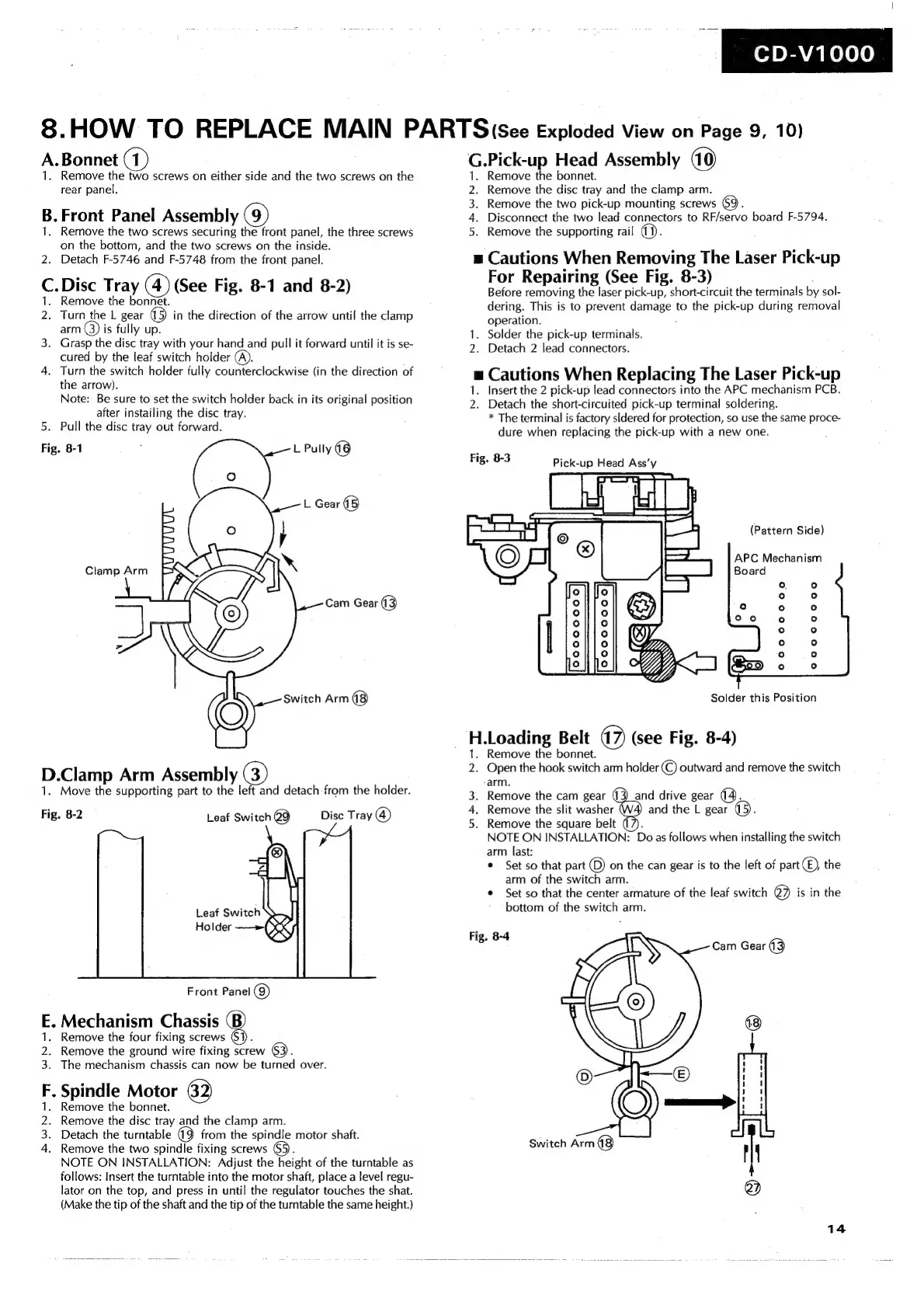
C.Disc
Tray
(4)
(See
Fig.
8-1
and
8-2)
1.
Remove
the
bonnet.
2.
Turn
the
L
gear
(5)
in
the
direction
of
the
arrow
until
the
clamp
arm
is
fully
up.
3.
Grasp
the
disc
tray
with
your
hand
and
pull
it
forward
until
it
is
se-
cured
by
the
leaf
switch
holder
A).
4.
Turn
the
switch
holder
fully
counterclockwise
(in
the
direction
of
the
arrow).
Note:
Be
sure
to
set
the
switch
holder
back
in
its
original
position
after
instailing
the
disc
tray.
5.
Pull
the
disc
tray
out
forward.
Fig.
8-1
:
L
Pully
(8
D.Clamp
Arm
Assembly
(3)
1.
Move
the
supporting
part
to
the
left
and
detach
-from
the
holder.
Fig.
8-2
Leaf
Switch
@9
Disc
Tray
(@)
Leaf
Switch
Front
Panel
@g)
E.
Mechanism
Chassis
1.
Remove
the
four
fixing
screws
2.
Remove
the
ground
wire
fixing
screw
63).
3.
The
mechanism
chassis
can
now
be
turned
over.
F,
Spindle
Motor
1.
Remove
the
bonnet.
2.
Remove
the
disc
tray
and
the
clamp
arm.
3.
Detach
the
turntable
from
the
spindle
motor
shaft.
4.
Remove
the
two
spindle
fixing
screws
65.
NOTE
ON
INSTALLATION:
Adjust
the
height
of
the
turntable
as
follows:
Insert
the
turntable
into
the
motor
shaft,
place
a
level
regu-
lator
on
the
top,
and
press
in
until
the
regulator
touches
the
shat.
(Make
the
tip
of
the
shaft
and
the
tip
of
the
turntable
the
same
height.)
od
DEAY
a
nel
010
8.HOW
TO
REPLACE
MAIN
PARTS
(see
Exploded
View
on
Page
9,
10)
G.Pick-up
Head
Assembly
Remove
the
bonnet.
Remove
the
disc
tray
and
the
clamp
arm.
Remove
the
two
pick-up
mounting
screws
69.
Disconnect
the
two
lead
connectors
to
RF/servo
board
F-5794.
Remove
the
supporting
rail
a).
GB
NS
=
Cautions
When
Removing
The
Laser
Pick-up
For
Repairing
(See
Fig.
8-3)
Before
removing
the
laser
pick-up,
short-circuit
the
terminals
by
sol-
dering.
This
is
to
prevent
damage
to
the
pick-up
during
removal
operation.
.
1.
Solder
the
pick-up
terminals.
Detach
2
lead
connectors.
=
Cautions
When
Replacing
The
Laser
Pick-up
1.
Insert
the
2
pick-up
lead
connectors
into
the
APC
mechanism
PCB.
2.
Detach
the
short-circuited
pick-up
terminal
soldering.
*
The
terminal
is
factory
sldered
for
protection,
so
use
the
same
proce-
dure
when
replacing
the
pick-up
with
a
new
one.
Fig.
8-3
Pick-up
Head
Ass’y
(Pattern
Side)
APC
Mechanism
Board
eo0000000
e0o0o00000
ooo
ooo
00
e000
00000
Solder
this
Position
H.Loading
Belt
47)
(see
Fig.
8-4)
1.
Remove
the
bonnet.
2.
Open
the
hook
switch
arm
holder
(C)
outward
and
remove
the
switch
arm.
3.
Remove
the
cam
gear
4,
Remove
the
slit
washer
5.
Remove
the
square
belt
;
NOTE
ON
INSTALLATION:
Do
as
follows
when
installing
the
switch
arm
last:
*
Set
so
that
part
(©)
on
the
can
gear
is
to
the
left
of
part
©)
the
arm
of
the
switch
arm.
*
Set
so
that
the
center
armature
of
the
leaf
switch
@
is
in
the
bottom
of
the
switch
arm.
(|
ah
@
and
drive
gear
(4.
and
the
L
gear
(5).
Fig.
8-4
i
Switch
Arm
(8)
14