6901-002026 <02>
8
1
CAUTION:
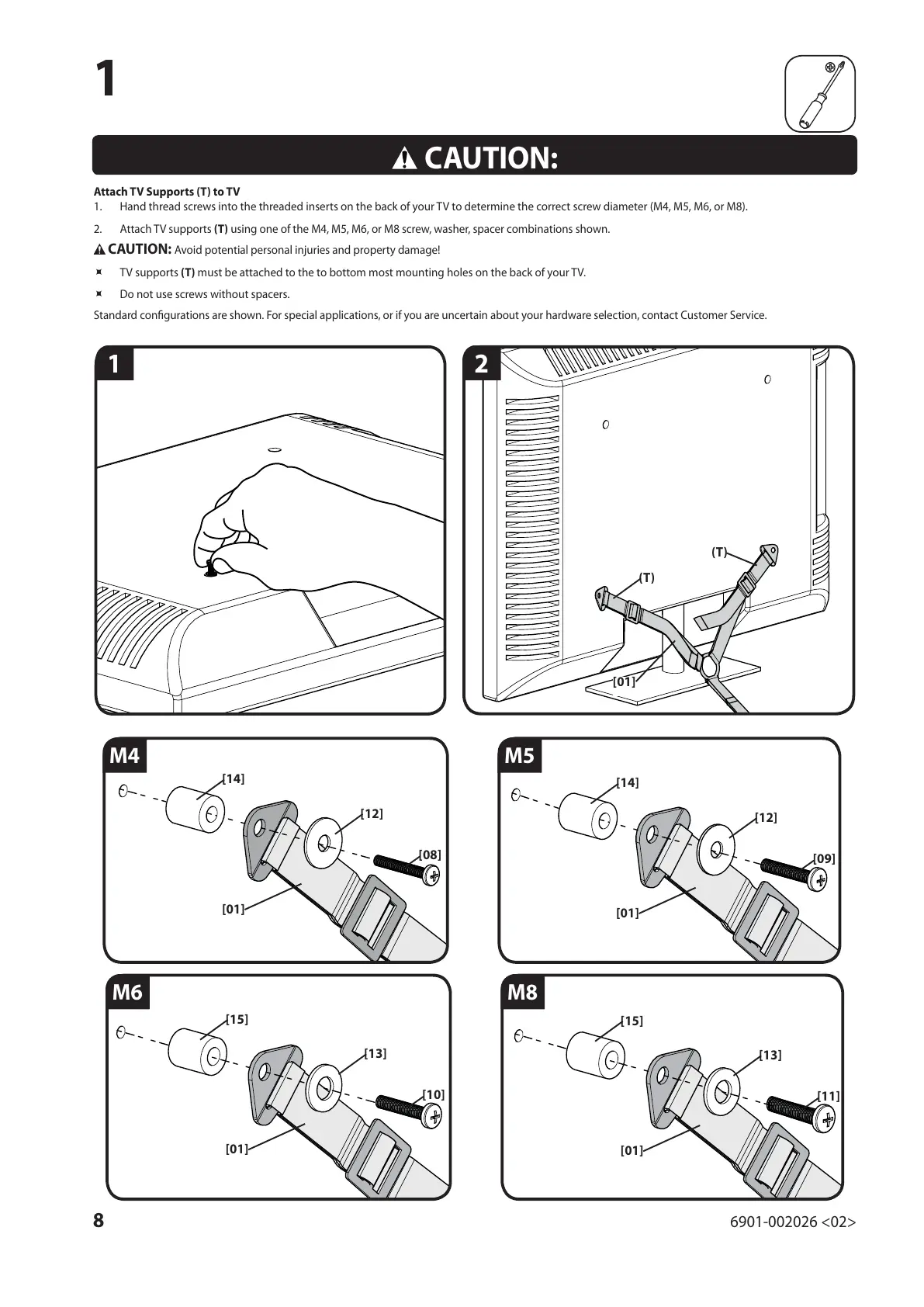
Attach TV Supports (T) to TV
1. Hand thread screws into the threaded inserts on the back of your TV to determine the correct screw diameter (M4, M5, M6, or M8).
2. Attach TV supports (T) using one of the M4, M5, M6, or M8 screw, washer, spacer combinations shown.
CAUTION: Avoid potential personal injuries and property damage!
Ù TV supports (T) must be attached to the to bottom most mounting holes on the back of your TV.
Ù Do not use screws without spacers.
Standard con gurations are shown. For special applications, or if you are uncertain about your hardware selection, contact Customer Service.
M4
M6
M5
M8
(T)
[14]
[14]
[15]
[15]
[12]
[12]
[13]
[13]
[08]
[09]
[10]
[11]
[01]
[01]
[01]
[01]
[01]
(T)
1
2


 To Next Page
 Loading...