Remote Control Unit
Identification of Controls (Continued)
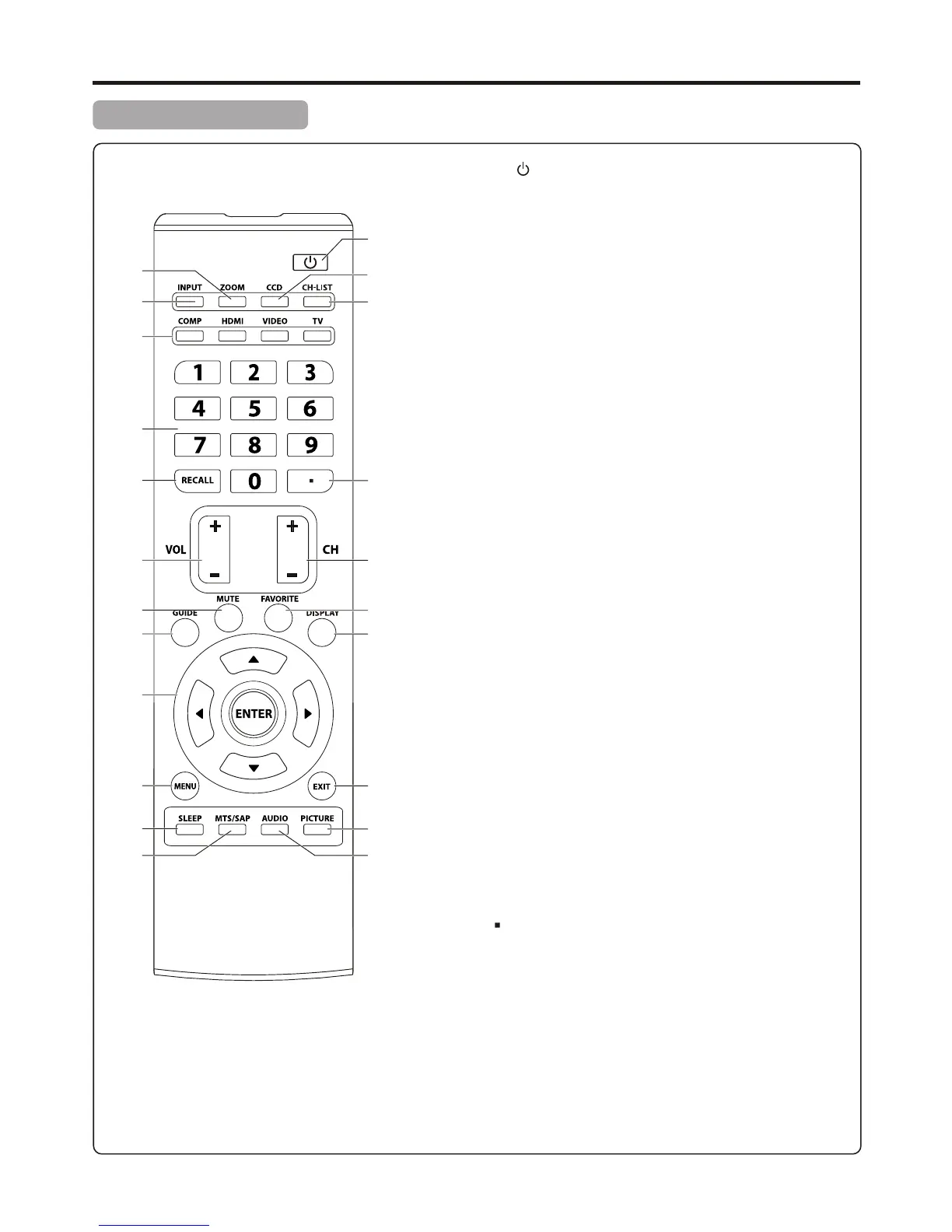
POWER : Switches the TV power on or Standby.
ZOOM: Selects the screen size.
INPUT: Displays input source menu.
COMP/HDMI/VIDEO/TV: Direct input source select
COMP: Press once to access Component 1 mode, press twice
to access Component 2 mode.
HDMI: Press once to access HDMI 1 mode, press twice to
access HDMI 2 mode.
VIDEO: Press once to access AV1 mode, press twice to access
AV2 mode, press a third time to access S-Video mode.
TV: Directly access TV mode.
0 – 9 number buttons: Press to enter channel numbers or
input password.
RECALL: Recalls the last viewed channel.
VOL+/-: Increases or decreases the volume.
MUTE: Mutes the sound.
GUIDE: Press to display the program guide information (if
available) when watching a DTV program. You may be able to
view program broadcasting time and program name from the
guide.
5/6/3/4: Menu navigation buttons.
5/6: Press to move up or down in the menu.
3/4: Press to move left or right in the menu or to adjust a
menu setting.
ENTER: Press to confirm a selection and/or enter into a sub-
menu.
MENU: Displays the main menu screen.
SLEEP: Sets the sleep timer.
MTS/SAP: To select STEREO, SAP or MONO sound in analog
TV mode. To select audio track in DTV mode.
CCD: Press to turn closed captioning on or off.
CH-LIST: Displays a channel list.
Dot ( )button: Press to enter a program number for multiple
program channels such as 2-1, or 2-2.
CH+/-: Changes channel up and down.
FAVORITE: Displays the favorite program list.
DISPLAY: Press to display the information banner.
EXIT: Press to exit the menu.
PICTURE: Selects picture mode.
AUDIO: Selects sound mode.
1
2
3
4
5
6
7
8
9
10
11
12
13
14
15
16
12
17
18
19
20
21
22
1
2
3
4
5
6
7
8
9
10
11
12
13
14
15
16
17
18
19
20
21
22


 To Next Page
 Loading...