JO G
FW D RE V
HZ
A
V
RU N
FL T
JOG
PROG
SHIFT
RE M
LO C
//
//
ENTER
PR O G
EN T E R
JO G
SH I F T
SH I F T
RUN
LOC/REM
FWD/REV
FLT
HZ
V
A
RU N
29
30
Chapter 4: Operation and Display
4.1 Instruction for operation and display interface
Such operations like amendment of function parameter, working state
monitoring and running control (start and stop) may be performed by using the
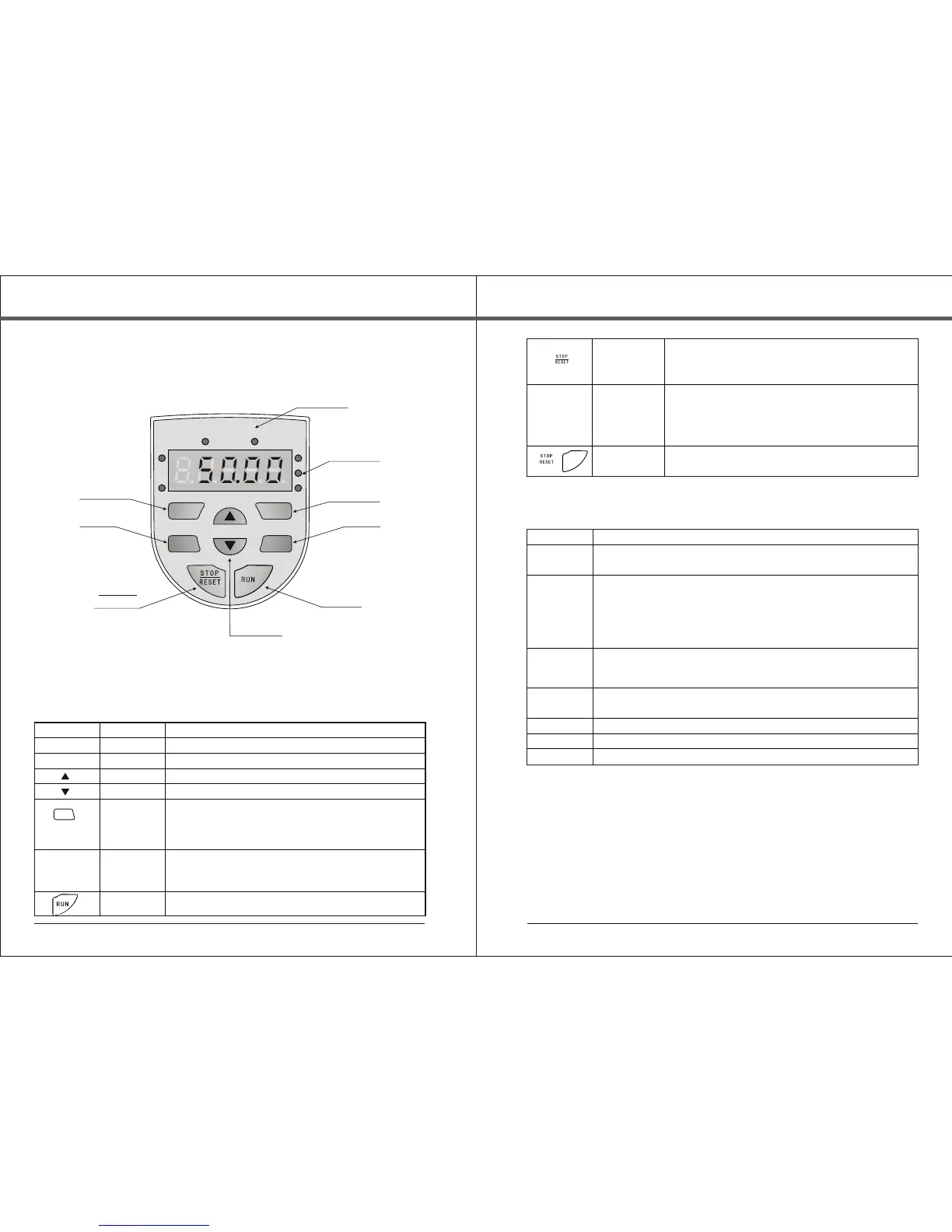
operation panel, the panel outline and function area are shown as fig. 4-1.
Function indication lamp
Unit indication lamp
ENTER key
JOG key
RUN key
PROGRAM/EXIT key
SHIFT key
STOP key
FAULT RESET key
CHANGE key
Fig. 4-1 Operation panel diagram
4.1.1 Instruction for button function
Button symbol
Name
Function
PROGRAM key
ENTER key
UP key
DOWN key
COMBINATION
SHIFT key
RUN key
Let primary menu enter or exit, delete the shortcut parameters.
Enter into the menu picture step by step, confirm the setting parameters.
Increase the data or function codes
Decrease the data or function codes
In the “ shutdown display” interface and “ run
display” interface, move to left and circularly select
the displayed parameters, please notice that in
operation, press " key first, then press the
key.
ENTER"
"JOG"
In the “ shutdown” interface and “ run” interface,
move to right and circularly select the displayed
parameters; in amending the parameters, please
select the amended places of parameters.
In the mode of keyboard operation, it is used for “RUN”
control.
STOP/RESET key
SHORTCUT
MULTI-FUNCTION
key
Combination
In “RUN”state, press this key to stop the running;
this function code P1.12
is used to restrict. In “FAULT & ALARM”state, all
control modes may be reset
by this key.
The function of this key is determined by P1.11.
0: Used for jogging operation, it is the JOG key
1: Used for forward/reverse operation shift, it is the
forward/reverse operation shift key.
2: Used for clearing the setting parameters by
UP/DOWN keys, namely the frequency values.
Press the " key at the
same time, the inverter will shut down freely.
RUN" key and "STOP/RST"
4.1.2 Instruction for indicator lamp
1)Instruction for function indicator lamp
Indicator lamp
Name
Indicator lamp Description
If the lamp goes out, the inverter is in the shutdown state; if the lamp
goes on, the inverter is in the running state; if the lamp flashes, the
inverter is in the parameter self-learning state;
It is the indicator lamp of keyboard operation, terminal operation and
remote communication control.
if the lamp flashes, the inverter is in the terminal operational control
state; if the lamp goes out, the inverter is in the remote operational
control state.
If this lamp goes out, the inverter is in the keyboard operational
control state;
Forward/reverse rotation indicator lamp
If this lamp goes out, the inverter is in the forward rotation state; if
this lamp goes on, this inverter is in the reverse rotation state.
Fault indicator lamp
In the fault state, this lamp goes on; in the normal state, this lamp goes out.
Frequency unit
Voltage unit
Current unit
2) Digitron display area
LED, with 5 bits, displays the monitoring data such as setting frequency and
output frequency, etc. as well as alarm codes.
Chapter 4: Operation and display



 To Next Page
 Loading...