ProductOverview
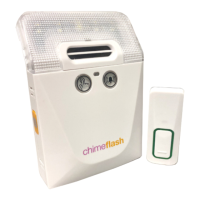
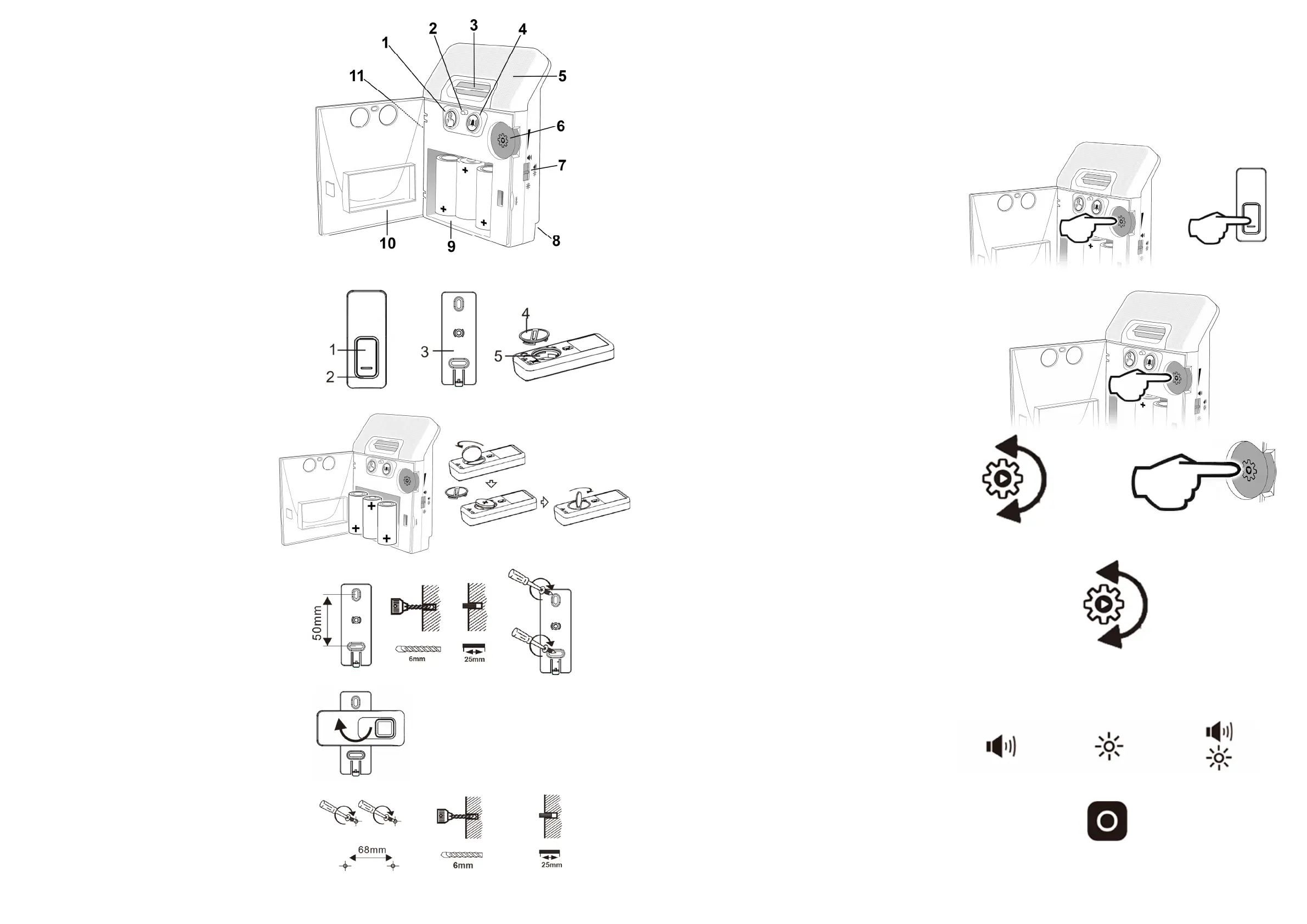
ReceiverUnit
1) DoorbellIcon(Green)
2) BaeryLowIndicator
3) SpeakerPort
4) GeneralBellIcon(Orange)
5) FlashLens
6) Volume/Setup(Mulfunconal)
7) AlertTypeSelector
8) PowerSupplySocket
9) BaeryCompartment
10) BaeryCompartmentDoor
11) AcceptBuon
Bellpush
1) PushBuon
2) PushIndicator
3) MounngBracket
4) BaeryCover
5) BaeryCompartment
BaeryInstallaon
Insert3x“C”sizealkalinebaeriesintothebaery
compartmentonthereceiverunit.
Removethebaerycoveronthepushtransmier
usingacoinandinserttheCR2032baery(Posive
sideupwards
).
FixingandWallMounng
Bellpush
Werecommendaachingthebellpushmounngplateto
yourdoororframeusingthesckypadalreadyaached.
Theprovidedscrewsandplugscan beusedforfixingthe
bellpushtomasonryORforwallmounngtheReceiver
unit.
TheBellpushshouldbefiedtothemounngplateata
90degreeangleandthenrotatedeitherclockwiseor
an‐clockwiseunlaclickisheard.
Receiver
TheReceivercanbewallmounted,wewouldsuggest
usingthescrewsprovidedfordoingthisandmountthe
bellpushusingthesckypadalreadyaachedtothe
mounngplate.
AlertType
chime flash canbesettooutputSoundOnly,FlashOnly
orSoundandFlashtogetherusingtheslide switchonthe
sideofthereceiverunit.
SoundOnlyFlashOnlySound&Flash
VolumeControl
Thereare8volumelevels.Everylevelhasasinglebeep
whichcorrespondstothevolumelevel,whenyouheara
doublebeepyouhavereachedmaximumvolume.
Thevolumelevelcanbesetatanymeexceptwhenin
setupmode.Thechosenvolumelevelisthesamefor
both
transmiersifusingasecondbellpushortelephone
transmier.
MelodySelecon
Thereare4doorbellmelodiesand2telephonemelodies
tochoosefrom.
Pressandholdthesetupbuonfor2‐3secondstoenter
setupmode,thegreensymbolwillsteadily flash.Release
thesetupbuon.
Ifthisisthesymbolyouwouldliketochangethemelody
ofthensimplyrotatethesetupbuonunlyouhear the
soundyouwishtokeep.Ifyouwishtochangethesound
onthesecondsymbolpressthesetupbuononce,the
bellsymbolwillflashandfollowtheinstruconsabove.
Oncethedesiredmelody
isselectedpressthesetup
buontoexitthesetupmode.
AcceptBuon
Thisbuoncanbeusedtoacknowledgethechime flash
alerts,pressthisbuonanymewhenthesystemis
triggered,itwillstopitimmediately.
InialSetup
Note: chime flash ispre‐programmed and ready to use once the baeries have been inserted.Follow the instrucons
belowifyouwanttoaddatransmier,setamelodyoradjustvolume.
The mulfuncon buon/wheel has 2 funcons, firstly it can be pressed on its
front face to enter the setup process,
secondlyitcanberotatedtoselectmelodywheninthesetup,ortoadjustthevolumeatanyotherme.
1)Press&holdthesetupbuonfor2‐3seconds,the
greendoorbellsymbolwillilluminateandflashata
steadyrate.
2)Pressthebellpushtransmierbuon,thegreen
symbolonthereceiverwillflashrapidlyfor1secondand
asinglebeepwillbeheard, this indicatesthatthe
bellpushandreceiverarenowpaired.


 To Previous Page
 Loading...