Schrack Seconet
0000 0000 0000
29.01.2020
INTEGRAL
Alarms Faults Disablements
FIRE
Site Info
Buzzer
silenced
Operation
Additional
Information
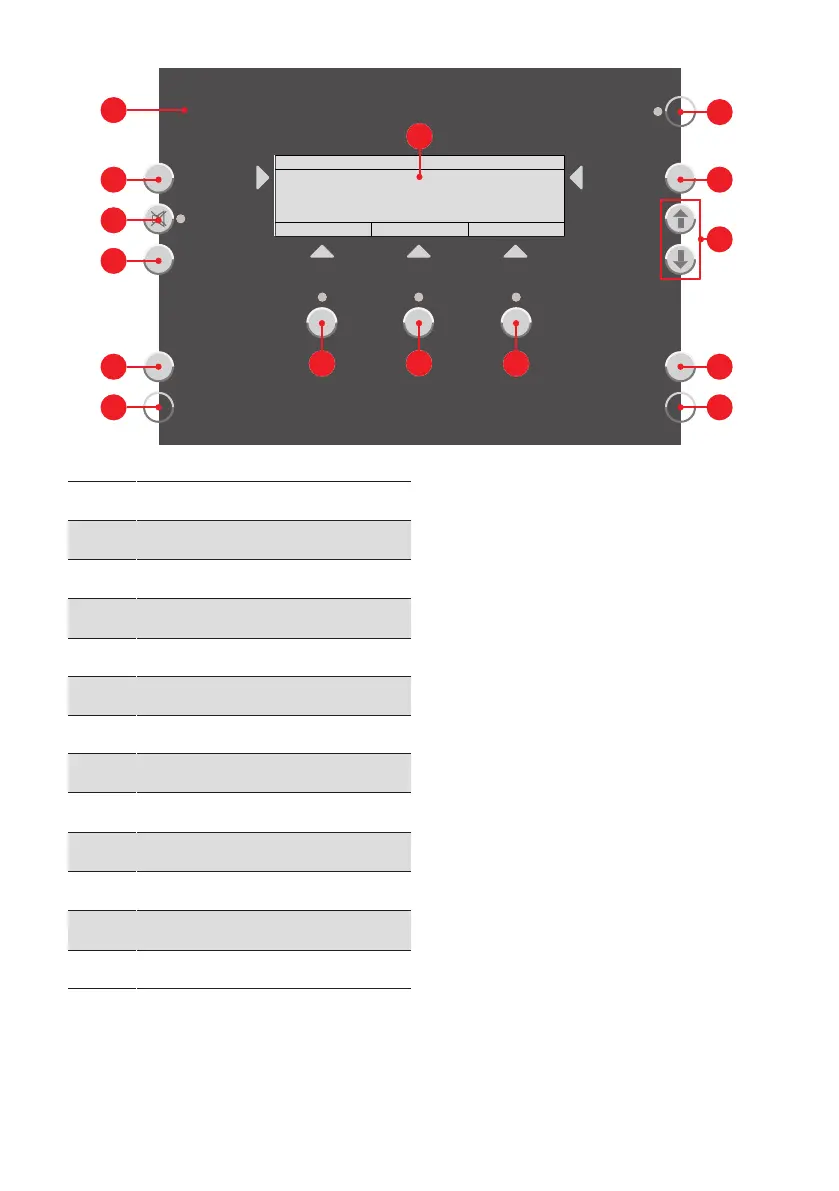
A
LED FIRE
B
Button Site Info
C
Button Buzzer silenced
D
Button
E
Freely programmable buttons
F
Freely programmable LEDs
G
Display
H
Button and LED Alarms
I
Button and LED Faults
J
Button and LED Disablements
K
LED Operation
L
Button Additional Information
M
Navigation buttons/scroll buttons
· Reset alarm/fault signal
Reset alarm/fault signal
Pressing the button Buzzer silenced
C
disables
the signal tone of an active alarm or fault message
in the fire alarm control panel; the LED remain lit
up. Any additional alarm or fault message will trig-
ger the alarm and fault signal tones again. Acknow-
ledgement and intervention signal tones cannot be
reset.
· Navigation buttons/scroll buttons
Navigation buttons/scroll
buttons
Scroll button I for selecting the previous list entry
(scroll up in the list). Scroll button H for selecting
the next list entry (scroll down in the list).
· Freely programmable buttons and LED
Freely programmable buttons
and LED
There are buttons
E
and LEDs
F
, which can be
freely programmed and labelled on the operating
panel as customers wish.



 To Next Page