Page 10 of 12
17. Tire Pressure Reading & Translation
Nominal Pressure Alarm (PSI)
kPa PSI BAR Low High
180 26.1 1.8 19.58 39.15
200 29 2 21.75 43.50
210 30.45 2.1 22.84 45.68
220 31.9 2.2 23.93 47.85
230 33.35 2.3 25.01 50.03
240 34.8 2.4 26.10 52.20
250 36.25 2.5 27.19 54.38
260 37.7 2.6 28.28 56.55
270 39.15 2.7 29.36 58.73
280 40.6 2.8 30.45 60.90
290 42.05 2.9 31.54 63.08
300 43.5 3 32.63 65.25
320 46.4 3.2 34.80 69.60
390 56.55 3.9 42.41 84.83
460 66.7 4.6 50.03 100.05
580 84.1 5.8 63.08 126.15
Page 3 of 12
4. Programming
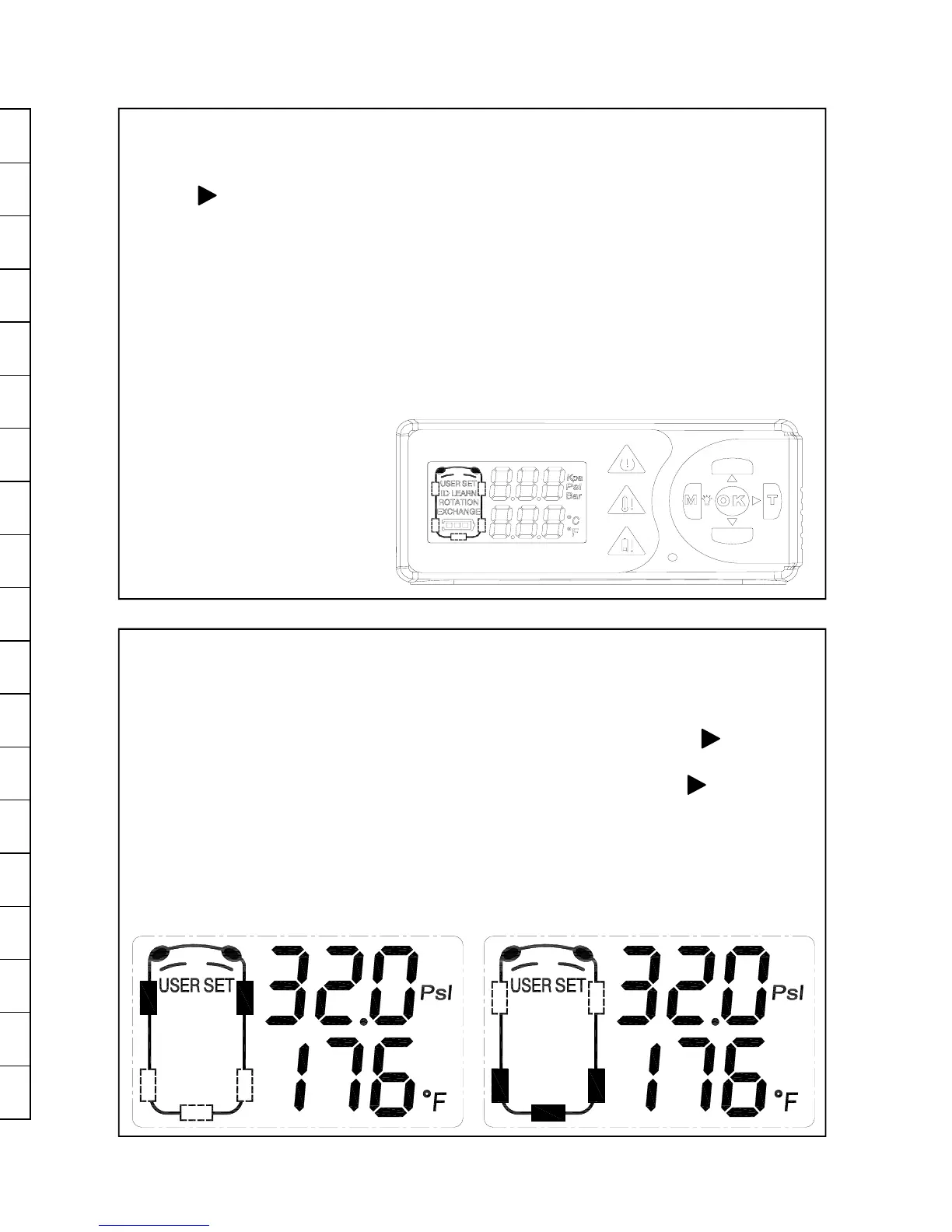
Press and hold the “M” button for 3 or more seconds (when receiver is on) to
enter programming mode. Use the “UP” or “DOWN” buttons to select, then
use the button to enter the selection. The programmable options are:
• USER SET Setting Pressure/Temp (front and rear tires)
• ID LEARN Learning Sensors
• EXCHANGE Rotating Tires
• SPARE TYRE ON/OFF
• UNIT kPa/PSI/bar, °C/°F
Press “OK” to accept the changes.
Press and hold “M” button to
quit & exit this mode.
5. User Setting
This pressure should be set to the vehicle placard pressures when tires are
cold. See table on page 10 for alarm trigger points for different pressures.
Front and rear pressures have a different setting. Enter programming mode
and select USER SET. Front tire setting is done first. Press the button,
and the first pressure digit will flash. Change the number with the up and
down buttons. Then next digit can be selected by pressing the button.
Continue until all pressure and temperature digits are changed. Once the
front setting has been adjusted, press “OK” button to store. Press and hold
the “DOWN” button to adjust the rear and spare tire setting. The temperature
setting is the level at which the alarm will trigger.
Front Tire Pressure Setting Rear & Spare Tire Pressure Setting


 To Next Page
 Loading...