25
INCLINE SPEED
Console Features
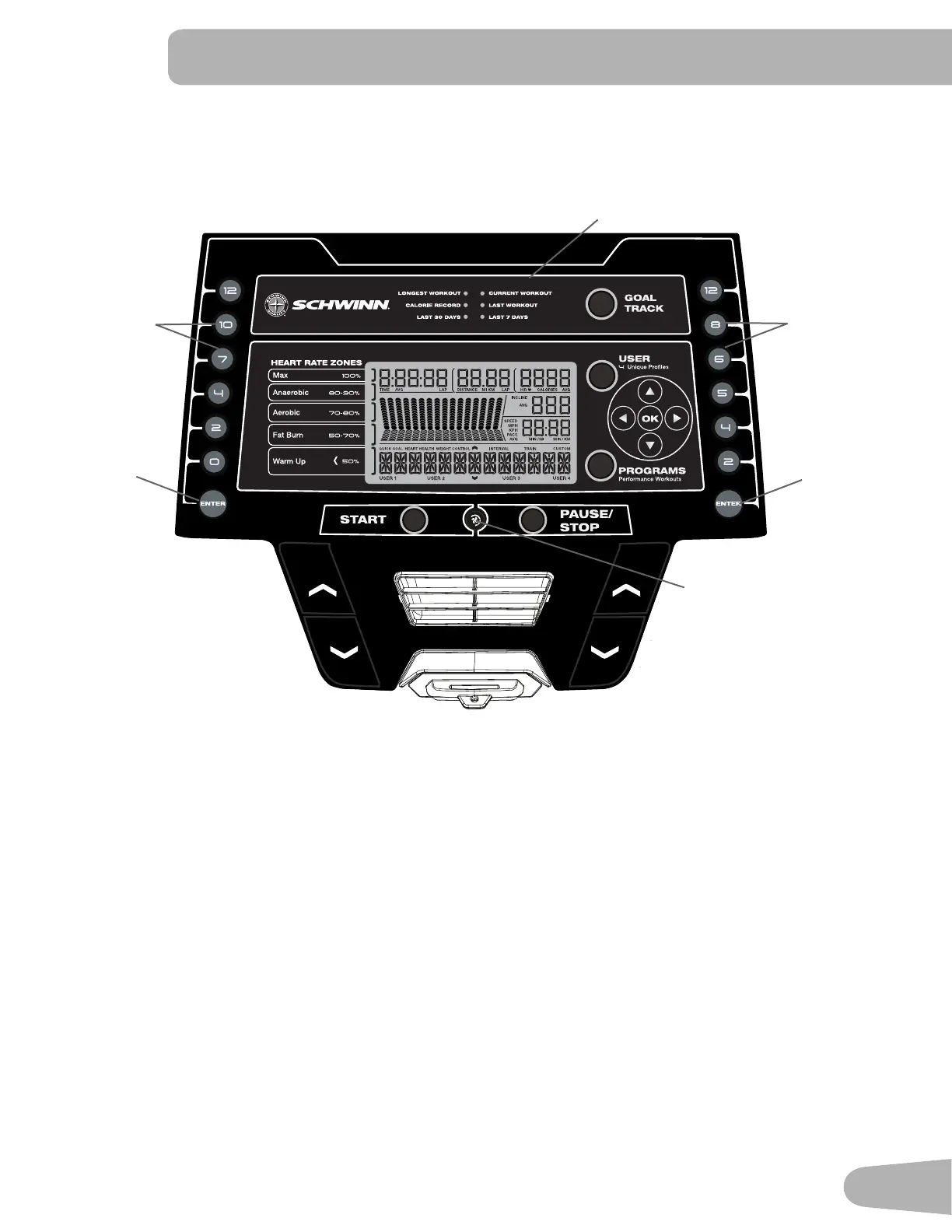
The Console provides important information about your workout and lets you control the resistance levels while you
exercise.TheConsolefeaturestouchcontrolbuttonstonavigateyouthroughtheexerciseprograms.
Console Display
Goal Track Achievement Lights- when an achievement level is reached or a result is reviewed, the achievement indicator
light will activate.
GOALTRACKbutton-DisplaystheWorkoutTotalsandAchievementsfortheselectedUserProle
USERbutton-PushtoselectthedesiredUserProle.TheActiveUserDisplaywilladjust
Increase () button- Increases the current value or moves through the options available
Left () button- Shifts the currently active segment, and moves through options
OKbutton-Conrmsinformationoraselection
Decrease () button- Decreases the current value, or moves through the options available
Right () button- Shifts the currently active segment, and moves through options
PROGRAMS button- Selects a category of workout programs
Pre-Set Incline buttons- Selects an incline value for the Walking Deck. After pushing a Pre-Set Incline button, push the
Incline Enter button within 12 seconds for the Walking Deck to be adjusted to the desired incline.
Fan Button
Pre-Set
Incline
Buttons
Incline
Enter
Button
Pre-Set
Speed
Buttons
Speed
Enter
Button
Goal Track Achievement
Lights


 To Next Page