Going into SUMMARY Mode
• SUMMARY mode signals the end of the ride. There are a couple ways to enter SUMMARY mode:
• Stop pedaling and enter PAUSE mode.
• After 5 minutes have elapsed without you pedaling, the console will enter SUMMARY mode.
• After the console enters PAUSE mode, press and hold the AVG/MAX button for 3-5 seconds and the console will
enter summary mode.
• Once the console enters SUMMARY you cannot return to RIDE mode. When in SUMMARY mode, the console
will do the following:
• Display your AVERAGE and MAXIMUM ride metrics.
• Upload data form the console to your USB drive
1
.
• You will know the console is transferring data because a USB symbol will ash next to the RPM display on the
console.
• Once the USB symbol stops ashing, your data upload has been completed and you may remove your USB
drive.
• The console will display SUMMARY mode for 2 minutes, and the console will power o.
Ending a Ride
• There are 2 ways to end a ride and power o the console:
• Stop pedaling, and allow the console to go into PAUSE MODE.
• From here you may allow to the console to power itself o—it will power o in 7 minutes if you do nothing else.
• While in either PAUSE mode or SUMMARY mode, press and hold the ON/OFF button for 3-5 seconds to shut o
the console.
Uploading data to the USB drive
• The ride data le is a great tool for people to track their rides and see their
progress.
• At the end of the ride, once the console goes into PAUSE mode, press and
hold the AVG/MAX button for 3-5 seconds to end the ride and go into
SUMMARY mode.
• Once in SUMMARY mode the console will upload the data.
• The console will display the USB symbol to the left of the RPM label while
the data is uploading—do not remove the USB stick until the USB symbol
stops ashing.
• Once the data upload is complete, the stick may be removed.
• To retrieve the data from the USB stick, plug the stick into a USB drive on a
computer, then open the USB folder.
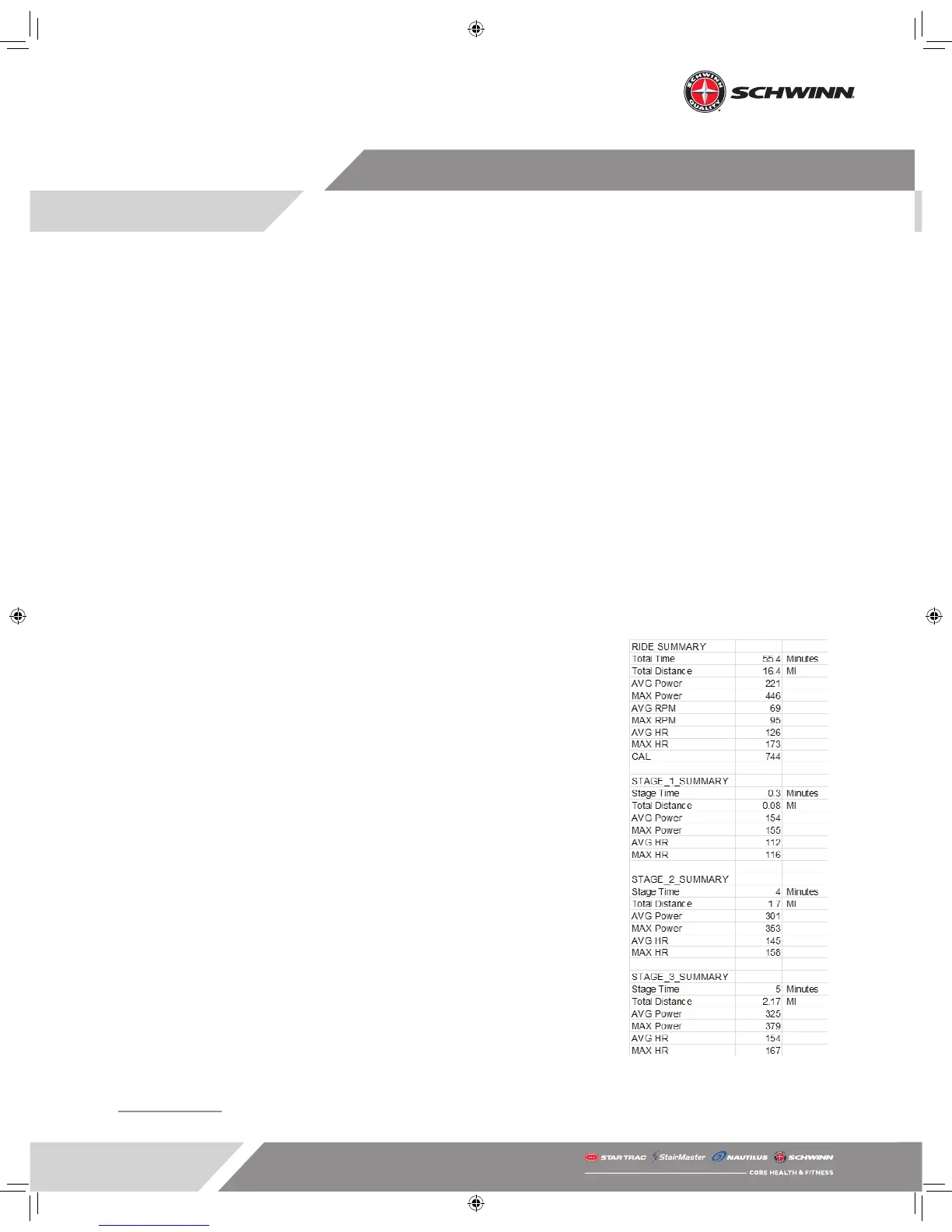
• There will be a le called “MPowerQ.csv.”
• Double click the le to open the le in Excel.
• Save the le in Excel format.
• A snapshot of the ride le is shown below with total ride and stage sum-
mary data.
• The ride data le will display the following:
- Summary data for the entire ride
- Summary data for each stage
- Total ride data recorded every three seconds
1 If the USB stick is not 2.0 or later and formatted with the FAT32 format, it may not record data.
Sample ride le



 To Next Page