MAGICPLATETM MOUNTING OPTIONS
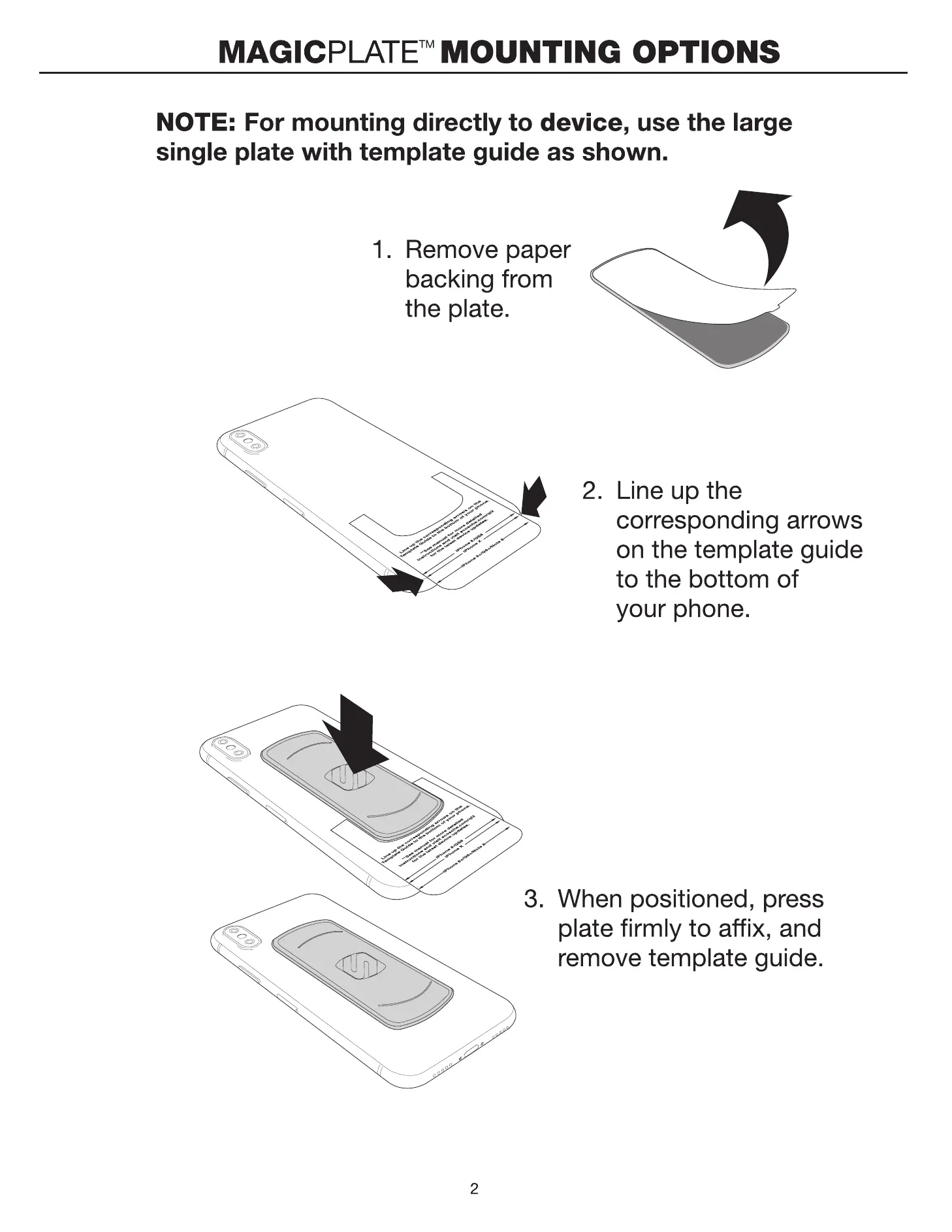
NOTE: For mounting directly to device, use the large
single plate with template guide as shown.
I. Remove paper
backing from
the plate.
2. Line up the
corresponding arrows
on the template guide
to the bottom of
your phone.
3. When positioned, press
plate firmly to affix, and
remove template guide.
2
MAGICPLATETM MOUNTING OPTIONS
(cont'd)
NOTE: For mounting to case, use the (2) small plates with
the integrated template guide as shown.
1. Remove the
white paper
backing from
both plates.
2. Line up the corresponding
arrows on the template
guide to the bottom Of
your phone.
3. When
positioned,
press plates
firmly to affix.
4. Remove
template
guide.
3


 To Next Page