SECTIONA
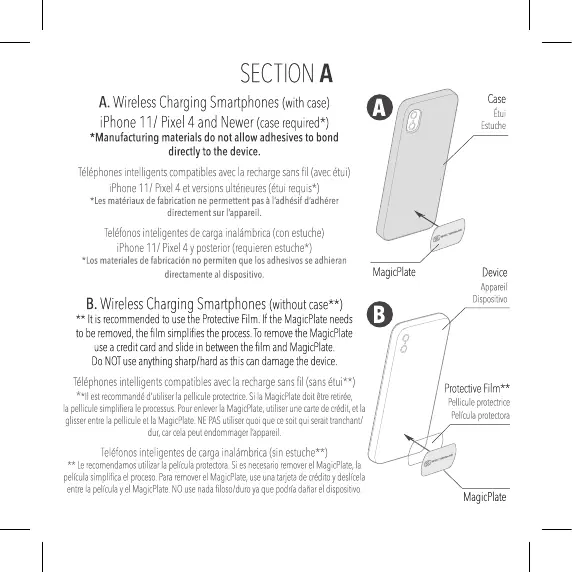
A.Wireless ChargingSmartphones(withcase)
iPhoneII/ Pixel4 andNewer(caserequired*)
*Manufacturingmaterialsdonotallowadhesivestobond
directlyto the device.
Téléphones intelligentscompatiblesaveclarechargeSansfil (avecétul)
iPhone11/Pixel4etversionsultérieures(étuirequis*)
*Lesmatériauxdefabricationne permettentpasål'adhésifd'adhérer
directementsurl'appareil.
Teléfonos inteligentesdecargainalåmbrica(conestuche)
iPhone11/Pixel4yposterior(requierenestuche*)
•Losmaterialesdefabricaciönnopermitenquelosadhesivosseadhieran
directamenteal dispositivo_
B.Wireless CharginaSmartphones (without
** Itisrecommended touse ProtectiveFilm.IftheMagicPlateneeds
toberemoved, thefilmsimplifiestheprocess.ToremovetheMagicPlate
useacreditcardandslideinbetweenthefilmandMagicPlate.
DoNOTuseanythingsharp/hardasthiscandamagethedevice.
Téléphones intelligentscompatiblesaveclarechargesansfil(sansétui**)
*ill estrecommandé d'utiliserlapelliculeprotectrice_SilaMagicPlatedoitetreretirée,
lapellicule simpliferaleprocessus. PourenleverlaMagicPlate,utiliserunecartedeCrédit,etla
glisser entrelapelliculeetlaMagicPlate.NEPASutiliserquoiquecesoitquiseraitÜanchanbi
dur,ar celapeutendommagerl±ppareil,
Teléfonos inteligentesdecargainalåmbrica(sinestuche**)
Le'Wirnendarnosutilizarlapel(culaprotectora.SiesnecesarioremoverelMagicP1ate,la
pelWasimpliftael procesoPararemoverel Magi&late,useunatarjetadea"ito ydesllcela
entrelapella'layel Magicmate.NOusenadafiloso/duroyaquepodrfadaiareldispsitivo.
MagicPlate
O
Étui
Appareil
Dispositivo
Protective
Pelliculeprote&ce
pel(culaprotectora
MagicPlate




 To Next Page