57
EN Function and Setting
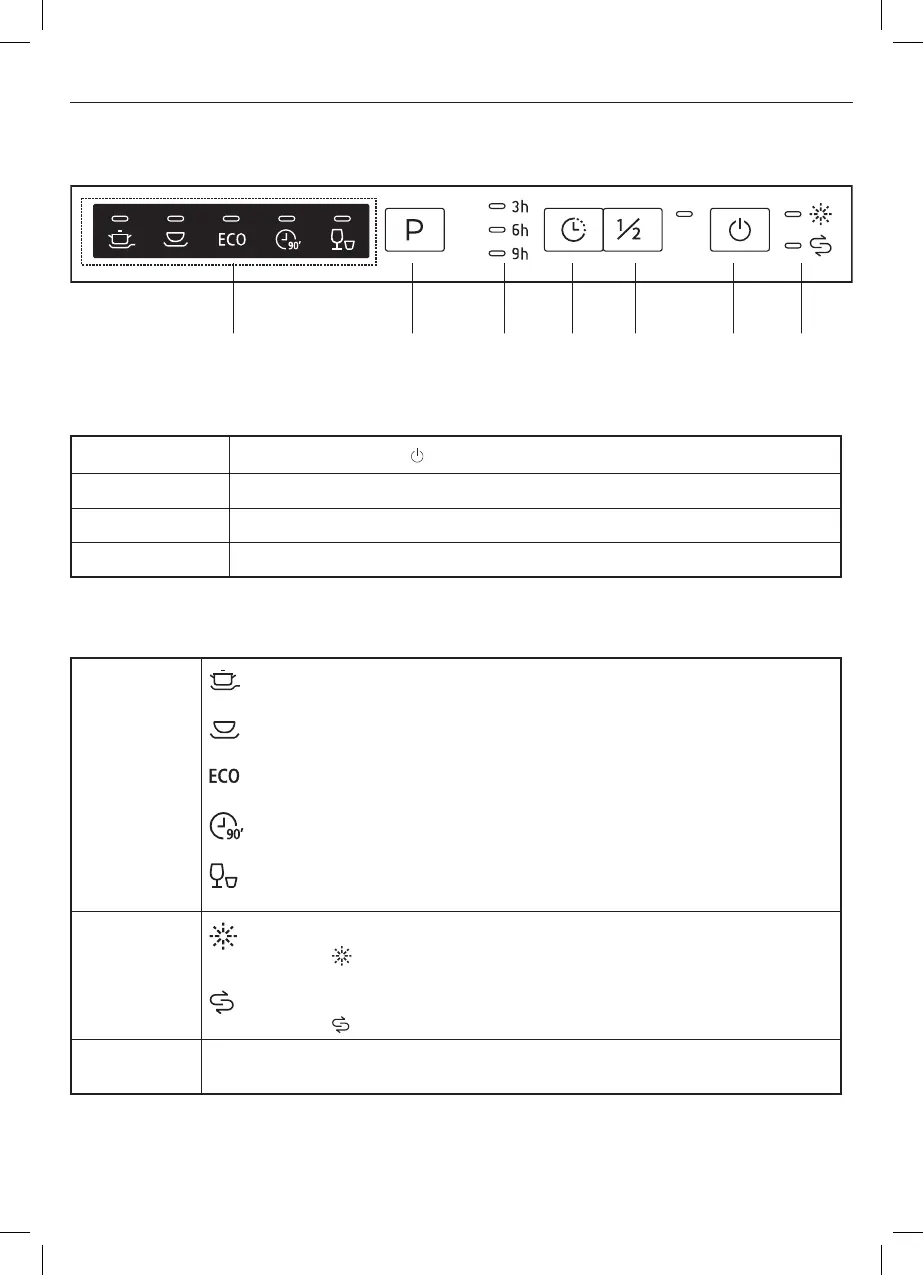
Control Panel
5 4 7 3 2 1 6
Operation (Buttons)
1 Power Button
Press the Power button to turn the dishwasher on.
2 Half Load Use for six place settings or less. Note the Rapid option is not available.
3 Delay Press the button to set the delay time for 3, 6 or 9 hours.
4 Program Press to cycle through the ve wash programs.
Display
5
Program
indicator
Intensive
Heavily soiled items including pots and pans with dried on food.
Universal
For normally soiled pots, pans and glasses.
ECO
Similar to Universal but uses less water and energy.
90 Min
Similar to Universal but with a shorter cycle.
Rapid
For lightly soiled cups and glasses that do not need a drying cycle.
6
Warning
indicator
Rinse Aid
If the “ ” indicator is lit, top up the rinse aid reservoir before the next
cycle.
Salt
If the “ ” indicator is lit, top up the salt reservoir before the next cycle.
7
Start
delay
Shows the selected Start time delay in hours.
5059340445762_MNL_IN_V10.indb 575059340445762_MNL_IN_V10.indb 57 31-03-2022 16:01:3231-03-2022 16:01:32


 To Next Page
 Loading...