97
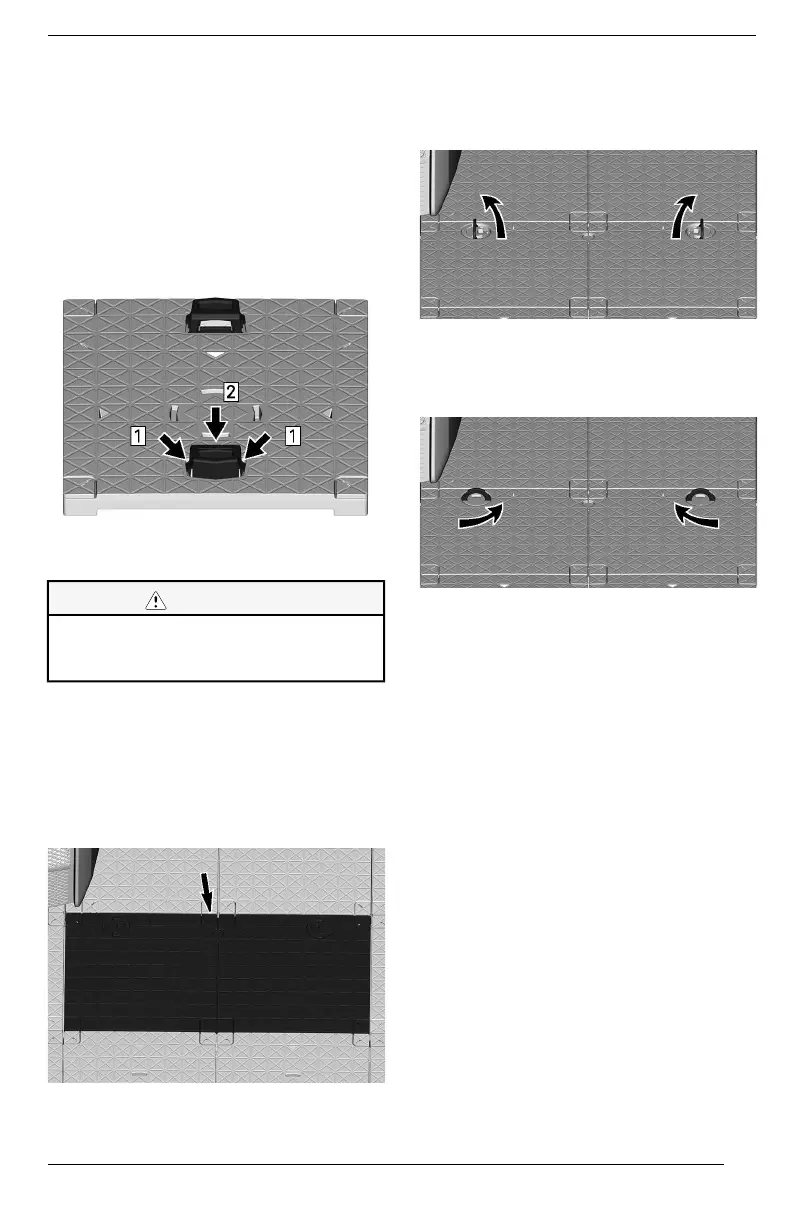
To use LinQ attachments, lift them,
making sure they are fully extended
and locked.
Refer to the accessory instruction
sheet for proper installation.
To lower the LinQ attachments when
not in use, squeeze tabs then push
down. Make sure the LinQ attach-
ments are fully retracted.
Step 1. Squeeze LinQ attachment tabs
Step 2. Push down LinQ attachments
CCAAUUTTIIOONN
TToo rreedduuccee tthhee rriisskk ooff iinnjjuurryy,, aall--
wwaayyss lloowweerr tthhee LLiinnQQ aattttaacchhmmeennttss
wwhheenn nnoott iinn uussee..
FFrroonntt SSttoorraaggee CCoommppaarrttmmeenntt
The front storage compartment that
can be used to carry larger personal
articles, such as Personal Floating
Device (PFD), is located under the
floor at the front of the vehicle.
FFRROONNTT SSTTOORRAAGGEE CCOOMMPPAARRTTMMEENNTT
OOppeenniinngg tthhee FFrroonntt SSttoorraaggee
CCoommppaarrttmmeenntt CCoovveerr
1. Pull on the latch handles.
PPUULLLL LLAATTCCHH HHAANNDDLLEESS
2. Turn the latch handles towards the
center to unlock the front storage
compartment cover.
TTUURRNN LLAATTCCHH HHAANNDDLLEESS
3. Remove the front storage compart-
ment cover.
CClloossiinngg tthhee FFrroonntt SSttoorraaggee
CCoommppaarrttmmeenntt CCoovveerr
The installation is the reverse of the
removal procedure. However, pay at-
tention to the following.
1. Make sure the front storage com-
partment cover is correctly in-
stalled before locking it in position.
2. Turn the latch to lock the cover. It
may require some force to com-
press the seal of the access cover
before turning the lock.
3. Make sure the latch handles are
flat on the cover when not in use.
EQUIPMENT


 To Next Page
 Loading...