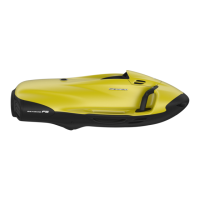
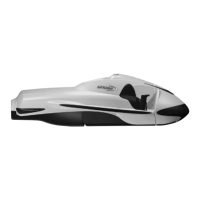
The SEABOB F5 S is an advanced underwater scooter designed for both recreational and professional use, offering a unique way to experience the aquatic environment. This quick reference guide provides essential information on its operation, charging, settings, and maintenance.
Function Description
The SEABOB F5 S is a high-performance watercraft that allows users to glide effortlessly through and under the water. It features a powerful electric motor that propels the device, controlled by a trigger on the right controlgrip. The device is equipped with an information display that provides real-time data on its operational status, including power level, water temperature, diving depth, and accumulator charge state.
Control and Navigation:
- Right Controlgrip: Houses the trigger for propulsion and the green and silver buttons for various functions.
- Left Controlgrip: Features red and blue buttons for navigation and settings adjustments.
- Trigger: Engages the motor for propulsion. Pushing the trigger against the controlgrip starts the SEABOB, and releasing it stops the device.
- Green Button: Used to increase power (during operation) or navigate menus (e.g., scroll between preset values, increase values).
- Red Button: Used to decrease power (during operation) or navigate menus (e.g., scroll between preset values, decrease values).
- Blue Button: Used for switching on from Sleep mode, moving the cursor to the left in entry masks, and as part of button combinations for settings or switching off.
- Silver Button: Used for moving the cursor to the right in entry masks and as part of button combinations for settings or switching off.
Display Information:
The information display provides critical data for safe and efficient operation:
- Power: Shown as a percentage of maximum power, with a red dot indicating the set maximum power.
- Accumulator Charge State: Indicates the remaining battery life.
- Water Temperature: Displays the current water temperature in °C.
- Diving Depth: Shows the current diving depth.
- Accumulator Temperature: Displays the battery temperature in °C.
- Power Level: Indicates the current power setting.
- Charge Symbol: Appears during charging, indicating partial or full charging status.
Important Technical Specifications
While specific numerical values for speed, power output, or battery capacity are not explicitly detailed in this quick reference, the manual highlights several key operational parameters and warnings:
Operational Limits and Warnings:
- Maximum Diving Depth: Can be set by the user.
- Operating Time Limit: Can be set by the user.
- Motor Temperature Warning ("motor overheated"): If triggered, power is limited to Power Level 2 to prevent damage.
- Accumulator Temperature Warning ("accumulator overheated"): If triggered, power is limited to Power Level 2.
- Accumulator Error ("accumulator error"): Indicates a critical issue, leading to emergency operation with power limited to Power Level 2 or the motor stopping entirely.
- Impeller Locked ("impeller locked"): The motor stops if the impeller is obstructed.
- Temperature Exposure: The SEABOB and charger must not be exposed to high temperatures (max. 60 °C / 140 °F) to prevent the discharge of flammable gases and irreparable damage to the TFT display.
Charging Specifications:
- Charger Type: Only chargers supplied by CAYAGO AG, specific to the SEABOB model, should be used.
- Charging State for Transport: For air transport/storage, the SEABOB should only be partially charged ("air transport/storage" state) and not switched off until the aircraft symbol is displayed.
- Regular Charging: The device should be charged after each use (within 24 hours) and continuously trickle-charged during longer storage periods to prevent total discharge of the Li-Ion accumulator cells.
Usage Features
Switching On (from Sleep mode):
- Tap the blue button.
- Push the trigger against the controlgrip within 5 seconds.
- Release the trigger completely.
The display will switch on, show the SEABOB logo, prompt "push trigger," and then display information.
Switching Off (to Sleep mode):
- Tap the silver-blue button combination in quick sequence.
- Push the trigger within 5 seconds to confirm "sleep mode."
The SEABOB will switch off. If no user actions are performed within 10 minutes (Time-off), the system automatically switches to Sleep mode.
Operation:
- Starting: Push the trigger against the controlgrip. The SEABOB starts at the minimum power of Power Level 1.
- Stopping: Release the trigger.
- Increasing Power: Tap the green button repeatedly.
- Decreasing Power: Tap the red button repeatedly.
- Accumulator Charge State: Always observe the charge state. When discharged to approximately one-third, maximum power is automatically reduced incrementally to protect the accumulator cells.
Settings:
- Tap the silver-blue-red button combination in quick sequence.
- Enter the Owner-PIN and confirm with the trigger.
- Use the green or red button to switch between menu items and select with the trigger.
- For list selections (e.g., maximum diving depth, maximum power, display brightness), use the green or red button to scroll.
- For entry masks (e.g., operating time limit, User PIN, date/time), use the green or red button to increase/decrease values, and the blue or silver button to move the cursor.
- Push the trigger against the controlgrip to confirm settings.
- Tap the green or red button until "exit" appears, then select with the trigger to return to the information display.
Entering PIN:
- Tap the red button repeatedly to decrease the digit under the cursor.
- Tap the green button repeatedly to increase the digit under the cursor.
- Tap the blue button repeatedly to move the cursor to the left.
- Tap the silver button repeatedly to move the cursor to the right.
- Push the trigger against the controlgrip to confirm and verify the PIN.
Maintenance Features
Charging:
- Connecting Charger: First, plug the connector into the connection port, then plug the mains plug into the mains socket.
- Partial Charging (for air transport/storage): Tap the green button. The charge symbol for partial charging appears. Disconnect the charger when the aircraft symbol is displayed. The SEABOB switches off after 5 seconds.
- Full Charging (for operation): Tap the red button. The charge symbol for full charging appears. Disconnect the charger when the completely full accumulator symbol is shown. The SEABOB switches off after 5 seconds.
- Disconnecting Charger: Always pull the mains plug from the mains socket first, then disconnect the connector from the connection port to avoid a short circuit.
- Off Mode: The SEABOB can remain in Off mode for a maximum of 4 weeks. It can only be switched on or off from Off mode using a connected and active charger.
Workshop Symbol (☑):
- If a motor, accumulator, or system defect is indicated, contact the manufacturer or a specialist dealer for service. This symbol serves as a clear indicator for professional intervention.
The SEABOB F5 S is designed for intuitive operation, but users are strongly advised to read the comprehensive Operation Manual for detailed safety information and instructions on intended use.

 Need help?

 To Next Page
 General