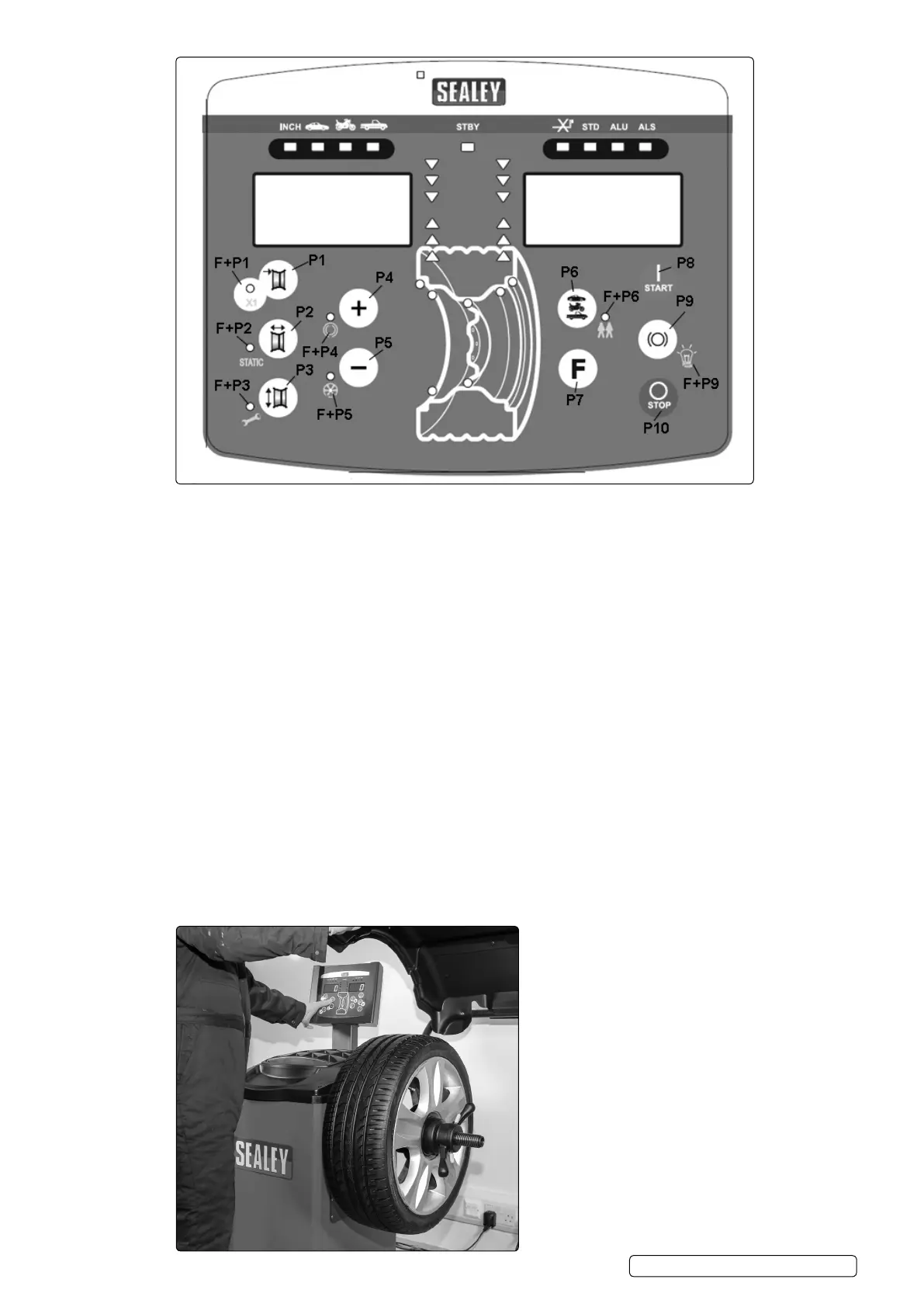
5.4. Display
P1 Distance to Wheel Rim
F+P1 Displays balance Fine value
P2 Wheel Rim Width
F+P2 Static Mode
P3 Wheel Rim Diameter
F+P3 Service Mode
P4 Plus/Scroll Key
F+P4 Heavy Spot Mode
P5 Minus/Scroll Key
F+P5 Split Weight Mode
P6 Vehicle Select
F+P6 Two Operator Mode
P7 To engage secondary key function.
P8 Start. (Not applicable on this model)
P9 Automatic Wheel Brake. (Not applicable on this model)
F+P9 Side Light On/Off
P10 STOP. (Not applicable on this model)
5.5. Mounting Wheel onto the Balancer
5.5.1. Select correct sized cone to t wheel being balanced.
5.5.2. Slide cone onto balance shaft.
5.5.3. Fit wheel over balance shaft and onto cone.
5.5.4. Fit quick release nut with bowl onto shaft and tighten.
5.5.5. Rotate wheel on shaft by hand to make sure wheel is squarely mounted/secured.
WB10 | Issue 1 05/02/18
Original Language Version
© Jack Sealey Limited


 To Next Page