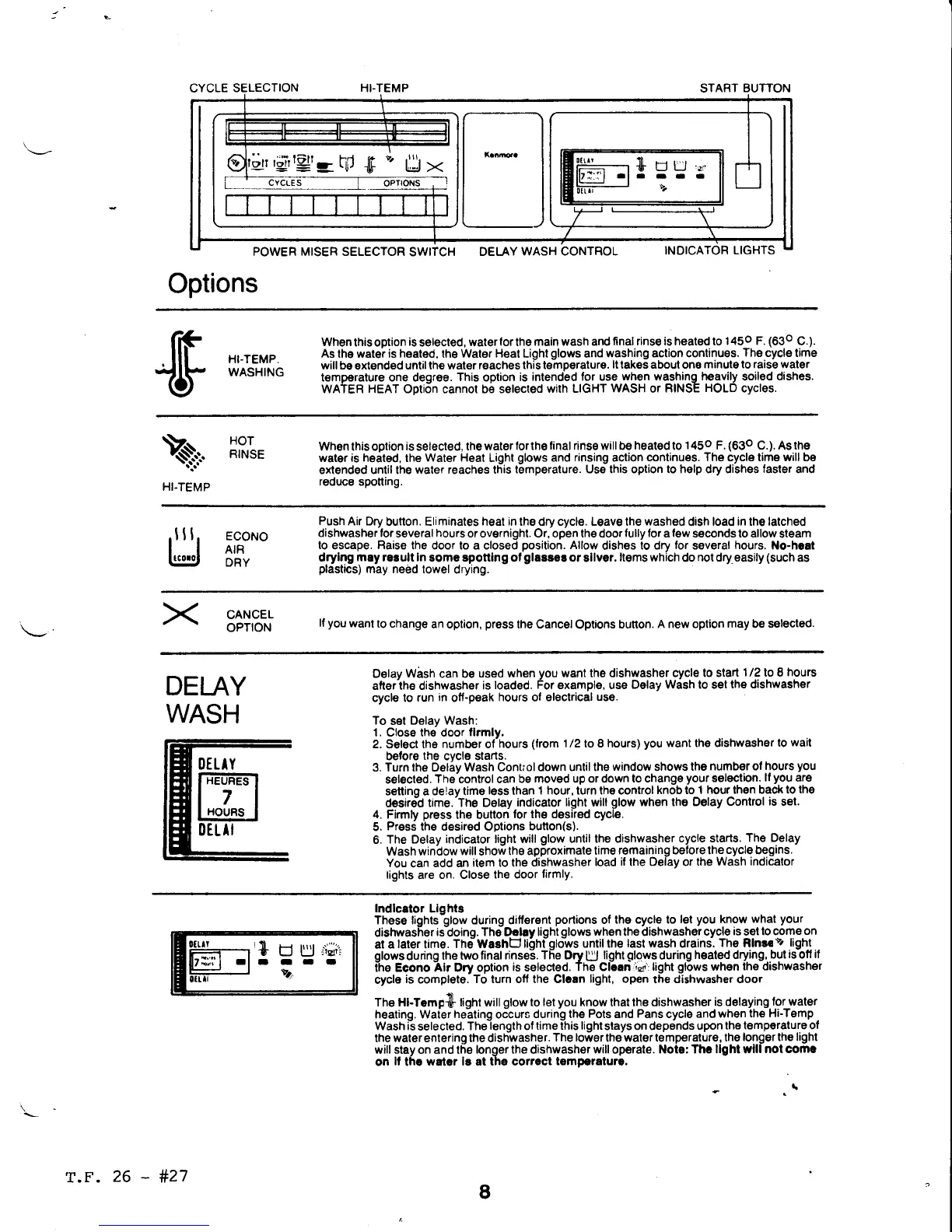
CYCLE
SELECTION HI-TEMP
POWER MISER SELECTOR
SWITCH
DEI,-AY
WASH CONTROL
START
BUTTON
INOICATOR
LIGHTS
Options
err
ri;irtgt--
f,d
$
"'
U
><
cYcLEs
I OPToNS
0ttlt
? - ,,,,'
t:-t il. LJ LJ
."1
ll7:':'l
-l
- - - -
t"l
iui-
{F
ilj;'.=#i"
When
this option
is
selected,
water
for
lhe
main wash and
final rinse is heated to
145o F.
(630
C.).
As lhe watei
is heated,
the
Water Heat Light
glows
and
washing action continues.
The
cycle time
will be
extended
untilthe water reaches
this t€mperature.
lttakss about one
minute to raise water
temperature one degree.
This
option
is
intended for use
when washingh€avily soiled dishes.
WATER
HEAT
Option cannot be selected
with LIGHT
WASH
or
RINSE
HOLD
cycles.
\
HI.TEMP
HOT
RINSE
Whsn this oplion
is
selected,
the water
forthe tinal rinse will be
heated
to
145o F.
(630
C.).
As ths
water is h€ated, the
water Heat
Light
glows
and
rinsing
action
continues. The cycls time will be
ext€nded until the
water reaches this
temperature. Us€ this option to help dry dishes
faster
and
reduce spotting.
ITJ
5F:'"
Push
Air Dry
button. Eliminates
heat in
the dry cycle. Leave the
washed
dish load in the latched
dishwasher lor
several
hours
or overnight. Or, open the door
fully for
a
few
seconds to allow
steam
to
escape.
Raise
the door to a closed
position.
Allow
dishes
to dry
for
several
hours.
No.hoat
drylng
may
rerult
in
som€
sponing
ot
glasse!
or
silver.
liems which
do
not dry,easily
(such
as
plastics)
may n€ed towel
drying.
CANCEL
OPTION
lf
you
want
to change
an option,
press
the Cancel
Options
bunon.
A new option
may
be
selected.
DEI-AY
WASH
Delay
Wash
can be
used when
you
want the dishwasher cycle
to slad
1/2
to I
hours
alter the dishwasher
is
loaded.
For
example, use
Delay Wash to set
the dishwash€r
cycle to
run
in
otf-peak
hours
ot
olectrical
use.
To
set
Delav Wash:
1. Close the door
tlrmly,
2.
Seloct
the number of'hours
(trom
1/2 to 8 hours)
you
want the dishwasher
to
wait
before
the
cycle starts.
3. Turn the Deliy
Wash Control down
until the
window
shows
the
number of
hours
you
s€lected.
The-control can
be moved up or down
to change
your
selection.
lf
you
are
senino
a
delav
time
less
lhan
t
hour,
turn the control
knob to
t hour then back
to the
desire?
time.'The Delay
indicator light will
glow
when the Delay
Control
is
set.
4.
Firmly
press
the button
for the desired cycle.
5.
Press
the desired Options
bunon(s).
6.
The Delay
indicator light will
glow
until the dishwasher
cycle starts.
The Delay
Wash window
will
shot
the ap,roximate
lime
remaining before the
cycle
begins.
You
can
add an
item to the
dishwasher
load
il
the Delay or
the Wash
indicalor
lights
are
on. Close
the door
firmly.
Indlcstor
Llghtg
These lights-glow during ditt€ront
portions
of
the cycle to
lel
you
know
what
your
dishwasher
is
doino.
The Drlry liqht
olows
when the
dishwashot
cycle
is
s€l
to come
on
at a
later
time.
Th;Washb
tioniqbws until the
last wash
drains-.
The
Rlnr.
v,
light
glows
during
the two
final rinse6.
The
Dry
U
light
glows
during
hsated drying,
but
isbtf if
the Econo
Alr
Dry option
is
selected.
The Clcan
;c'
light
glows
when
the dishwasher
cycle
is
completo.
To turn otf the Clcan
light, open
the
dishwasher door
The Hl-Tempdl light will
glow
to let
you
know that the dishwasher
is delaying
f.or water
heating. Waier
he-ating
oCcurs
durrng the
Pots
and
Pans
cycle
and rvhen
th€ Hi-Temp
.
Wash is
selected.
The
length
of
time lhis light
slays
on
depends
upon
the temp€rature ol
the water enlering the dishwasher.
The
lower
the water temperalure,
the
longer tho
light
wilt stay
on and
the longer the dishwasher
will
operale.
Note: Thc llght wlll
not comc
on
lf
thc
watcr lg at the corroct
temp€ralurc,
I
r+
-
U
U:ii't
-r-
Y.
r.F.
26
-
#27


 To Next Page
 Loading...