9
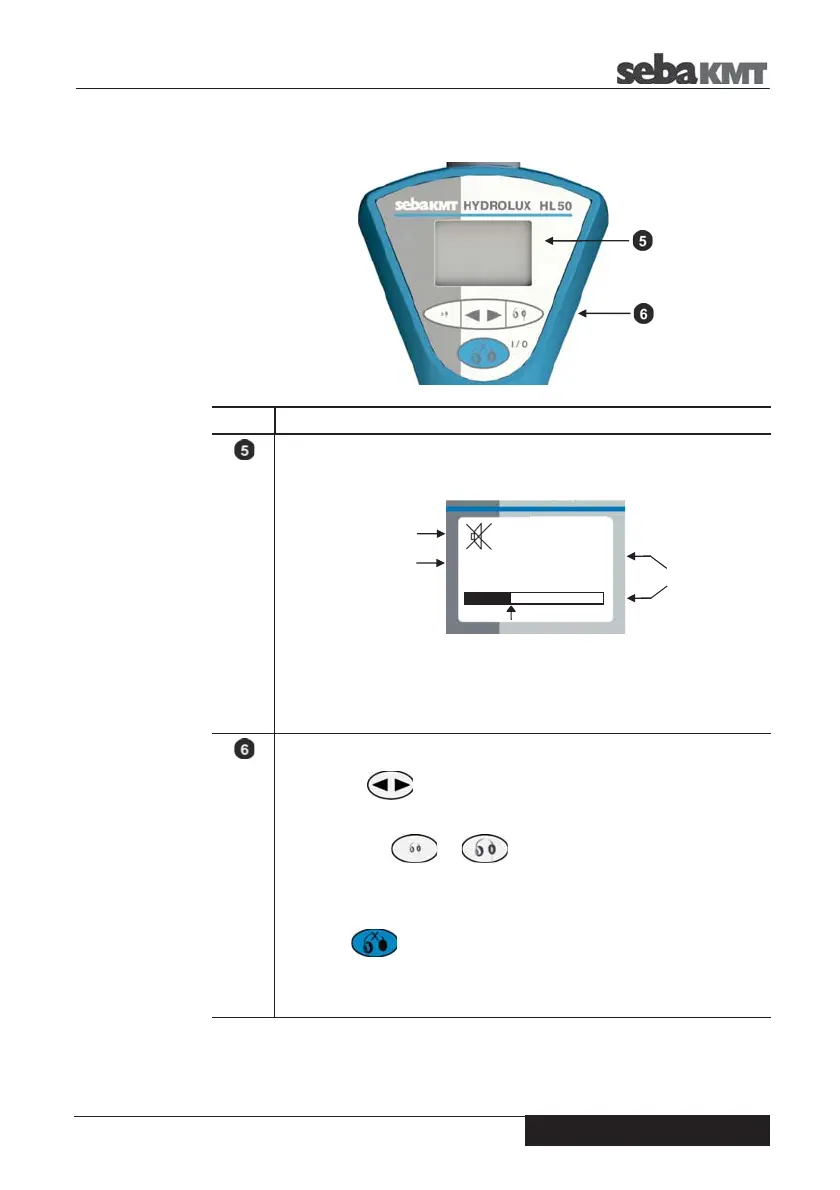
The following picture shows the control panel of the device.
Element Description
Display
On the screen you find the following information:
The currently measured level is displayed as a dimensionless numerical value
between 1-99.
The bar also reflects the current level. The arrow below the bar marks the
most recently saved measurement value.
Operating keys
Filter button
Select frequency filter (3 settings LOW / HIGH / ALL)
Volume buttons …
Increase / decrease headphone volume
(Attention: this ONLY applies to corded headphones, NOT to wireless
headphones)
I/O button
Long press … switches the device on / off
Short press … starts / stops the ongoing measurement:
headphones are activated / deactivated at the same time
English
34
ALL
Current
Level
Frequency Filter
Headphones OFF


 To Next Page