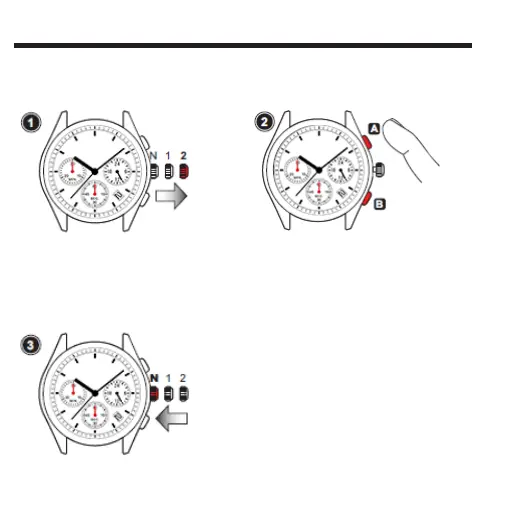
COMMENT UTILISER LES FONCTIONS DE CHRONOMèTRE
Tirer sur
la 2ème
position
• Tirer la couronne au deuxième déclic.
Nota:Pendant que le chronomètre est en marche ou
s'il a été arrêté pendant qu'il était en marche, si la
couronne est tirée au deuxième déclic, le chronomètre
sera automatiquement remis à zéro.
AjUSTAgE DE LA POSITION DE L'AIgUILLE DU CHRONOMèTRE
Si les aiguilles du chronomètre ne sont pas en position “0”, suivre la procédure ci-dessous
pour les placer en position the “0”.
Repousser
en
position
normale
Appuyer sur A.
pour déplacer les aiguilles
du chronomètre dans le
sens horaire.
Appuyer sur B.
pour déplacer les aiguilles
du chronomètre dans le
sens antihoraire.
• Press Button “A” or “B” to set the stopwatch
hands tothe “0” position.
• The movements of the stopwatch
minute hand and stopwatch second hand
areinterlocked. To set the stopwatch minute
hand to the "0" position, continue to move the
stopwatch second hand until the stopwatch
minute hand reaches the "0" position.
Note: The stopwatch minute and second hand move
quickly if Button “A” or “B” is kept pressed.
• Repousser la couronne en
position normale.



 To Next Page