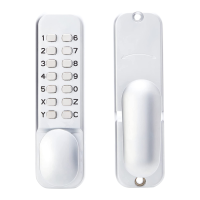
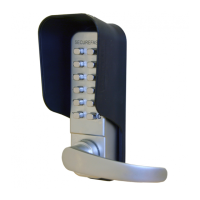
This document is a troubleshooting guide for Securefast Mechanical Digital Locks, covering various models including SBL300, SBL310, SBL340, SBL350, SBL370, SBL315, SBL320, SBL325, SBL330, SBL365, and SBL700. It addresses common issues users might encounter with these locks, providing solutions and explanations for their operation, maintenance, and features.
Function Description:
Securefast Mechanical Digital Locks are keyless entry systems that use a numerical code for access. They are designed for various applications, offering different features such as standard code change, easy code change, and holdback facilities. The locks operate mechanically, meaning they do not require batteries or external power. Users input a code using a keypad, which then allows the handle (knob or lever) to operate the latch or lockcase, granting entry. Some models include a clutch mechanism in the handle to prevent damage from forced operation without the correct code.
Important Technical Specifications (as inferred from troubleshooting):
- Code Digits: The number of digits that can be entered in a code varies depending on the unit, typically between 4 and 7, as spare detainers are supplied to allow for this variation.
- Latch Backset: For the SBL310, the standard latch backset is 60mm; a 50mm backset latch is not provided for this model.
- Spindle Orientation: Correct spindle orientation is crucial for proper latch operation. The top edge of the spindle should lean towards the locking edge of the door when positioned in the cam of the digital lock.
- Code Change Mechanism:
- Standard Code Change (e.g., SBL300, SBL310): Code is changed by manipulating detainers on the back of the digital lock. Red detainers face upwards for the code, blue detainers for unused numbers. The 'C' button must be pressed during detainer changes to prevent damage to the ledger.
- Easy Code Change (e.g., SBL315, SBL320, SBL325, SBL330, SBL365): Code is set by turning dials 180° on the back of the outside unit so that a dot faces the desired number. These models do not come with a code card.
- Easy Code Plus (e.g., SBL700): Code is programmed by identifying holes with red markings next to numbers on the reverse of the digital keypad side after pressing 'C'.
- Handing: Many units are universal, and handing (direction of handle rotation) can be adjusted. For SBL340/SBL350, this involves moving a pin located under a small plate on the reverse of the digital keypad side. For SBL330.SL and SBL365, handing is changed by unsecuring a grub screw, rotating the handle 180° past the digital unit face until it clicks, and then re-securing the grub screw.
- Anti-Thrust Feature: The latch head has a main body and a separate radius part that can be pushed in independently. This anti-thrust feature prevents forced entry by ensuring the main part enters the aperture while the radius part sits on the striker plate.
Usage Features:
- Code Entry: For standard code change locks, the 'C' button must always be pressed before entering a new code to clear the previous one.
- Non-Sequential Code: Many digital locks allow for non-sequential code entry, meaning the digits can be entered in any order (e.g., 1-2-3-4 can be entered as 3-1-2-4).
- Holdback Facility: Some models (e.g., SBL310, SBL315, SBL320) offer a holdback option to keep the door unlocked. This feature can often be removed, and a blanking plate is supplied or can be requested. The SBL365 lever handle digital lock has a passage function that allows unlimited access until disengaged, which is a variation of a holdback facility. Knob variations in the digital lock range are more commonly associated with a holdback facility.
- Key Override: For SBL365 with Mortice Lock Cases, a key can be used to withdraw the latch independently of the digital lock, by rotating it fully anti-clockwise for left-handed doors or fully clockwise for right-handed doors.
- Handle Movement: A slight free movement in the knob handle is normal and does not compromise security.
- Inside Pad Handle Rotation: The rotational direction of the inside pad handle can be changed by moving a blue screw on the back plate to an alternative hole.
Maintenance Features:
- Spindle Length: The spindle must be cut to the correct length to ensure proper engagement and prevent bottoming out, which can cause twisting, bending, and incorrect operation. Replacements are available if the spindle is cut too short.
- Springs: While springs for the inside handle are not sold separately, a new handle set (code ZKI-handle followed by product code) can be ordered to replace the inside handle and its springs.
- Spare Parts: Fixings and other spare parts can be ordered upon request if missing from the parts pack.
- Troubleshooting Latch Issues:
- If the latch does not return to its fully extended position, check for obstructions (shavings, timber) or ensure the spindle is not too long and the unit is not overtightened.
- If the latch does not enter the striker, remember that only the main body of the latch is intended to enter, with the anti-thrust radius part resting on the striker plate.
- Code Change Best Practices: When changing the code on standard code change locks, always hold down the 'C' button to prevent damage to the ledger. When reassembling, do not press on the detainers; instead, click the 'C' button to drop them into place.
- Spindle Assembly (SBL365, SBL700.S): Feed the radius end of the spindle through the collar, secure with the supplied pin, remove the 3 screws covering the cam plate on the outside unit, place the spindle assembly, and re-secure the fixing plate.
- Code Programming (SBL700): When programming a new code, always press 'C' before inputting the new code to clear the unit's memory. Failing to do so can result in a combined code of the old and new inputs.

 Need help?
 General

 To Next Page