VAC
Vdc
Step 1:
Step 2:
Step 3:
Step 4:
Step 1:
Step 2:
Step 3:
No.
1
2
3 Step 1:
4 Step 2:
5
Step 3:
Step 4:
Remove power from the LK190
A confirmation tone will be heard and the Administrator Code will reset
to the default 1234
Press the key to exit this function
Administrator Programming
Enter the to exit this function
The mode indicator (Yellow) will flash and a confirmation tone will be
heard
Enter a value between 00 and 99
The mode indicator will be flashing (Yellow)
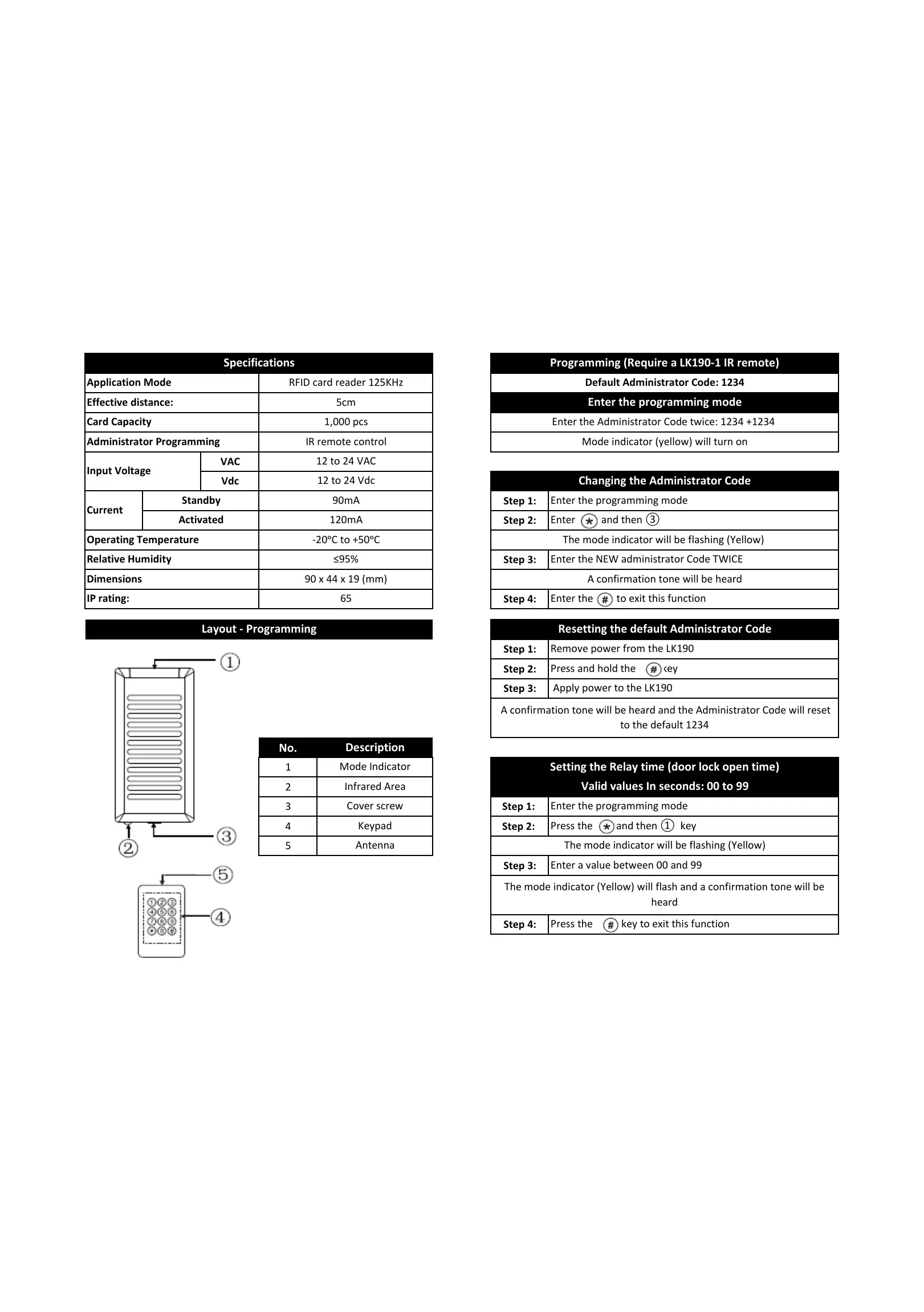
Programming (Require a LK190-1 IR remote)
Default Administrator Code: 1234
Enter the Administrator Code twice: 1234 +1234
Mode indicator (yellow) will turn on
Enter the programming mode
Changing the Administrator Code
Enter the programming mode
The mode indicator will be flashing (Yellow)
A confirmation tone will be heard
Resetting the default Administrator Code
Enter the NEW administrator Code TWICE
Valid values In seconds: 00 to 99
Enter the programming mode
Setting the Relay time (door lock open time)
All manuals and user guides at all-guides.com


 To Next Page
 Loading...