EasyManua.ls Logo

seeed studio ReSpeaker 2-Mics Pi HAT - User Manual

seeed studio ReSpeaker 2-Mics Pi HAT
18 pages
Print Icon
To Next Page IconTo Next Page
Loading...
3/4/2019 ReSpeaker 2-Mics Pi HAT - Seeed Wiki
http://wiki.seeedstudio.com/ReSpeaker_2_Mics_Pi_HAT/ 1/18
ReSpeaker 2-Mics Pi HAT
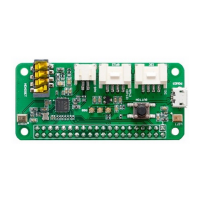
ReSpeaker 2-Mics Pi HAT is a dual-microphone expansion board for Raspberry Pi
designed for AI and voice applications. This means that you can build a more
powerful and exible voice product that integrates Amazon Alexa Voice Service,
Google Assistant, and so on.
The board is developed based on WM8960, a low power stereo codec. There are 2
microphones on both sides of the board for collecting sounds and it also provides 3
APA102 RGB LEDs, 1 User Button and 2 on-board Grove interfaces for expanding
your applications. What is more, 3.5mm Audio Jack or JST 2.0 Speaker Out are both
available for audio output.
Question and Answer IconNeed help?

Do you have a question about the seeed studio ReSpeaker 2-Mics Pi HAT and is the answer not in the manual?

Overview

The ReSpeaker 2-Mics Pi HAT is a dual-microphone expansion board designed for Raspberry Pi, specifically tailored for AI and voice applications. This board enables users to develop powerful and flexible voice products that can integrate with services like Amazon Alexa Voice Service and Google Assistant.

Function Description

The ReSpeaker 2-Mics Pi HAT serves as an audio input and output interface for Raspberry Pi boards, enhancing their capabilities for voice-controlled projects. It features two microphones for sound collection, allowing for stereo audio input. For audio output, it offers both a 3.5mm Audio Jack and a JST 2.0 Speaker Out connector, providing flexibility for connecting headphones or speakers. The board also includes three APA102 RGB LEDs for visual feedback, a user button for interactive control, and two on-board Grove interfaces for expanding applications with additional sensors or modules.

Important Technical Specifications

  • Compatibility: Raspberry Pi compatible, supporting a wide range of models including Raspberry Pi Zero, Zero W, B+, 2 B, 3 B, 3 B+, and 3 A+.
  • Audio Codec: Based on the WM8960, a low-power stereo codec.
  • Microphones: 2 microphones, positioned on both sides of the board for effective sound collection.
  • LEDs: 3 APA102 RGB LEDs, connected via an SPI interface, providing customizable visual indicators.
  • User Input: 1 User Button, connected to GPIO17, for interactive control.
  • Audio Output:
    • 3.5mm Audio Jack for connecting headphones or speakers with a 3.5mm audio plug.
    • JST 2.0 Speaker Out for connecting speakers with a JST 2.0 connector.
  • Expansion Interfaces: 2 Grove Interfaces:
    • I2C Grove port, connected to I2C-1.
    • GPIO12 Grove digital port, connected to GPIO12 & GPIO13.
  • Power: Micro USB port for powering the ReSpeaker 2-Mics Pi HAT. It is recommended to power the board sufficiently, especially when using a speaker.
  • Max Sample Rate: 48kHz.

Usage Features

The ReSpeaker 2-Mics Pi HAT is designed for ease of use and integration with Raspberry Pi.

  • Connection: The HAT mounts directly onto the Raspberry Pi, ensuring proper pin alignment when stacking.
  • Driver Setup: Requires manual driver installation on Raspbian Operating System (Debian 9 or later). The process involves:
    1. Updating and upgrading the system.
    2. Cloning the seeed-voicecard source code from GitHub.
    3. Installing the driver and rebooting the Raspberry Pi.
    4. Verifying the sound card installation using aplay -l and arecord -l commands, ensuring the seeed2micvoicec device is recognized.
  • Audio Testing: After driver installation, users can test the microphones by recording and playing back audio using commands like arecord -f cd -Dhw:1 | aplay -Dhw:1.
  • Sound Configuration: The alsamixer graphical mixer program is used to configure sound settings and adjust volume. Users can navigate channels and adjust volume levels using arrow keys, and select the seeed-2mic-voicecard device using F6.
  • LED Control: The on-board APA102 RGB LEDs can be controlled programmatically. A Python script (pixels.py) is provided as an example, requiring the installation of spidev and cloning the mic_hat repository.
  • User Button Interaction: The user button, connected to GPIO17, can be detected and used in Python scripts with the RPi.GPIO library. An example script (button.py) demonstrates how to read the button's state and print "on" or "off".
  • AI and Voice Applications:
    • Google Assistant SDK Integration: The board is well-suited for integrating the Google Assistant Library. This involves:
      1. Configuring a Developer Project and obtaining a JSON file from Google Cloud Platform.
      2. Setting up a Python virtual environment to isolate the SDK dependencies.
      3. Installing the google-assistant-library.
      4. Authorizing the Google Assistant SDK using the JSON file and an authorization code obtained from a browser.
      5. Starting the Google Assistant demo, adjusting volume with alsamixer, activating the virtual environment, and running env/bin/google-assistant-demo.
      6. Interacting with the Assistant by saying "Ok Google" or "Hey Google" followed by a query.
    • STT (Speech to Text) SDK Integration: The board supports Baidu STT, which can be integrated with GPIO control. This involves:
      1. Installing dependencies like mpg123 and baidu-aip.
      2. Obtaining a Baidu key.
      3. Downloading and running the Smart_Fan.py example, which demonstrates voice control for a fan (simulated or actual). This script requires adding Baidu keys and modifying strings for custom voice commands.
  • Application Ideas: Primarily focused on voice interaction applications and AI assistants.

Maintenance Features

  • Driver Updates: Users should ensure they are running the latest Raspbian Operating System for optimal compatibility and to benefit from any driver fixes. The driver installation process is manual, allowing for specific versions to be used if needed.
  • Troubleshooting: The manual provides guidance for common issues, such as:
    • Google Assistant not responding: Refers to Google's troubleshooting instructions for hotword detection.
    • #include "portaudio.h" Error: Solved by installing portaudio19-dev.
    • Changing Raspbian Mirrors: Instructions are provided to modify sources.list for faster package downloads, especially for users in specific regions (e.g., Tsinghua source for China).
  • Technical Support: Users can submit technical issues to the Seeed Studio forum or contact techsupport@seeed.cc via email.
  • Resource Availability: Comprehensive resources are provided, including:
    • Eagle schematic and PCB files (.zip and .pdf formats).
    • 3D model files (.zip).
    • Driver source code (Seeed-Voice Driver on GitHub).
    • Algorithms for DOA (Direction of Arrival), VAD (Voice Activity Detection), NS (Noise Suppression), and AEC (Acoustic Echo Cancellation) (mic_array and voice-engine on GitHub).
    • Project examples, such as building an Amazon Echo using Raspberry Pi and the ReSpeaker HAT, and a voice-enabled coffee machine.

The ReSpeaker 2-Mics Pi HAT is a versatile and well-supported platform for developing advanced voice-controlled projects with Raspberry Pi, offering a robust set of hardware features and clear instructions for software setup and application development.

seeed studio ReSpeaker 2-Mics Pi HAT Specifications

General IconGeneral
Brandseeed studio
ModelReSpeaker 2-Mics Pi HAT
CategoryComputer Hardware
LanguageEnglish