13
TECHNICAL GUIDE
Cal. 4F32A, 8F32A, 8F33A, 8F35A
• Necessary procedure after battery change
1. After the battery is replaced with a new one, be sure to contact the “ AC” terminal of the circuit block
and the (+) surface of the battery with conductive tweezers for m ore than three seconds, w ith the
crow n at the normal position.
2. Pull out the crow n all the way to the second click, and then, push it back in to the norm al position.
Repeat this procedure twice.
• If the date dial w ill not turn, and the second
hand starts m oving at 5-second intervals, the
calendar data has been erased.
• If the date dial returns to the current date, and
the second hand starts m oving at one-second
intervals, the calendar data is securely retained.
➪
➪
Input the calendar data following the procedure
in “ Inputting the calendar data” .
Th e bat ter y replacem en t w o rk has been
com pleted successfully. Next, set the time.
• Inputting the calendar data
• Input each type of calendar data in the following order:
ø
Resetting
the date dial position
Set the date dial to “ 1” .
Y
Year setting
Set the date dial to
the current year.
M
Month setting
Set the date dial to
the current month.
D
Date setting
Set the date dial to
the current date.
* Be sure to reset the date dial position first.
▲
▲
▲
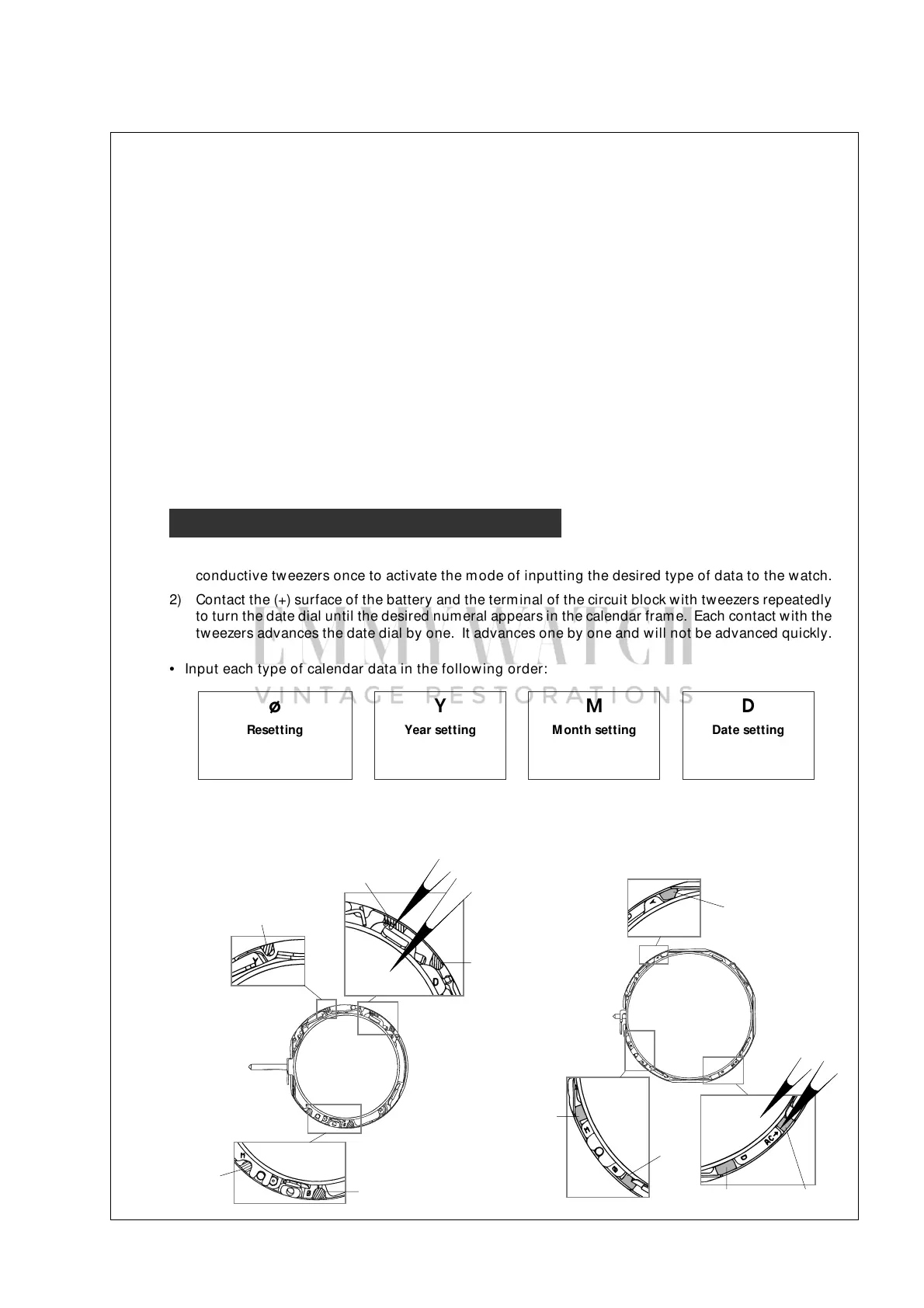
• Positions of each term inal of the circuit block
[ Cal. 4F32A ] [ Cal. 8F32A, 8F33A and 8F35A ]
Tw eezers
“ AC”
“ D” (Date)
“ Y “ (Year)
“ M ” (Month)
“ ø”
“ Y “ (Year)
“ M ” (Month)
“ ø”
Tw eezers
“ AC”
“ D” (Date)
■ Basic routine of inputting each type of calendar data
1) Contact the (+) surface of the battery and the term inal of the circuit block (“ ø” , “ Y” , “ M ” or “ D” ) with
conductive tw eezers once to activate the m ode of inputting the desired type of data to the watch.
2) Contact the (+) surface of the battery and the terminal of the circuit block with tw eezers repeatedly
to turn the date dial until the desired numeral appears in the calendar frame. Each contact with the
tw eezers advances the date dial by one. It advances one by one and w ill not be advanced quickly.



 To Next Page