How to set the time, 24-hour hand and date
■ How to set the time and date
The watch is provided with a date function. It is designed so that the date changes once every
24 hours.
It also is provided with a 24-hour hand, which can be used to check whether the displayed time
is AM or PM.
The date changes around 12 o’clock midnight. Therefore, if the time is not properly set with regard
to AM/PM, the date will change at 12 o’clock noon. Please make sure that AM/PM is set correctly
with the 24-hour hand.
* To adjust the date only on a day such as the next day after the completion of a month that has less than 31 days
(February, April, June, September and November), please refer to “Date adjustment at the end of the month”
→ P.17.
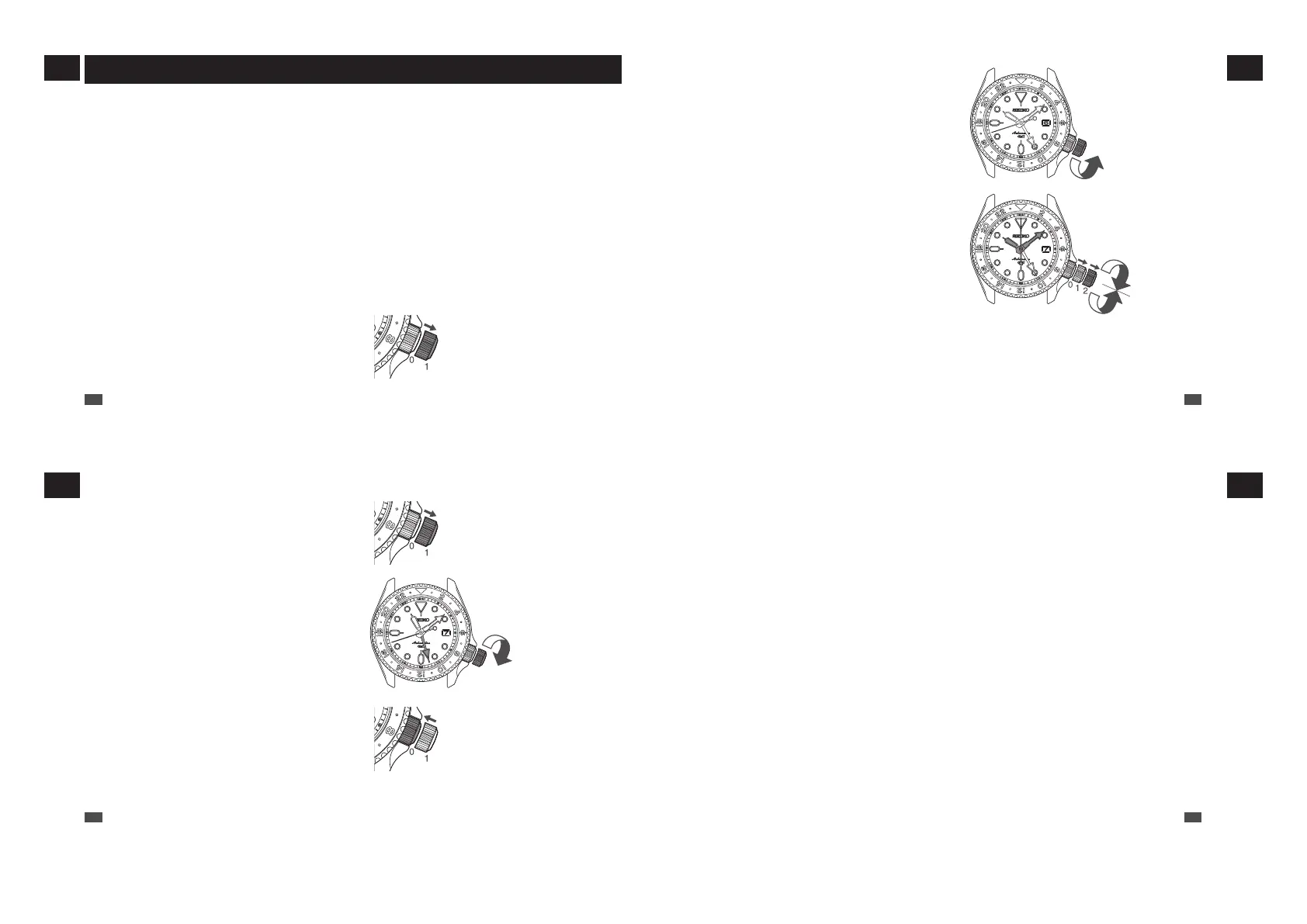
1
Make sure that the watch is working.
* To carry out the procedure, please make sure that the watch is in working state. Please wind the mainspring
when the watch is not working.
Pull out the crown to the first
click
2
Pull out the crown to the first click.
* For models with screw down crown, please unlock the
crown before operating it.
EN
13
1
HOW TO USE
The date is
advanced one
day
5
Push the crown back in to the normal position in accordance with a time signal.
The seconds hand immediately starts moving.
* The telephone time signal service is helpful for setting the seconds hand exactly.
3
Turn the crown counterclockwise to set
the date.
Turn the crown until the current date appears.
* Do not adjust the date when the 24-hour hand is
between 9:00 PM and 1:00 AM.
Please adjust the time (procedure 4) before setting
the date.
4
Pull out the crown to the second click
and set the time.
Pull out the crown to the second click when the
seconds hand is at the 12 o’clock position; the
seconds hand stops on the spot.
Turn the crown to set the correct time. The hour
hand and 24-hour hand move in conjunction, so
check the AM/PM setting with the 24-hour hand
while setting the current time.
EN
14
1
HOW TO USE
Next, set the 24-hour hand.
Pull out the crown to the first
click
The 24-hour hand
moves clockwise
Push the crown back in to
the normal position
6
Pull out the crown to the first click.
The seconds hand continues moving.
7
Turn the crown clockwise to adjust the
24-hour hand.
Turn the crown to set the 24-hour hand to the
correct time.
8
Push the crown back in to the normal
position.
* For models with screw down crown, please be sure to
lock the crown after operating it.
EN
15
1
HOW TO USE
■ Date setting
The date is linked to the time and changes once every 24 hours, whether the watch is running or the crown
is used to adjust the time. When the time is advanced across a day, the date is also advanced. Even when
the time is set back across a day, the date will not be set back.
• When the watch is running, the date changes at around midnight (between 11:45 PM and 0:30 AM).
• When the crown is used to adjust the time, the date changes between 9:00 PM and 3:00 AM of the next
day. The date will then change at around midnight (between 11:45 PM and 0:30 AM) when the watch is
running normally.
●
When setting the time between 9:00 PM and 3:00 AM the next day
•
When setting the time between 9:00 PM and 3:00 AM the next day, first set the time back before 9:00 PM
(or ahead of 3:00 AM) and make sure that the date is correct before setting the time.
• When the time is advanced or set back to between 9:00 PM and 3:00 AM the next day, the date may not
change at around midnight. However, the date will change to the day after the date at 9:00 PM (i.e., the
date at 3:00 AM) after 3:00 AM. Also, when the watch is running, the timing at which the date changes
will return to the normal timing.
EN
16
1
HOW TO USE



 To Next Page