2
▪ ▪ ▪ ▪ ▪ ▪ ▪ ▪ ▪ ▪ ▪ ▪ ▪ ▪ ▪ ▪ ▪ ▪ ▪ ▪ ▪ ▪ ▪ ▪ ▪ ▪ ▪ ▪ ▪ ▪ ▪ ▪ ▪ ▪ ▪ ▪ ▪ ▪ ▪ ▪ ▪ ▪ ▪ ▪ ▪ ▪ ▪ ▪ ▪ ▪ ▪ ▪ ▪ ▪ ▪
Instructions
Thank you for choosing Senal.
The SMH series headphones feature Senal’s twist-locking jack
allowing compatible cables and accessories to be attached.
Senal offers a wide range of accessories to expand the
functionality of your headphones and enhance your listening
experience.
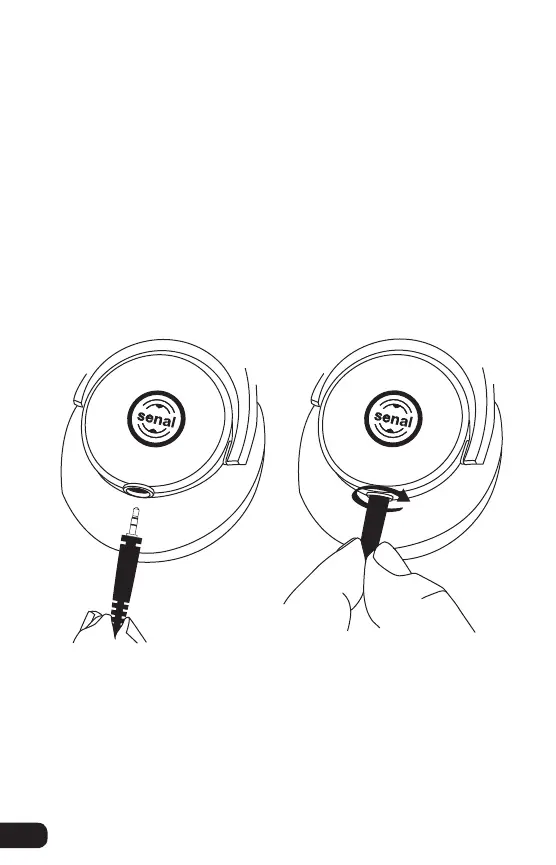
To attach cable: Fully insert plug. A quarter turn CLOCKWISE
locks the plug into place.
To detach cable: Turn the plug COUNTERCLOCKWISE
a quarter turn and remove it from the jack.


 To Next Page