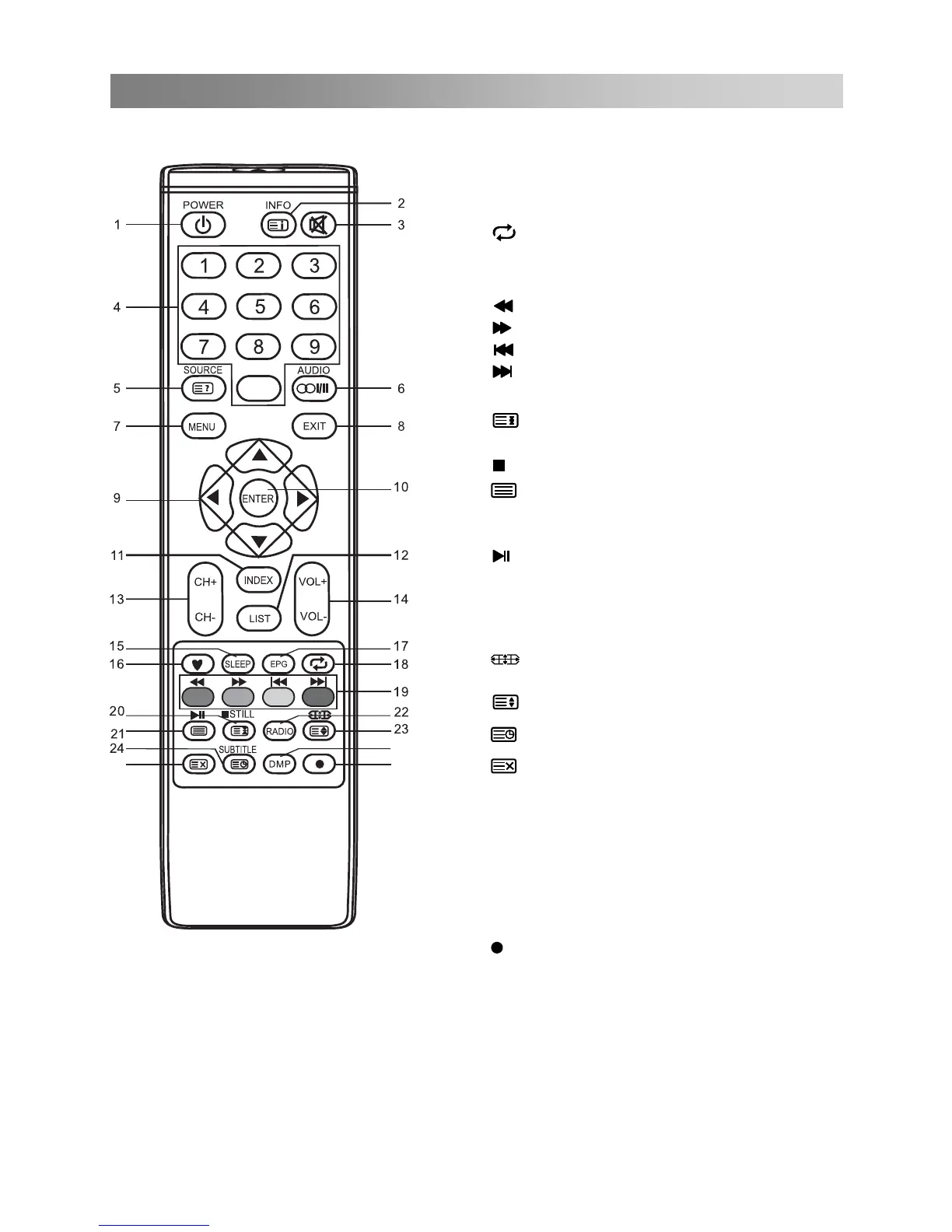
Remote Control
Footnote:
Red, green, yellow and blue and buttons are multifunction; please follow on-screen prompts
and section instructions.
0
25
26
27
Press to switch to the media source.
can press this button to return directly
to the media source.
When you are in the sub-menu,you
26. DMP(Digital Media Professionals Inc):
17. EPG: Electronic Programme Guide (in
DTV mode). Press again to exit.
18.
: Return to last viewed programme.
19. COLOURED BUTTONS: Red/ green/
yellow/ blue buttons (See footnote).
: Fast reverse (in media mode).
: Fast forward (in media mode).
: Previous (in media mode).
: Next (in media mode).
20. STILL: Press to hold the picture.
: Press to hold the teletext page on
display, press again to release.
: Stop (in media /PVR mode).
21.
: Press to enter the Teletext, press
again for MIX mode, press once more to
exit.
: Play / Pause (in media mode).
22. RADIO: Press to interchange Radio and
DTV programmes when there is Radio
programme (In DTV mode).
23.
: Press to select different image
sizes.
: Press to zoom in the teletext screen.
24.
: Enter subtitle mode or subpage.
25.
: Hide the teletext page from the
screen. Press once more to enable
again, press again to exit.
27.
: Press to start recording (in DTV
mode).



 To Next Page